deleted
Hi again,
Can someone help me I’m trying to make a crew member pages with the default pilots_list.php?
Here is the code
<?php require 'app_top.php' ?>
<section class="content-header">
<h1>Crew Members</h1>
</section>
<section class="content">
<div class="row">
<div class="col-lg-8">
<div class="box box-primary">
<div class="box-body table-responsive">
 <?php
 if(!$pilot_list) {
 echo 'There are no pilots!';
 return;
 }
 ?>
 <table id="tabledlist" class="tablesorter table table-hover">
 <thead>
 <tr>
 <th>Pilot ID</th>
 <th>Name</th>
 <th>Rank</th>
 <th>Flights</th>
 <th>Hours</th>
 </tr>
 </thead>
 <tbody>
 <?php
 foreach($pilot_list as $pilot)
 {
 /*
 To include a custom field, use the following example:
 <td>
 <?php echo PilotData::GetFieldValue($pilot->pilotid, 'VATSIM ID'); ?>
 </td>
 For instance, if you added a field called "IVAO Callsign":
 echo PilotData::GetFieldValue($pilot->pilotid, 'IVAO Callsign');
 */

 // To skip a retired pilot, uncomment the next line:
 //if($pilot->retired == 1) { continue; }
 ?>
 <tr>
 <td width="1%" nowrap><a href="<?php echo url('/profile/view/'.$pilot->pilotid);?>">
 <?php echo PilotData::GetPilotCode($pilot->code, $pilot->pilotid)?></a>
 </td>
 <td>
 <img src="<?php echo Countries::getCountryImage($pilot->location);?>"
 alt="<?php echo Countries::getCountryName($pilot->location);?>" />

 <?php echo $pilot->firstname.' '.$pilot->lastname?>
 </td>
 <td><img src="<?php echo $pilot->rankimage?>" alt="<?php echo $pilot->rank;?>" /></td>
 <td><?php echo $pilot->totalflights?></td>
 <td><?php echo Util::AddTime($pilot->totalhours, $pilot->transferhours); ?></td>
 <?php
 }
 ?>
 </tbody>
 </table>
</div>
</div>
</div>
</div>
</section>
<?php require 'app_bottom.php' ?>
Hi again,
Can someone help me I’m trying to make a crew member pages with the default pilots_list.php?
I was actually just working on that, but I encountered a strange issue. As you can see from the screenshot below, the template actually runs multiple times! I believe the template runs for every hub and I can’t see another template file which parents it, so if anyone can solve this kudos to you!
As you said Swan it tried to repeat the template for each HUB, so I got ride of this.
To make the code above work you gotta edit the module Pilots.php
Here is the code of the file:
<?php
class Pilots extends CodonModule
{

 public function index() {
  $this->set('pilot_list', PilotData::getAllPilots());
  $this->render('pilots_list.tpl');
 }


 public function reports($pilotid='')
 {
  if($pilotid == '')
  {
   $this->set('message', 'No pilot specified!');
   $this->render('core_error.php');
   return;
  }

  $this->set('pireps', PIREPData::GetAllReportsForPilot($pilotid));
  $this->render('pireps_viewall.php');
 }


 /* Stats stuff for charts */


 public function statsdaysdata($pilotid)
 {
  $data = PIREPData::getIntervalDataByDays(array('p.pilotid'=>$pilotid), 30);
  $this->create_line_graph('Past 30 days PIREPs', $data);
 }

 public function statsmonthsdata($pilotid)
 {
  $data = PIREPData::getIntervalDataByMonth(array('p.pilotid'=>$pilotid), 3);
  $this->create_line_graph('Monthly Flight Stats', $data);
 }

 public function statsaircraftdata($pilotid)
 {
  $data = StatsData::PilotAircraftFlownCounts($pilotid);
  if(!$data) $data = array();

  include CORE_LIB_PATH.'/php-ofc-library/open-flash-chart.php';

  $d = array();
  foreach($data as $ac)
  {
   OFCharts::add_data_set($ac->aircraft, floatval($ac->hours));
  }

  echo OFCharts::create_pie_graph('Aircraft Flown');
 }

 protected function create_line_graph($title, $data)
 {
  if(!$data)
  {
   $data = array();
  }

  $bar_values = array();
  $bar_titles = array();
  foreach($data as $val)
  {

   $bar_titles[] = $val->ym;
   $bar_values[] = floatval($val->total);
  }

  OFCharts::add_data_set($bar_titles, $bar_values);
  echo OFCharts::create_area_graph($title);
 }

 public function RecentFrontPage($count = 5)
 {
  $this->set('pilots', PilotData::GetLatestPilots($count));
  $this->render('frontpage_recentpilots.php');
 }
 }
then for the pilots_list.php
<?php require 'app_top.php' ?>
<section class="content-header">
<h1>Crew Members</h1>
</section>
<section class="content">
<div class="row">
<div class="col-lg-8">
<div class="box box-primary">
<div class="box-body table-responsive">
	 <?php
	 if(!$pilot_list) {
	 echo 'There are no pilots!';
	 return;
	 }
	 ?>
	 <table id="tabledlist" class="tablesorter table table-hover">
	 <thead>
	 <tr>
	 <th>Pilot ID</th>
	 <th>Name</th>
	 <th>Rank</th>
	 <th>Flights</th>
	 <th>Hours</th>
	 </tr>
	 </thead>
	 <tbody>
	 <?php
	 foreach($pilot_list as $pilot)
	 {
	 /*
	 To include a custom field, use the following example:
	 <td>
	 <?php echo PilotData::GetFieldValue($pilot->pilotid, 'VATSIM ID'); ?>
	 </td>
	 For instance, if you added a field called "IVAO Callsign":
	 echo PilotData::GetFieldValue($pilot->pilotid, 'IVAO Callsign');
	 */

	 // To skip a retired pilot, uncomment the next line:
	 //if($pilot->retired == 1) { continue; }
	 ?>
	 <tr>
	 <td width="1%" nowrap><a href="<?php echo url('/profile/view/'.$pilot->pilotid);?>">
	 <?php echo PilotData::GetPilotCode($pilot->code, $pilot->pilotid)?></a>
	 </td>
	 <td>
	 <img src="<?php echo Countries::getCountryImage($pilot->location);?>"
	 alt="<?php echo Countries::getCountryName($pilot->location);?>" />

	 <?php echo $pilot->firstname.' '.$pilot->lastname?>
	 </td>
	 <td><img src="<?php echo $pilot->rankimage?>" alt="<?php echo $pilot->rank;?>" /></td>
	 <td><?php echo $pilot->totalflights?></td>
	 <td><?php echo Util::AddTime($pilot->totalhours, $pilot->transferhours); ?></td>
	 <?php
	 }
	 ?>
	 </tbody>
	 </table>
</div>
</div>
</div>
</div>
</section>
<?php require 'app_bottom.php' ?>
Hello ,
First of All , Big Thanks to Mark Swan for his prompt reply on emails and for creating such a lovely crewcenter.
I have couple of questions
- If I want a drop down menu inside the side bar itself , is it possible?
For Eg :
Suppose I keep a tab called “Flight Planning” and inside flight planning I keep many other modules like weather , notams , etc.
But If I make a simple nested list , the list would be too long , so I want to bring down Weather , Notams only when I click on Flight Planning.
Is it Possible?
- How can I add a Airline Logo in the list below Recent , Live Flight Map ?
- If I want a drop down menu inside the side bar itself , is it possible?
For Eg :
Suppose I keep a tab called “Flight Planning” and inside flight planning I keep many other modules like weather , notams , etc.
But If I make a simple nested list , the list would be too long , so I want to bring down Weather , Notams only when I click on Flight Planning.
Is it Possible?
Yes, you can definitely add a drop-down menu. The link can be added in app_top.php. Replace everything in this file with this, then change the href links, text and font awesome icons (if you want):
<?php

if(empty(Auth::$userinfo->firstname)) {
 header("Location: /");
}

?>

<div class="hold-transition skin-blue sidebar-mini">
<div class="wrapper">
 <header class="main-header">
	 <!-- Logo -->
	 <a href="<?php echo SITE_URL?>" class="logo">
		 <!-- mini logo for sidebar mini 50x50 pixels -->
		 <span class="logo-mini">C<b>C</b></span>
		 <!-- logo for regular state and mobile devices -->
		 <span class="logo-lg">Crew<b>Center</b></span>
	 </a>
	 <!-- Header Navbar: style can be found in header.less -->
	 <nav class="navbar navbar-static-top">
		 <!-- Sidebar toggle button-->
		 <a href="#" class="sidebar-toggle" data-toggle="offcanvas" role="button">
			 <span class="sr-only">Toggle navigation</span>
		 </a>
		 <div class="navbar-custom-menu">
			 <ul class="nav navbar-nav">
				 <!-- User Account: style can be found in dropdown.less -->
				 <li class="dropdown user user-menu">
					 <a href="#" class="dropdown-toggle" data-toggle="dropdown">
						 <img src="<?php echo SITE_URL?>/lib/skins/crewcenter/dist/img/pilot.png" class="user-image" alt="User Image">
						 <span class="hidden-xs"><?php echo Auth::$userinfo->firstname.' '.Auth::$userinfo->lastname; ?></span>
					 </a>
					 <ul class="dropdown-menu">
						 <!-- User image -->
						 <li class="user-header">
							 <img src="<?php echo SITE_URL?>/lib/skins/crewcenter/dist/img/pilot.png" class="img-circle" alt="User Image">
							 <p>
								 <?php echo Auth::$userinfo->firstname.' '.Auth::$userinfo->lastname; ?>
								 <small><?php echo $pilotcode; ?></small>
							 </p>
						 </li>
						 <!-- Menu Footer-->
						 <li class="user-footer">
							 <div class="pull-left">
								 <a href="<?php echo url('/profile/editprofile'); ?>" class="btn btn-primary btn-block btn-flat">My Profile</a>
							 </div>
							 <div class="pull-right">
								 <a href="<?php echo url('/logout'); ?>" class="btn btn-danger btn-block btn-flat">Log Out</a>
							 </div>
						 </li>
					 </ul>
				 </li>
			 </ul>
		 </div>
	 </nav>
 </header>
 <!-- Left side column. contains the logo and sidebar -->
 <aside class="main-sidebar">
	 <!-- sidebar: style can be found in sidebar.less -->
	 <section class="sidebar">
		 <!-- Sidebar user panel -->
		 <div class="user-panel">
			 <div class="pull-left image">
				 <img src="<?php echo SITE_URL?>/lib/skins/crewcenter/dist/img/pilot.png" class="img-circle" alt="User Image">
			 </div>
			 <div class="pull-left info">
				 <p><?php echo Auth::$userinfo->firstname.' '.Auth::$userinfo->lastname; ?></p>
				 <a><i class="fa fa-circle text-success"></i><?php if(PilotGroups::group_has_perm(Auth::$usergroups, ACCESS_ADMIN)) { echo ' Administrator'; } else { echo ' Pilot'; } ?></a>
			 </div>
		 </div>
		 <!-- sidebar menu: : style can be found in sidebar.less -->
		 <ul class="sidebar-menu">
			 <li class="header">NAVIGATION</li>
			 <li>
				 <a href="<?php echo SITE_URL?>">
					 <i class="fa fa-dashboard"></i> <span>Dashboard</span>
				 </a>
			 </li>
			 <li>
				 <a href="<?php echo url('/schedules/view'); ?>">
					 <i class="fa fa-search"></i> <span>Schedule Search</span>
				 </a>
			 </li>
			 <li>
				 <a href="<?php echo url('/pireps/filepirep'); ?>">
					 <i class="fa fa-file-text"></i> <span>File Manual Report</span>
				 </a>
			 </li>
			 <li>
				 <a href="<?php echo url('/pireps/mine'); ?>">
					 <i class="fa fa-list"></i> <span>My Reports</span>
				 </a>
			 </li>
			 <li>
				 <a href="<?php echo url('/schedules/bids'); ?>">
					 <i class="fa fa-list"></i> <span>My Bids</span>
				 </a>
			 </li>
			 <li>
				 <a href="<?php echo url('/downloads'); ?>">
					 <i class="fa fa-cloud-download"></i> <span>Downloads</span>
				 </a>
			 </li>
			 <li class="treeview">
				 <a href="#">
					 <i class="fa fa-circle"></i> <span>Dropdown</span>
					 <span class="pull-right-container">
									 <i class="fa fa-angle-left pull-right"></i>
								 </span>
				 </a>
				 <ul class="treeview-menu">
					 <li><a href=""><i class="fa fa-circle-o"></i> Link 1</a></li>
					 <li><a href=""><i class="fa fa-circle-o"></i> Link 2</a></li>
					 <li><a href=""><i class="fa fa-circle-o"></i> Link 3</a></li>
				 </ul>
			 </li>

			 <?php if(PilotGroups::group_has_perm(Auth::$usergroups, ACCESS_ADMIN)) { echo '
			 <li>
				 <a href=" '.SITE_URL.'/admin">
					 <i class="fa fa-cog"></i> <span>Administration</span>
				 </a>
			 </li>
			 '; } ?>
		 </ul>
	 </section>
	 <!-- /.sidebar -->
 </aside>

 <!-- Content Wrapper. Contains page content -->
 <div class="content-wrapper">
So, you can just add this for each dropdown:
<li class="treeview">
<a href="#">
<i class="fa fa-circle"></i> <span>Dropdown</span>
<span class="pull-right-container">
<i class="fa fa-angle-left pull-right"></i>
</span>
</a>
<ul class="treeview-menu">
<li><a href=""><i class="fa fa-circle-o"></i> Link 1</a></li>
<li><a href=""><i class="fa fa-circle-o"></i> Link 2</a></li>
<li><a href=""><i class="fa fa-circle-o"></i> Link 3</a></li>
</ul>
</li>
Mark
Thanks , That worked awesome.
Cheers!
Hello again ,
I feel very sorry to disturb you again and again. But any help is greatly appreciated. I am trying to bring in the reCAPTCHA (the new one). Can you please guide me how to set it up? I have phpvms v5.5x. I tried editing the registration - mainform.php but I am not successful. If you can help me out I would be very thankful . I dont have much knowledge about php.
Hello guys, okay?
I’m trying to install the skin on my PHPVMS system, I did everything according to the installation instructions included in the skin files, but still could not make it work 100%! am new to php editing, I’m still learning, could someone help me? and excuse me, I am Brazilian and I’m using google translator! thank you!
Follow the screen shots of the “error”
Hello guys, okay?
I’m trying to install the skin on my PHPVMS system, I did everything according to the installation instructions included in the skin files, but still could not make it work 100%! am new to php editing, I’m still learning, could someone help me? and excuse me, I am Brazilian and I’m using google translator! thank you!
1.Make sure that your skin’s folder name is “crewcenter” and not anything else.
2.Are you using PHPVMS v5.5x? If yes , then you need to copy all the contents of folder “php_templates” and paste it in the root crewcenter/ folder.
1.Make sure that your skin’s folder name is “crewcenter” and not anything else.
2.Are you using PHPVMS v5.5x? If yes , then you need to copy all the contents of folder “php_templates” and paste it in the root crewcenter/ folder.
Thank you! Now it works 100% the problem is the folder name! I put wrong! Thank you!
1 Like
Hello , I don’t know if this bug is just with me or with everyone :- When I edit any Info in my Profile , It doesnt get saved. It stays with previous values itself.
Hence I have modified the code between (approx) line 17 to line 109 in profileedit.php/tpl
(after the code “<form action=”<?php echo url(‘/profile’);?>" method=“post” enctype=“multipart/form-data”>)
Edited Code :
<dl>
<label>Name</label>
<dd><input type="text" class="form-control" disabled placeholder="<?php echo $pilot->firstname . ' ' . $pilot->lastname;?>"></dd>

<label>Airline</label>
<dd><input type="text" class="form-control" disabled placeholder="<?php echo $pilot->code?>">
<p>To request a change, contact your admin</p>
</dd>

<label>Email Address</label>

<dd><input type="text" class="form-control" name="email" value="<?php echo $pilot->email;?>" />
<?php
if(isset($email_error) && $email_error == true)
echo '<p class="error">Please enter your email address</p>';
?>
</dd>

<label>Location</label>
<dd><select name="location" class="form-control">
<?php
foreach($countries as $countryCode=>$countryName)
{
if($pilot->location == $countryCode)
$sel = 'selected="selected"';
else
$sel = '';

echo '<option value="'.$countryCode.'" '.$sel.'>'.$countryName.'</option>';
}
?>
</select>
<?php
if(isset($location_error) && $location_error == true)
echo '<p class="error">Please enter your location</p>';
?>
</dd>

<label>Signature Background</label>
<dd><select name="bgimage" class="form-control">
<?php
foreach($bgimages as $image)
{
if($pilot->bgimage == $image)
$sel = 'selected="selected"';
else
$sel = '';

echo '<option value="'.$image.'" '.$sel.'>'.$image.'</option>';
}
?>
</select>
</dd>


<?php
if($customfields) {
foreach($customfields as $field) {
echo '<dt>'.$field->title.'</dt>
 <dd>';

if($field->type == 'dropdown') {
$field_values = SettingsData::GetField($field->fieldid);
$values = explode(',', $field_values->value);


echo "<select name=\"{$field->fieldname}\">";

if(is_array($values)) {

 foreach($values as $val) {
 $val = trim($val);

 if($val == $field->value)
 $sel = " selected ";
 else
 $sel = '';

 echo "<option value=\"{$val}\" {$sel}>{$val}</option>";
 }
}

echo '</select>';
} elseif($field->type == 'textarea') {
echo '<textarea name="'.$field->fieldname.'" class="customfield_textarea">'.$field->value.'</textarea>';
} else {
echo '<input type="text" name="'.$field->fieldname.'" value="'.$field->value.'" />';
}

echo '</dd>';
}
}
?>
Please NOTE : Do not edit the code unnecessarily. Edit the code only if the changes made in Edit Profile page are not reflected after saving it. The above code works for me. I am using PHPVMS v5.5
Really liking this - any reason why we can’t just install it on the main site instead of a subdomain?
Also, I seem to have a “no route passed” error when bidding on a schedule. This only seems to happen when using CrewCenter.
Really liking this - any reason why we can’t just install it on the main site instead of a subdomain?
Also, I seem to have a “no route passed” error when bidding on a schedule. This only seems to happen when using CrewCenter.
There’s nothing stopping you from putting in in your main domain, however, the default page is a redirect to the login page so your visitors would not see any front page.
As for the error, what version of phpVMS are you using? Is it the PHP one? I did test it on the TPL version and it worked fine but I haven’t actually tried it on the PHP version!
Really liking this - any reason why we can’t just install it on the main site instead of a subdomain?
Also, I seem to have a “no route passed” error when bidding on a schedule. This only seems to happen when using CrewCenter.
Yes , Same Error Here. I am using PHPvms v5.5
<p>
There’s nothing stopping you from putting in in your main domain, however, the default page is a redirect to the login page so your visitors would not see any front page.
As for the error, what version of phpVMS are you using? Is it the PHP one? I did test it on the TPL version and it worked fine but I haven’t actually tried it on the PHP version!
I’m showing this:
Install Check
phpVMS Build Number: 936
Checking PHP version
[OK] PHP version is 5.3.29.x
Also got it on the subdomain which is showing this:
phpVMS Build Number: simpilot 5.5.2
Checking PHP version
[OK] PHP version is 5.3.29.x
I did a FireBug Test from Mozilla Firefox and it is showing error in Morris js.
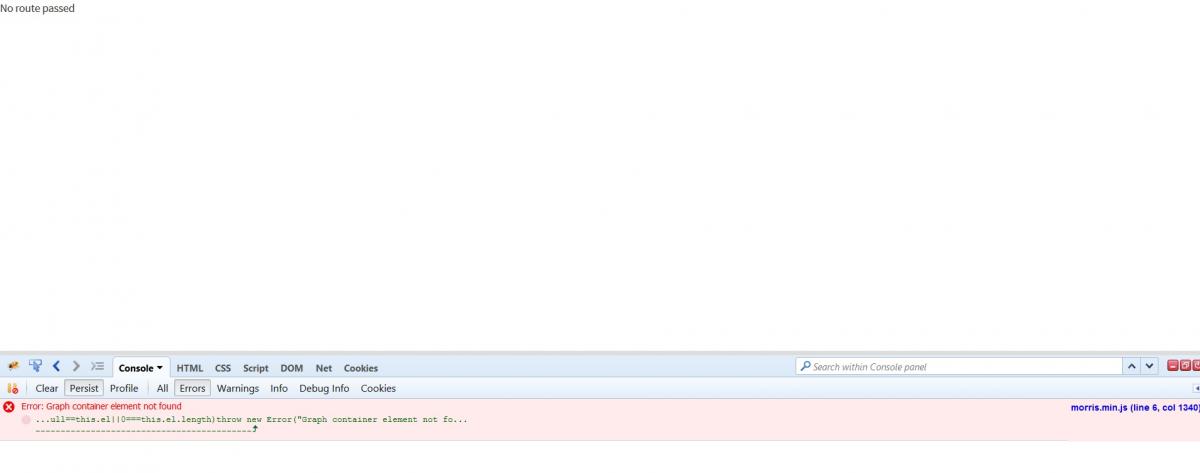
This method works for me , it adds bids successfully (“Bid Added” is printed on a blank page)…but removing bid does not work.
I hope Mark is able to find a solution for “No Routes Passed” real soon , that’s the only thing left before I launch my VA.
I’m looking into this error. It only happens in phpVMS 5.5.x (PHP version). The no route passed error has happened before on another skin I believe. I looked at the JS console and it appears it could be something to do with the AJAX form or jQuery. This may have something to do with the JS scripts for the application overriding the core phpVMS jQuery required for core functions like adding a bid.
Error message if anyone is interested: Uncaught TypeError: $(…).ajaxForm is not a function
I’ll try my best to fix it, but if anyone can figure this one out, that’d be awesome.
1 Like
Usually when this happens, it is because of a jQuery version mis-match.
All of your jQuery references should be in your core_htmlhead.php and not anywhere else (e.g. layout.php)
So in your layout.php remove these
<!-- jQuery 2.2.3 -->
<script src="<?php echo SITE_URL?>/lib/skins/crewcenter/plugins/jQuery/jquery-2.2.3.min.js"></script>
<!-- jQuery UI 1.11.4 -->
<script src="https://code.jquery.com/ui/1.11.4/jquery-ui.min.js"></script>
And see if it works. If it doesn’t, try messing around with the other js (adding/removing) files until you get the addbid working.
If that still doesn’t work, you could re-write the bidding code to support an updated jQuery library or just add an AJAX request.