56 minutes ago, mattsmith said:
Where is the file located to edit the skin? i.e dropdown menus etc

Please check readme
https://github.com/FatihKoz/DisposableTheme#customizing-va-logo-images-and-menu-items
56 minutes ago, mattsmith said:
Where is the file located to edit the skin? i.e dropdown menus etc
Please check readme
https://github.com/FatihKoz/DisposableTheme#customizing-va-logo-images-and-menu-items
Hello i make every steps from github page but the theme dosen’t work i upload the log file and photo for 500 erorr in following google drive lin sorry for distrub but i relly need help.
https://drive.google.com/drive/folders/1QR4U08w4GfZAqO1XZGjLclRykNWXGk-7?usp=sharing
14 hours ago, SaudWasly said:
Hello i make every steps from github page but the theme dosen’t work i upload the log file and photo for 500 erorr in following google drive lin sorry for distrub but i relly need help.
https://drive.google.com/drive/folders/1QR4U08w4GfZAqO1XZGjLclRykNWXGk-7?usp=sharing
Install latest dev build of phpvms v7, you are trying to run an old version with latest version of my theme. After installing latest dev build, don’t forget cleaning the application cache (admin > maintenance).
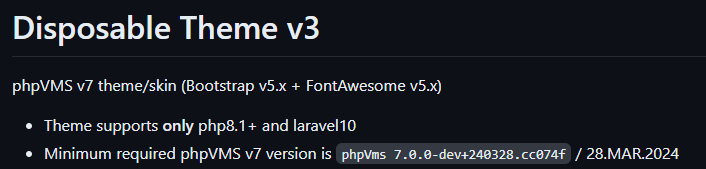
This applies to all Dispo Addons, all need the above mentioned build or something much recent.
Good luck
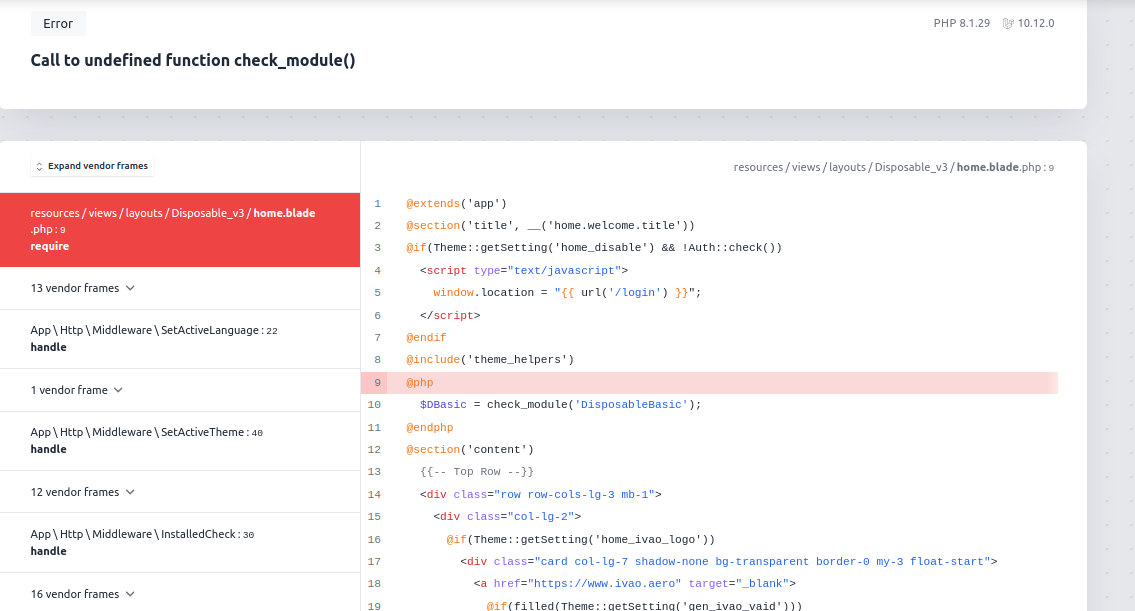
Hello, I just started setting up my VA and I am using 7.0.0-beta.5, I just installed the Disposable_v3 and it shows error 500, when I enabled debugging from .env I found many errors, as a novice with a basic background in web dev, I need your help resolving these issues as I think the theme fits well with my needs for my VA
PhpVMS version : 7.0.0-beta.5
Php : 8.1.29
Laravel: 10.12.0
13 minutes ago, CartesianPixels said:
Hello, I just started setting up my VA and I am using 7.0.0-beta.5, I just installed the Disposable_v3 and it shows error 500, when I enabled debugging from .env I found many errors, as a novice with a basic background in web dev, I need your help resolving these issues as I think the theme fits well with my needs for my VA
PhpVMS version : 7.0.0-beta.5
Php : 8.1.29
Laravel: 10.12.0
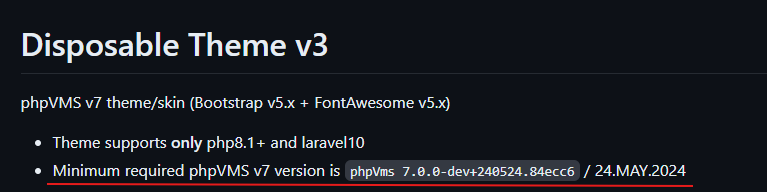
It is clearly stated in theme readme (literally it is the third line), that it needs a much recent build compared to your phpvms v7 (which is beta.5 and almost a year old).
So in theory, you have two options;
Keep your current build (beta5) and stick with default theme (or you can use older builds of Disposable Theme which are compatible with beta5)
Update your phpvms v7 to the latest development build and use latest addons/themes
I would prefer the second option
Good luck
This topic may help to get download links of latest dev (development) builds
Thank you for your prompt reply, and excuse my oversight
My pleasure, good luck with the update.
Hi,
accessing the live map, when there is a flight active via the vmsacars results in this error:
[previous exception] [object] (GeoJson\Exception\InvalidArgumentException(code: 0): Position elements must be integers or floats at /mnt/web502/c3/83/559619683/htdocs/airline/vendor/jmikola/geojson/src/Geometry/Point.php:39)
Laravel log:
https://drive.google.com/file/d/1LMstbt3aCj05WhuYQ8Lh-Udm7DIXDhe1/view?usp=sharing
Everything else works as intended, i am using the most recent phpvms dev version, php 8.1 (tried 8.2 aswell) updated phpvms acars etc. Once there are no active flights anymore, the page works showing the default position (north america).
Regards,
Philipp
7 hours ago, fillikirch said:
Hi,
accessing the live map, when there is a flight active via the vmsacars results in this error:
[previous exception] [object] (GeoJson\Exception\InvalidArgumentException(code: 0): Position elements must be integers or floats at /mnt/web502/c3/83/559619683/htdocs/airline/vendor/jmikola/geojson/src/Geometry/Point.php:39)
Laravel log:
https://drive.google.com/file/d/1LMstbt3aCj05WhuYQ8Lh-Udm7DIXDhe1/view?usp=sharing
Everything else works as intended, i am using the most recent phpvms dev version, php 8.1 (tried 8.2 aswell) updated phpvms acars etc. Once there are no active flights anymore, the page works showing the default position (north america).
Regards,
Philipp
Probably you are missing some coordinates for livemap or migrations at phpvms, without seeing more details or knowing more I can not speculate. There were some improvements for altitude values, these should not cause location based errors.
Are you using vmsAcars ?
If so, is your vmsAcars module updated ?
Are you really on latest phpvms v7 dev build ? Please provide the full version number installed on your end.
Which version of my theme you are using ?
Did you tried switching to non-modified default theme, is it working ? (Best way to understand if this is theme related or not)
Also please provide error details, something publicly without any additional access needs.
Hi thanks for the reply sry for the bother but it seems the issue is not related to the disposable theme since it persists when switching to the default theme. If you dont mind to clarify i assumed the acars would be updated via the maintenance tab aswell?
Regards
Philipp
Hi,
No problem, was trying to understand what is going on there 'cause you are the first reporting something like this with the theme… If you are using vmsAcars, as you know it has a module for phpvms v7 and it needs to be updated too (depending on the changes) and when an update is needed you got notified during that process.
I am not sure where are you referring with “maintenance tab”, but there is not auto update feature for modules (or phpvms v7 itself) it is always done manually.
Hope you can solve the problem and have a working livemap soon.
I’ve tried moving and overwriting the vmsacars module again (after i got the update notice) and performing the update in the admin section to no avail, but since its not a to essential feature for me at the moment i will just ignore it for now. Thanks for your input anyway.
Regards,
Philipp
Hi, without getting error details or the log itself, no one can help you, even it is not an essential feature for you, you are getting errors and this can be a sign of other (maybe bigger) problems.
If it continues, and if you want to solve it just provide required details and open a topic on v7 support section or use discord
Safe flights