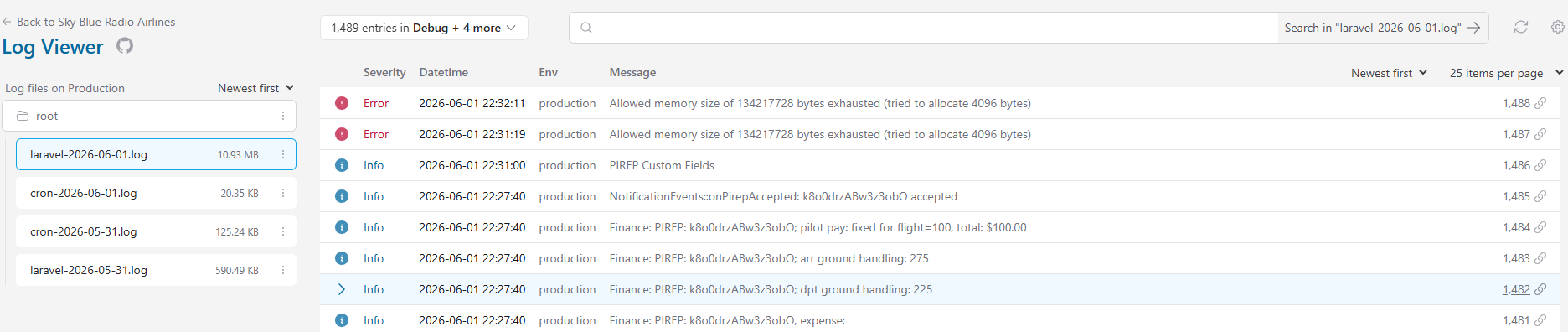
I am having the same issues but only when in the admin panel and clicking on finances… It returns a 500 error. I increased my memory size in php.ini but that didn’t help.
Attached is a screenshot of my log.
I am having the same issues but only when in the admin panel and clicking on finances… It returns a 500 error. I increased my memory size in php.ini but that didn’t help.
Attached is a screenshot of my log.
I moved your topic to a new post. Your issue may not be directly related to the OP’s issue in the other post. Unless the issue is exactly the same, start a new topic.
It appears that your webserver doesn’t have enough memory allocated.
What is the memory_limit in the php.ini file?
Are you in the correct subdomain for your phpVMS install?
Does your hosting use cPanel?
If so, under Software, is there a MultiPHP INI Editor? If so, look under the subdomain your phpVMS v7 install is on. Set the memory_limit there and save.
Let us know if that fixes your issue or not.
Hi There.
Thanks for the help.
The mem Limit on my php.ini is currently set at 512M
We are on ea-php82
and we are on 8.3 now
Just looked at the Log Viewer and am getting Allowed memory size of 536870912 bytes exhausted (tried to allocate 4096 bytes)
Look in post #2 and answer the specific questions asked there.
We still don’t know if your phpVMS install is in a subdomain, if you are using cPanel with your hosting and if you have access to MultiPHP INI Editor in cPanel.
Is the php.ini file in the same folder as the phpVMS files?
Ok - Sorry for the delay and thank you for helping… Memory Limit in php.ini is at 512M
I am in the correct subdomain (crew.skyblueradioairlines.com) and under our cpanel, ssoftware and Multiphp ini editor we are on ea-php83
I check finances again and it still does not work.
Quick follow-up: I was able to get this fixed.
The issue was with the admin finance page at:
/admin/finances
The error in the Laravel log showed PHP memory being exhausted, with Carbon showing in the stack trace.
The problem ended up being in:
app/Support/Dates.php
Specifically, the getMonthsList() function was using addMonth() while building the finance month list. In my case, the first journal date was on the 31st of the month. Since the next month did not have 31 days, the month loop could skip the expected current month and keep running until PHP ran out of memory.
The fix was to start from the first day of the month and use addMonthNoOverflow().
Original:
public static function getMonthsList(Carbon $start_date): array
{
    $months = [];
    $now = date('Y-m');
    $last_month = $start_date;

    do {
        $last_value = $last_month->format('Y-m');
        $months[$last_value] = $last_month->format('Y F');
        $last_month = $last_month->addMonth();
    } while ($last_value !== $now);

    return $months;
}
Updated:
public static function getMonthsList(Carbon $start_date): array
{
    $months = [];

    $last_month = $start_date->copy()->startOfMonth();
    $end_month = Carbon::now()->startOfMonth();

    while ($last_month->lessThanOrEqualTo($end_month)) {
        $last_value = $last_month->format('Y-m');
        $months[$last_value] = $last_month->format('Y F');

        $last_month->addMonthNoOverflow();
    }

    return $months;
}
After saving the change and clearing the application cache, the finance page loaded normally again.
So in my case, it was not a bad finance record. It was the month list loop getting stuck when the first journal date was on the 31st.