Disregard - just checked my site and it 's not working there either.
I will check tomorrow when I’m on my desktop and can attempt to figure out the issue.
The API it gets the data from is working, so it’s odd it isn’t working thru my site.
Disregard - just checked my site and it 's not working there either.
I will check tomorrow when I’m on my desktop and can attempt to figure out the issue.
The API it gets the data from is working, so it’s odd it isn’t working thru my site.
I’ve been trying to figure this out all morning.
I turned on error reporting and I am not getting any errors at all. I checked the error logs under core/logs and the “error_log.txt” in the phpVMS root folder.
Thanks
I don’t think this is the issue, but here are the only errors I am getting.
Here are the errors I see:
[26-Oct-2023 09:52:03 UTC] PHP Warning: Invalid argument supplied for foreach() in /home/domains/public_html/core/common/TouchdownStatsData.class.php on line 89
[26-Oct-2023 09:52:03 UTC] PHP Warning: Division by zero in /home/domains/public_html/core/common/TouchdownStatsData.class.php on line 94
Here is the pertaining section:
public static function airline_average() {
$stats = self::get_all_stats();
$total = 0;
$count = 0;
foreach ($stats as $stat) <---------THIS IS LINE # 89
{
$total = $total + $stat->landingrate;
$count++;
}
$average = $total / $count; <----------THIS IS LINE # 94
return $average;
}
Thanks,
Chris
Another error that just popped up:
[26-Oct-2023 10:05:54 UTC] PHP Warning: Use of undefined constant GEONAME_URL - assumed ‘GEONAME_URL’ (this will throw an Error in a future version of PHP) in /home/domains/public_html/lib/skins/blueIce/core_htmlhead.php on line 28
<script type=“text/javascript”>
var baseurl = “<?php echo SITE_URL;?>”;
var geourl = “<?php echo GEONAME_URL; ?>”; <-----------------THIS IS LINE 28
</script>
Looks to be a CORS policy issue…
Access to XMLHttpRequest at 'https://\<airport data provider\>' from origin 'https://\<your doamin\>' has been blocked by CORS policy: The 'Access-Control-Allow-Origin' header contains multiple values '\*, \*', but only one is allowed.
I’m looking for a solution. I haven’t messed with this in over 3 years, so it may take a while - unless someone knows an easy fix.
54 minutes ago, ProAvia said:
Looks to be a CORS policy issue…
Access to XMLHttpRequest at ‘https://<airport data provider>’ from origin ‘https://<your doamin>’ has been blocked by CORS policy: The ‘Access-Control-Allow-Origin’ header contains multiple values ‘*, *’, but only one is allowed.
I’m looking for a solution. I haven’t messed with this in over 3 years, so it may take a while - unless someone knows an easy fix.
I will look into this also. You know I like to try to figure things out myself. I only ask if I can’t find a solution. Thanks for looking into this ProAvia. I appreciate it.
15 minutes ago, cfitz619 said:
I will look into this also. You know I like to try to figure things out myself. I only ask if I can’t find a solution. Thanks for looking into this ProAvia. I appreciate it.
If you find a solution, please post it here.
Thanks
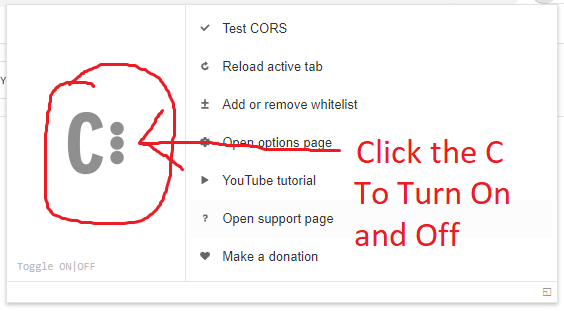
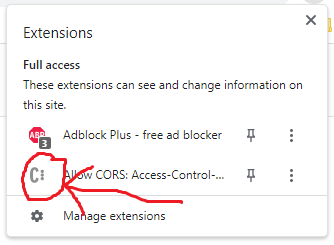
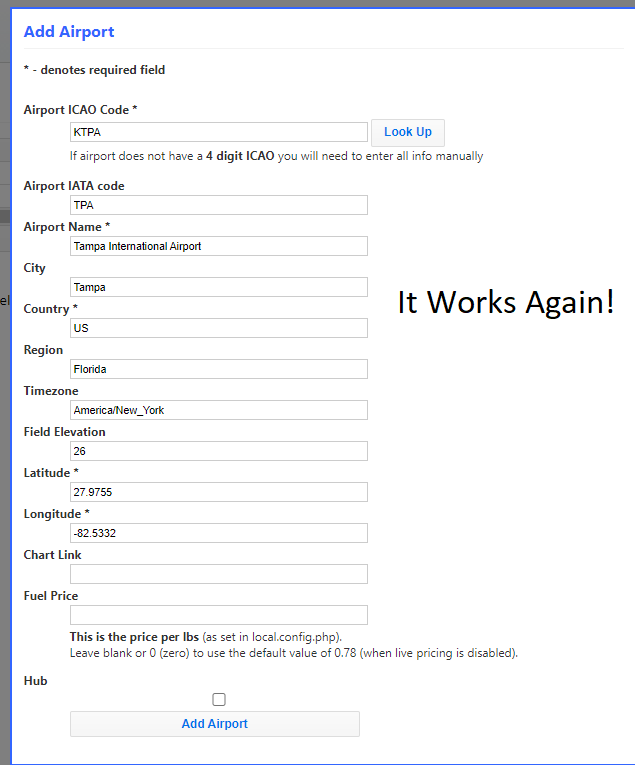
Here is A temporary fix that I found. It has been tested by me and I can confirm that it 100% works on Google Chrome Version 118.0.5993.118 (Official Build) (64-bit).
1. THIS FIX IS FOR CHROME USERS.
2. Go to the chrome webstore at this link and install the extension.
 ------3------
 ------2------
 ------1------
32 minutes ago, ProAvia said:
If you find a solution, please post it here.
Thanks
Please let me know if the temporary solution works for you. If it doesn’t, I will do some more digging.
I was just coming here to let you know about that work-around.
Chrome Browser Extension
https://chrome.google.com/webstore/detail/allow-cors-access-control/lhobafahddgcelffkeicbaginigeejlf
Edge Browser Extension
Firefox
https://addons.mozilla.org/en-US/firefox/addon/access-control-allow-origin/
Anyone who needs to use the new airport lookup referenced at the top of this post in phpVMS v5 can install the browser extension for their chosen browser.
Use at your own risk.
5 minutes ago, ProAvia said:
I was just coming here to let you know about that work-around.
Chrome Browser Extension
https://chrome.google.com/webstore/detail/allow-cors-access-control/lhobafahddgcelffkeicbaginigeejlf
Edge Browser Extension
Firefox
https://addons.mozilla.org/en-US/firefox/addon/access-control-allow-origin/
Anyone who needs to use the new airport lookup referenced at the top of this post in phpVMS v5 can install the browser extension for their chosen browser.
Use at your own risk.
Thanks for the info on all of the browsers.