Airport lookup update to work with same API as used by phpVMS v7. Restores ability to lookup airports for airport table. Adds additional fields to airport table for use in your templates.
I’ve been sitting on these files for a while to be sure the beta testers didn’t have any issues. Read the README_1ST.txt file for info.
Works with phpVMS 5.5.2 and 5.5.2.72 - not tested with phpVMS 2.x - will not work with phpVMS v7.
You will need to manually update each existing airport in you database after installing this mod to get all the new data in the airports table - use EDIT from airport page, click LOOK UP, click Edit Airport. It will not automatically update all your existing airports. Some lesser known airports are not available in the parsed database - you will have to add those manually.
Released as freeware. Shall not be uploaded to other sites without written permission.
Thanks to all those who contributed to getting this working.
I have a question regarding this, after reading readme file I didn’t find PHPVMS_API inside local.config.php but only in app.config.php and when I add LOOKUP and PHPVMS_API lines and install your module it is stuck at Fetching airport data.
app.config.php is where all the base settings are. You never change or add anything to app.config.php. All changes/additions are done to local.config.php.
local.config.php overrides any like settings in app.config.php.
Steps # 3 and #4 need to be followed to the letter.
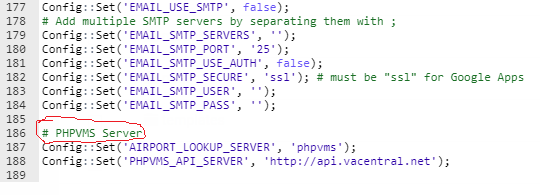
Hello. Great feature for my new airline! Does this look right? Followed the directions for install but the Lookup feature is not working for my airports. Is it because the vacentral website is down?
Hello. Great feature for my new airline! Does this look right? Followed the directions for install but the Lookup feature is not working for my airports. Is it because the vacentral website is down?
Thank You in advance for your assistance.
The vacentral server is up and correctly providing airport data.
The entry above looks correct - check your other entries to be sure they are correct.
That skin is for the frontend. The Airport Lookup is on the backend - admin panel. If you are using the default admin panel skin it should be fine.
Did you import the phpvms_airports_update.sql file as indicated in the directions?
Do you have error reporting turned on? Check the logs to see if any errors related to Airport Lookup or VACentral are shown - maybe3 a Cross Site Error. Post any errors here.
Yes, I imported the airport sql into the database. I checked the database and KJFK is there but the airport doesn’t show up in “all airports” on my site. I also tried fetching the data for KTPA after turning on error reporting. Still a no go.
The error in the log is:
[09-Jan-2021 01:49:12 UTC] PHP Parse error: syntax error, unexpected end of file, expecting function (T_FUNCTION) or const (T_CONST) in /home/u742478123/domains/flymajesticva.com/public_html/core/common/OperationsData.class.php on line 780
That skin is for the frontend. The Airport Lookup is on the backend - admin panel. If you are using the default admin panel skin it should be fine.
Did you import the phpvms_airports_update.sql file as indicated in the directions?
Do you have error reporting turned on? Check the logs to see if any errors related to Airport Lookup or VACentral are shown - maybe3 a Cross Site Error. Post any errors here.
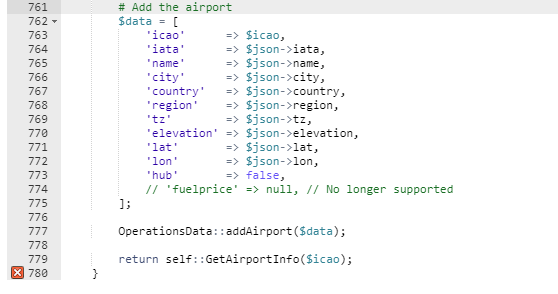
Here is the OperationsData.class.php. The problem is on line # 780 (the last line below has a red X) according to the error log. I believe this is my problem. Not sure how to fix it. Thank You for trying to assist me with this. It is greatly appreciated.
I think this is what your looking for. I can’t get the logs to open. Sorry if this is not what you meant. I’m new to coding. Kind of learning as I go.
Is this the right log? Here is the path:
public_html/core/logs/errors.txt
[09-Jan-2021 01:49:12 UTC] PHP Parse error: syntax error, unexpected end of file, expecting function (T_FUNCTION) or const (T_CONST) in /home/u742478123/domains/flymajesticva.com/public_html/core/common/OperationsData.class.php on line 780
[09-Jan-2021 01:57:17 UTC] PHP Parse error: syntax error, unexpected end of file, expecting function (T_FUNCTION) or const (T_CONST) in /home/u742478123/domains/flymajesticva.com/public_html/core/common/OperationsData.class.php on line 780
[09-Jan-2021 02:13:29 UTC] PHP Parse error: syntax error, unexpected end of file, expecting function (T_FUNCTION) or const (T_CONST) in /home/u742478123/domains/flymajesticva.com/public_html/core/common/OperationsData.class.php on line 780
[09-Jan-2021 02:17:10 UTC] PHP Parse error: syntax error, unexpected end of file, expecting function (T_FUNCTION) or const (T_CONST) in /home/u742478123/domains/flymajesticva.com/public_html/core/common/OperationsData.class.php on line 780
[09-Jan-2021 02:29:42 UTC] PHP Parse error: syntax error, unexpected ‘<’, expecting function (T_FUNCTION) or const (T_CONST) in /home/u742478123/domains/flymajesticva.com/public_html/core/common/OperationsData.class.php on line 781
[09-Jan-2021 02:42:24 UTC] PHP Parse error: syntax error, unexpected ‘<’, expecting function (T_FUNCTION) or const (T_CONST) in /home/u742478123/domains/flymajesticva.com/public_html/core/common/OperationsData.class.php on line 781