I have tried to start your program but all I get is in the lower right corner “CONNECTION ERROR”. Using
P3D V4 and FSUIPC 5.01
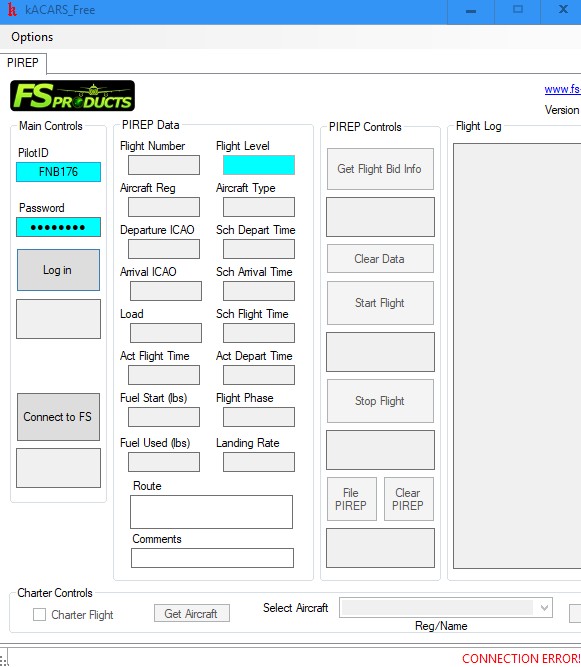
I have tried to start your program but all I get is in the lower right corner “CONNECTION ERROR”. Using
P3D V4 and FSUIPC 5.01
I have moved the thread to the correct board. Have you tried running it using Administrator Permissions?
OK got connected to P3DV4 by:
Go to your kACARS install folder, wherever you installed it. We will be dealing with 2 files;
in the main kACARS install folder;
1) “kACARS - Free.exe.config”
and in the ‘profiles’ folder;
2) “Template.xml”
1) in the main kACARS install folder;
1. Double click (open) the “kACARS - Free.exe.config” file.
2. only 2 lines need editing;
<setting name=“PilotID” serializeAs=“String”>
<value>FNB***</value> <------- enter your Pilot ID here
</setting>
<setting name=“Password” serializeAs=“String”>
<value> ********* </value> <------- enter your FSNB password here
</setting>
3. Save and close.
2) in the ‘profiles’ folder;
1. First, the only file required is the “Template.xml” file. Delete any others.
( Don’t worry, these are the files being made when you are setting up your ‘VA profile’ in kACARS. They re-generate each time you save a profile)
2. Double click (open) the “Template.xml” file.
It should look like this:
<?xml version=“1.0” encoding=“utf-8”?>
<va>
<url>http://fsnb.ca/Airline</url> <------- copy/paste this here
<pilotid>FNB***</pilotid> <------- enter your Pilot ID here
<password> ********* </password> <------- enter your password here
</va>
Save.
OK got connected to P3DV4 by:
Go to your kACARS install folder, wherever you installed it. We will be dealing with 2 files;
in the main kACARS install folder;
1) “kACARS - Free.exe.config”
and in the ‘profiles’ folder;
2) “Template.xml”
1) in the main kACARS install folder;
1. Double click (open) the “kACARS - Free.exe.config” file.
2. only 2 lines need editing;
<setting name=“PilotID” serializeAs=“String”>
<value>FNB***</value> <------- enter your Pilot ID here
</setting>
<setting name=“Password” serializeAs=“String”>
<value> ********* </value> <------- enter your FSNB password here
</setting>
3. Save and close.
2) in the ‘profiles’ folder;
1. First, the only file required is the “Template.xml” file. Delete any others.
( Don’t worry, these are the files being made when you are setting up your ‘VA profile’ in kACARS. They re-generate each time you save a profile)
2. Double click (open) the “Template.xml” file.
It should look like this:
<?xml version=“1.0” encoding=“utf-8”?>
<va>
<url>http://fsnb.ca/Airline</url> <------- copy/paste this here
<pilotid>FNB***</pilotid> <------- enter your Pilot ID here
<password> ********* </password> <------- enter your password here
</va>
Save.
Well me and another P3DV4 user (both Win 7 for him and Win 10 for me) had to change it manually to get it to work.