My live flight map on eastern airways isnt showing any flights, could this be my host?
Cheers
My live flight map on eastern airways isnt showing any flights, could this be my host?
Cheers
Could be. Turn on ACARS_DEBUG to true, and post the log, lets see if any data is being sent.
log is 151kb wont attach, this is the code from a successful flight from yesterday
Array

lat=54.086018&long=-4.621848&GS=0&Alt=59&IATA=T&pnumber=EZE0021&depaptICAO=EGNS&depapt=ISLE%20OF%20MAN&disdepapt=0&timedepapt=00:01&destaptICAO=EGNT&destapt=NEWCASTLE&disdestapt=116&timedestapt=13:34&Ph=2&Regist=SB20

STATUS UPDATE
Array
(
    [lat] => 54.086018
    [long] => -4.621848
    [GS] => 0
    [Alt] => 59
    [iATA] => T
    [pnumber] => EZE0021
    [depaptICAO] => EGNS
    [depapt] => ISLE OF MAN
    [disdepapt] => 0
    [timedepapt] => 00:01
    [destaptICAO] => EGNT
    [destapt] => NEWCASTLE
    [disdestapt] => 116
    [timedestapt] => 13:34
    [Ph] => 2
    [Regist] => SB20
    [module] => ACARS
=> fsacars
    [redir] => status
    [id] => status
    [icao] =>
    [pilotid] => status
    [action] => status
    [request] => fsacars
)
I just increased the attachment limit, or just delete from everything except for today
OK just done a flight heres the full log to date.
[log.txt](< base_url >/applications/core/interface/file/attachment.php?id=23)
Did it show up?
I think it’s the letters in the flight number which are throwing it off.
Change the flightnumber column in phpmyadmin to varchar(10) and see if that fixes it.
Actually, before you do that, try a flight that doesn’t have a letter, that’s just a number
OK i will test this tonight, you might be right about that as Monarch dont have letters and their flights show up.
Took the leter out and still no flight tracking, do i need to set anything in fsacars settings?
Did you try the plain ol’ config file from the pilot center, without any mods (the original)
This is driving me nuts now…this is how i do it from all the “fixes” and posts ive read on these forums.
Ive done fresh FSACARS install, downloaded a clean .ini from the pilot center and removed EZE from Company ICAO=
This allows the me to sucessfully file logs to our site, the only thing not working is the live map.
This is all flights including other members who are running clean installs like described above, ive now tested a flight EZE63N with the N removed and still no live map.
There are also 2 settings in FSACARS:
Do i need to tick these?
Check Plane Positions, uncheck ACARS online.
Live map, hmm. Check the phpvms_acarsdata table, and see if it’s showing up in there.
If not, then I’ll run through the code again and see if I missed anything.
Though I did change some things for the next update in there.
Also, make sure you’ve got that update for FSACARS.
FSACARS 4.0.15?
Can you add support for flights with a letter at the end like EZE63N? Is that a big job?
It appears that its sending data to the DB as phpvms_acarsdata is populated (see attachment)
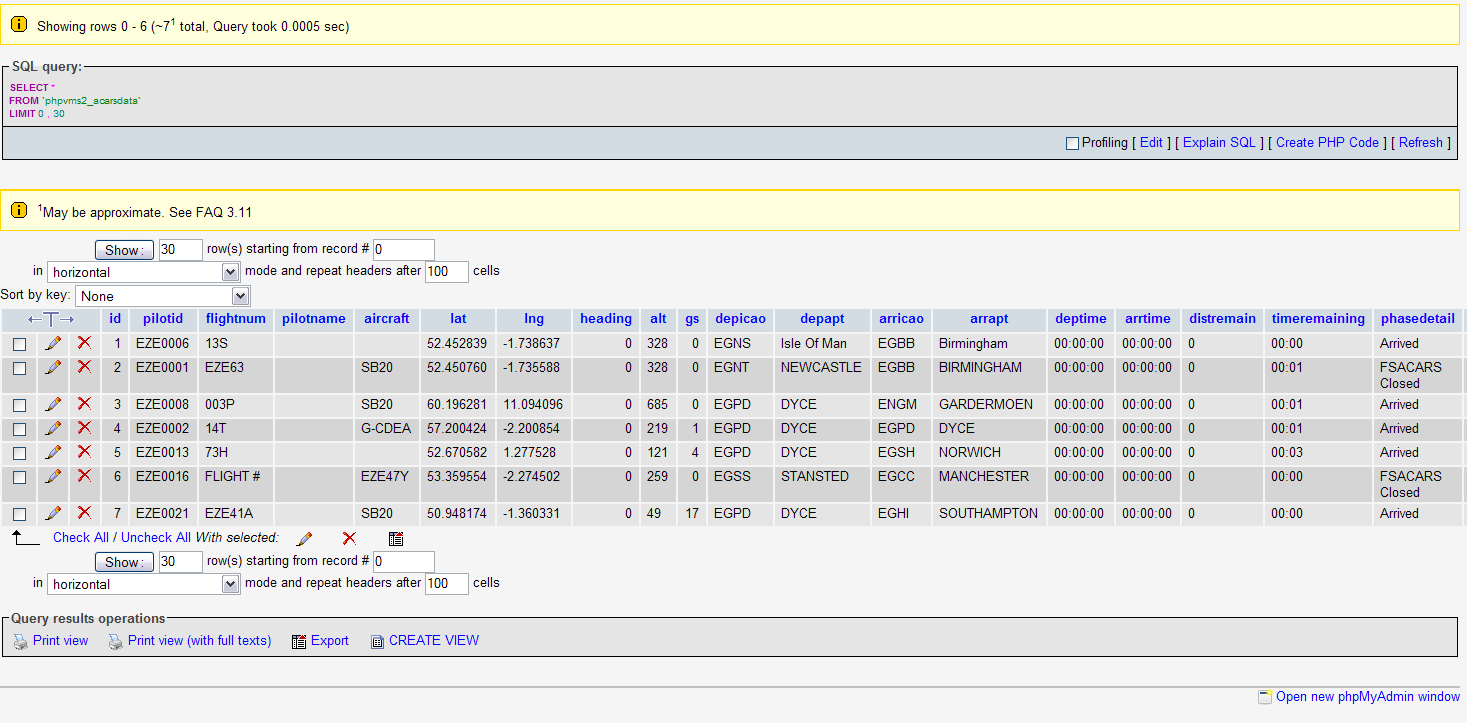
Alright I’ll take a look into the code. That’s odd it’s not showing.
Support for that is on my list for the next version
OK i have 3 aircraft.
SB20 with the REG SB20
JS41 with the REG JS41
ANY with the REG ANY
If i flew a flight assigned to JS41 with a SB20 and set SB20 in fsacars would that stop it from showing on the map?
For me it’s working great… weird…
Good luck !
OK i have 3 aircraft.
SB20 with the REG SB20
JS41 with the REG JS41
ANY with the REG ANY
If i flew a flight assigned to JS41 with a SB20 and set SB20 in fsacars would that stop it from showing on the map?
Nah, that won’t matter. It just looks for a valid aircraft that’s in the system. Doesn’t have to be the same one on the schedule
OK thats good as i can remove ANY then
I think its a hosting problem as Monarch live map works and its been setup by me witht he same settings
Hmm perhaps. Same version?
I thinkso
Hey,
Are you getting any Javascript errors?