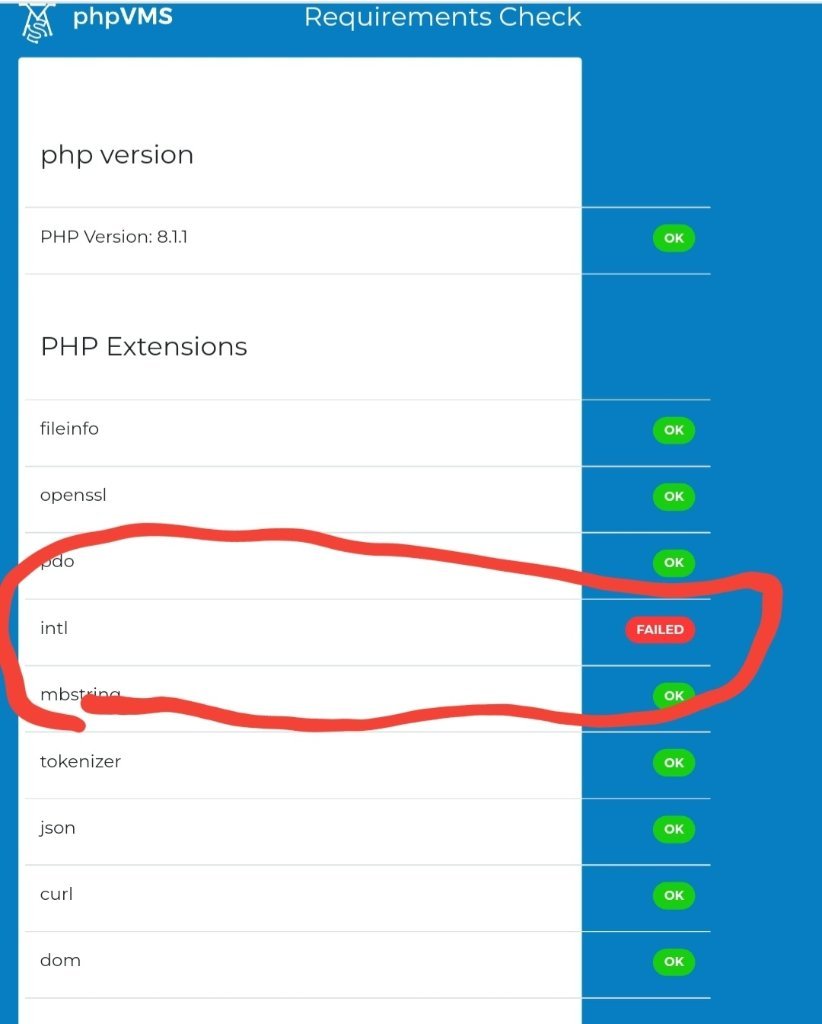
 I’m having this issue when installing phpvms 7, could someone please help me, thanks
I’m having this issue when installing phpvms 7, could someone please help me, thanks
23 minutes ago, mattsmith said:
I’m having this issue when installing phpvms 7, could someone please help me, thanks
Speak with your hosting service provider (hosting company) or if it is allowed in your hosting control panel, enable that php extension, re-start the install process.
Also if intl extension is not available for php 8.1.1 (your current version) you can maybe switch to another php version through your control panel like php 8.0.xx or php 7.4.xx to see if it is available there.
If you are on a VPS service, you can enable (or add) that extension from your php.ini
Good luck
how do I get to that check page?
By following docs, properly uploading files to your server and visiting your site of course. It is the first page you will see during install.
https://docs.phpvms.net , click “installation” on the menu then click “uploading files” and continue reading as you progress.