Does it work with the default theme when someone is flying?
Try updating to the latest dev build (last was on 8/30/24) and latest Dispo Theme.
Have you edited any core phpVMS files or Dispo Theme files?
Do you have any Dispo or other modules installed?
What version of vmsACARS are you using? Open vmsACARS, click gear icon on lower left. Version will be just to the right of the gear icon.
As the error is related with a core feature (direct communication between acars client and phpvms v7 itself), it can not be related with any Dispo addon as my addons do not alter core/communication files. Dispo Theme only displays the map created by phpvms, only the look of the page is different.
In the other topic same/similar error was reported, and the admin did not provided any details for debugging What I can assume from the error is, somehow the coordinates are not being recorded at all or not being recorded properly (faulty9, by the acars software being used (either vmsAcars or any other solution) thus the map is failing to create a geographic location properly.
To better understand this error, we need to re-create or live debug during a flight (while the error is happening) , the data transferred by acars client and the data recorded to the database needs to be checked live (by some debug lines added to some files and then then inspecting the log to spot the differences).
Additionally we can suspect the server dropping/altering http post data during a forced redirect (imagine like the server uses https, server has a forced redirection from http to https, client is configured to use http by the pilot). This needs to be checked too.
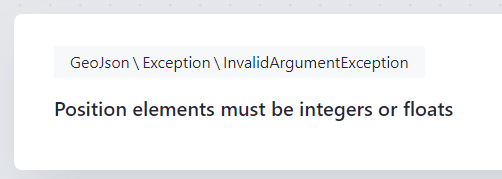
Also the error is simple (this is why I am suspecting the client and/or communications in between)
GeoJson expects a value like “12345” (which is an integer) or “12345.67” (which is a float).
So a value like “N 12345” (notice the N and space which is a string) or “12345,67” (notice the comma, which makes this a string too) or the value is just an empty string “” (thus can not considered as null in some cases) will create the above error
We saw in some European servers, comma is being used as the decimal separator instead of a point, which was creating a problem in monetary values, same can be happening here too (a server forcing comma can mess up internal easily)
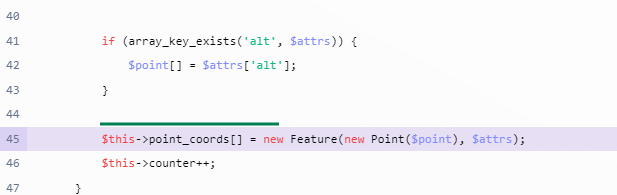
A simple way to debug this error can be done by adding below text to line 44 of the mentioned file ( app/Models/GeoJson.php ) and saving it
dd($point, $attrs);
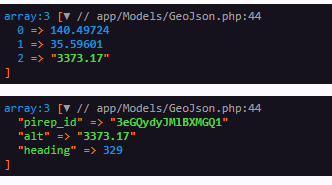
With this, instead of erroring out code will dump the data (contents) of $point and $attrs and stop there (die), hence the helper is called dump and die “dd”.
A simple way to debug this error can be done by adding below text to line 44 of the mentioned file and saving it
dd($point, $attrs);
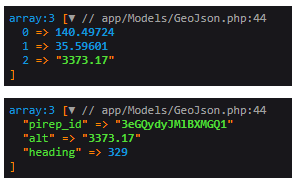
With this, instead of erroring out code will dump the data (contents) of $point and $attrs and stop there (die), hence the helper is called dump and die “dd”.
Good luck again
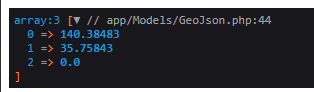
By adding that piece of code it does show that it’s outputting a float without comma.
Here 0 and 1 is ok, they are floats but 2 is a string (notice the double quotes and display difference) and it is the altitude. So line 42 is causing trouble.
Would you please change it as below and save the file (keep the dd for now)
Here 0 and 1 is ok, they are floats but 2 is a string (notice the double quotes and display difference) and it is the altitude. So line 42 is causing trouble.
Would you please change it as below and save the file (keep the dd for now)
$point = floatval($attrs[‘alt’]);
Did not notice that one…
I’ve updated as per request and it seems like it worked, the string got converted into a float