Hello! got a little issue with ACARS
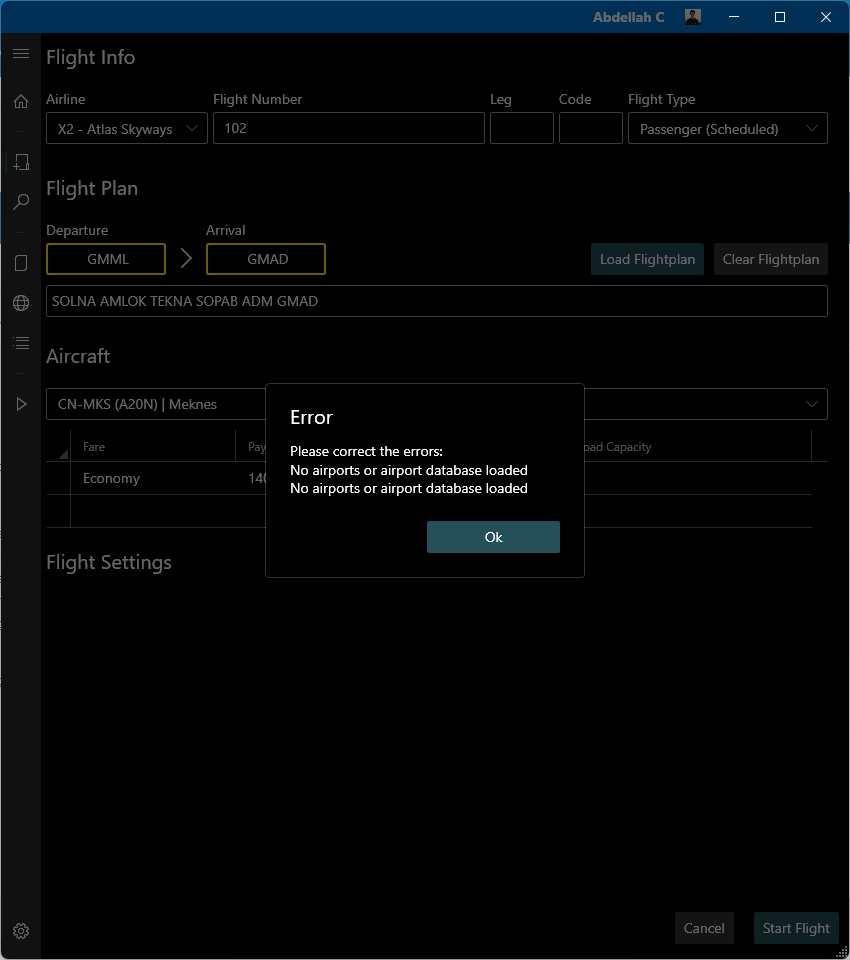
I just purchased vmsACARS, and I can’t get it to work for me, it shows the following error : “No airports or airport database loaded”
1- I scanned the scenery
2- I updated FSUIPC as required
3- deleted data and launched the acars again
4- no apps are running other than the sim : Microsoft Flight Simulator 2020 (Store version)
5- UserCfg.opt permissions are all set as required
6- Acars is set on website and up and module running as expected
log can be found here : https://drive.google.com/file/d/1gs0ztrtg6FUswTYEWi-LVwwvl9mg5yBm/view?usp=sharing
Thanks!
1 hour ago, CartesianPixels said:
5- UserCfg.opt permissions are all set as required
No, they are not and vmsAcars is telling you exactly this with a message box whenever you try to scan your sceneries.
09-13 17:32:26|INFO; Found UserOpt file in C:\Users\PC GAMER\AppData\Local\Packages\Microsoft.FlightSimulator_8wekyb3d8bbwe\LocalCache\UserCfg.opt
09-13 17:32:26|ERROR; UnauthorizedAccessException: Access to the path 'C:\Users\PC GAMER\AppData\Local\Packages\Microsoft.FlightSimulator_8wekyb3d8bbwe\LocalCache\UserCfg.opt' is denied.
09-13 17:32:26|INFO; MessageBox, message=There was an error trying to access the path, permissions denied. Run as admin or check the folder security
https://docs.phpvms.net/acars/user-guide#permission-denied-errors
Good luck
On 9/13/2024 at 6:50 PM, DisposableHero said:
No, they are not and vmsAcars is telling you exactly this with a message box whenever you try to scan your sceneries.
09-13 17:32:26|INFO; Found UserOpt file in C:\Users\PC GAMER\AppData\Local\Packages\Microsoft.FlightSimulator_8wekyb3d8bbwe\LocalCache\UserCfg.opt
09-13 17:32:26|ERROR; UnauthorizedAccessException: Access to the path ‘C:\Users\PC GAMER\AppData\Local\Packages\Microsoft.FlightSimulator_8wekyb3d8bbwe\LocalCache\UserCfg.opt’ is denied.
09-13 17:32:26|INFO; MessageBox, message=There was an error trying to access the path, permissions denied. Run as admin or check the folder security
https://docs.phpvms.net/acars/user-guide#permission-denied-errors
Good luck
I made it work, thank you, indeed, permissions were the reason
however now I am facing another issue, log is showing the following errors
09-14 00:44:37|INFO; Setting flight phase to Boarding
09-14 00:44:39|ERROR; uri=/api/pireps/9lyY6m8jq2e2jRBw/acars/positions
09-14 00:44:39|ERROR; error=App\Events\AcarsUpdate::__construct(): Argument #2 ($acars) must be of type App\Models\Acars, null given, called in /home/flyatlas/public_html/app/Http/Controllers/Api/AcarsController.php on line 212
09-14 00:44:39|ERROR; code=503
any idea how I can fix this issue? thank you DH, you’re a life saver.
51 minutes ago, CartesianPixels said:
I made it work, thank you, indeed, permissions were the reason
however now I am facing another issue, log is showing the following errors
09-14 00:44:37|INFO; Setting flight phase to Boarding
09-14 00:44:39|ERROR; uri=/api/pireps/9lyY6m8jq2e2jRBw/acars/positions
09-14 00:44:39|ERROR; error=App\Events\AcarsUpdate::__construct(): Argument #2 ($acars) must be of type App\Models\Acars, null given, called in /home/flyatlas/public_html/app/Http/Controllers/Api/AcarsController.php on line 212
09-14 00:44:39|ERROR; code=503
any idea how I can fix this issue? thank you DH, you’re a life saver.
I shared my thoughts already at Discord.
Looks like your install is not good and you have file/folder access problems.
1 Like
Hello, I’m having the same error. And I checked the file that needed the permissions, and it had all the permissions already set. So I checked the log file to see what error I might be getting and I saw these:
01-09 13:51:50|INFO; Checking C:\Users\Kaan\AppData\Local\Packages\Microsoft.FlightSimulator_8wekyb3d8bbwe\LocalCache for MSFS config
01-09 13:51:50|WARN; Directory $C:\Users\Kaan\AppData\Local\Packages\Microsoft.FlightSimulator_8wekyb3d8bbwe\LocalCache doesn’t exist, skipping
01-09 13:51:50|INFO; Checking C:\Users\Kaan\AppData\Roaming\Microsoft Flight Simulator for MSFS config
01-09 13:51:50|WARN; Directory $C:\Users\Kaan\AppData\Roaming\Microsoft Flight Simulator doesn’t exist, skipping
01-09 13:51:50|ERROR; FileNotFoundException: MSFS Config path not found
01-09 13:51:50|ERROR; MSFS Config path not found
01-09 13:51:50|INFO; MessageBox, message=MSFS Config path not found
I double checked my folders and in the Appdata folder the Microsoft Flight Simulator folder is not named as in the log file. It’s named as: Microsoft.Limitless_8wekyb3d8bbwe
What should I do about this?
Already replied on Discord, v1 is not fully MSFS2024 compatible It needs MSFS2020 to support 24, wait for v2 beta.
Safe flights