

About This File
Widget Volanta Export phpVMS 7
Exports flights from phpVMS to the CSV format required by Volanta.
https://github.com/avs-code/volantaWidget
✨ Features
📅 Customisable date selection.
🔽 Direct download in CSV format.
📊 Flight preview in table format.
🎯 Specific format for Volanta.
🔒 Only visible to the pilot themselves.
📋 Requirements
phpVMS 7.x
PHP >=8.1
Users with registered flights (PIREPs).
📸 Screenshots

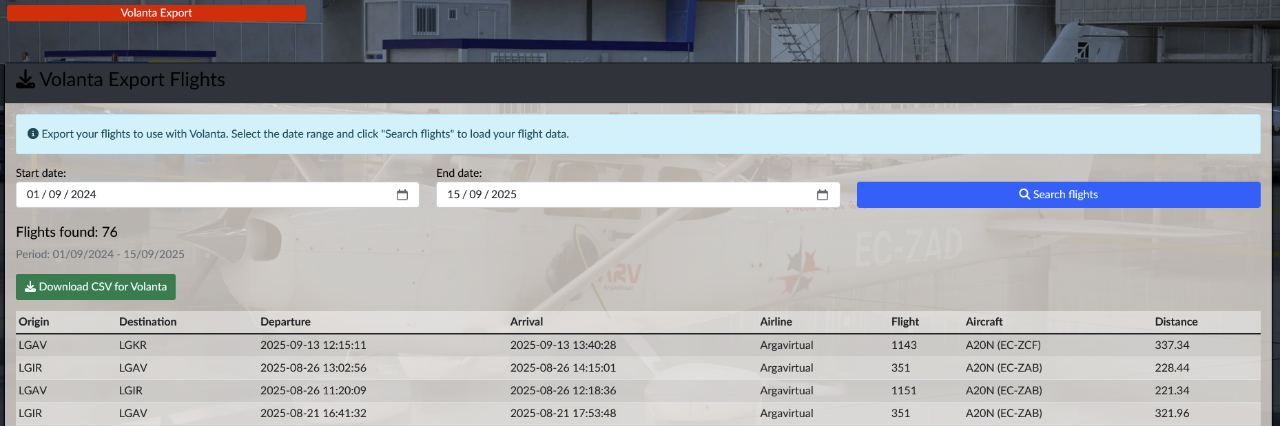
Installing the Volanta Export Widget
📦 Manual Installation
Step 1: Copy widget files
Copy these files to your phpVMS installation:
VolantaExportFlights.php → app/Widgets/VolantaExportFlights.php
volanta_export_flights.blade.php → resources/views/widgets/volanta_export_flights.blade.php
├── app/
│   └── Widgets/
│       └── VolantaExportFlights.php
└── resources/
    └── views/
        └── widgets/
            └── volanta_export_flights.blade.php
Step 2: Integrate into the Profile view
Add these lines to the file:
resources/views/layouts/your_theme_name/profile/index.blade.php
    {{-- Widget Volanta Export Flights - Only visible to the user themselves --}}
@if (Auth::check() && $user->id === Auth::user()->id)
    <div class="row mt-5">
        <div class="col-sm-12">
        @widget('VolantaExportFlights')
        </div>
    </div>
@endif
Step 3: Clear cache
In administration panel->maintenance->Clear all caches.
✅ Verification
Go to your profile (/profile).
You should see the ‘Volanta Export Flights’ widget.
🗑️ Uninstallation
Delete the 2 copied files (VolantaExportFlights.php and volanta_export_flights.blade.php).
Remove the lines added to the profile file (resources/views/layouts/your_theme_name/profile/index.blade.php).
Clear cache.
📋 CSV format generated
The CSV includes these columns for Volanta:
Origin, Destination, DepartureTime, Duration, Airline, Callsign, FlightNumber, AircraftType, AircraftRegistration, Route, ArrivalTime, Distance, Fuel
✅ Use
Go to your profile (/profile).
Click on Volanta Export button.
Select dates and click over Search flights.
Click again on Volanta Export button to see the results.
Click on Download CSV for Volanta.
In your Volanta app, Settings -> Data Import/Export -> Manual -> Select CSV.
Select Data to import, Aircraft and Flights, the selected data will merged in aircraft case, or duplicated in fligths case, so select only flights that you don't actually have in Volanta.
Click on Begin Import.
Edited by ARV187
What's New in Version 1.0.1 See changelog
Released
Widget Volanta Export
Recommended Comments
There are no comments to display.
Join the conversation
You can post now and register later. If you have an account, sign in now to post with your account.