

DisposableHero
-
Posts
620 -
Joined
-
Last visited
-
Days Won
97
Content Type
Profiles
Forums
phpVMS Resources
Downloads
Posts posted by DisposableHero
-
-
Did you reverted back the filename ?
Technically your install is not able to find the views (which is a part of laravel theme, the part causing problems before). Maybe cleaning the application cache manually may help (delete the contents of bootstrap folder manually, not the folder but the contents) and try visiting your site again.
As I wrote before, we are not experiencing the issue, even not able to replicate to dig deep. This is really hard to for us to help

-
Hi,
Unfortunately you are 3rd or 4th person getting this error, which we believe is somehow hosting related but it is not clear too 'cause when hosting provider checks they will say server is ok and settings are fine.
There are some workaround for this, but I am not sure if it will work or will provide a stable solution. Other users changed their hosting service providers and they did not faced the same error anymore (as far as I remember it was hostinger)
Only workaround I remember was renaming the themes.php file under config folder to something different like themes-backup.php and try visiting your site. After finishing install you can change the filename back to its first state.
Hope this helps
-
9 hours ago, Todd said:
During a new install of Version 7 of phpVMS, after the database is created, the installer stops on Step 3 (install/step3?) with a "500 SERVER ERROR". This is my second time trying to install with the same issue.
Versions
PHP Version: 8.0
Database versions: MySQL, MariaDB
phpVMS Version: 7.0.0 Dev
Appreciate any help.
Thanks!
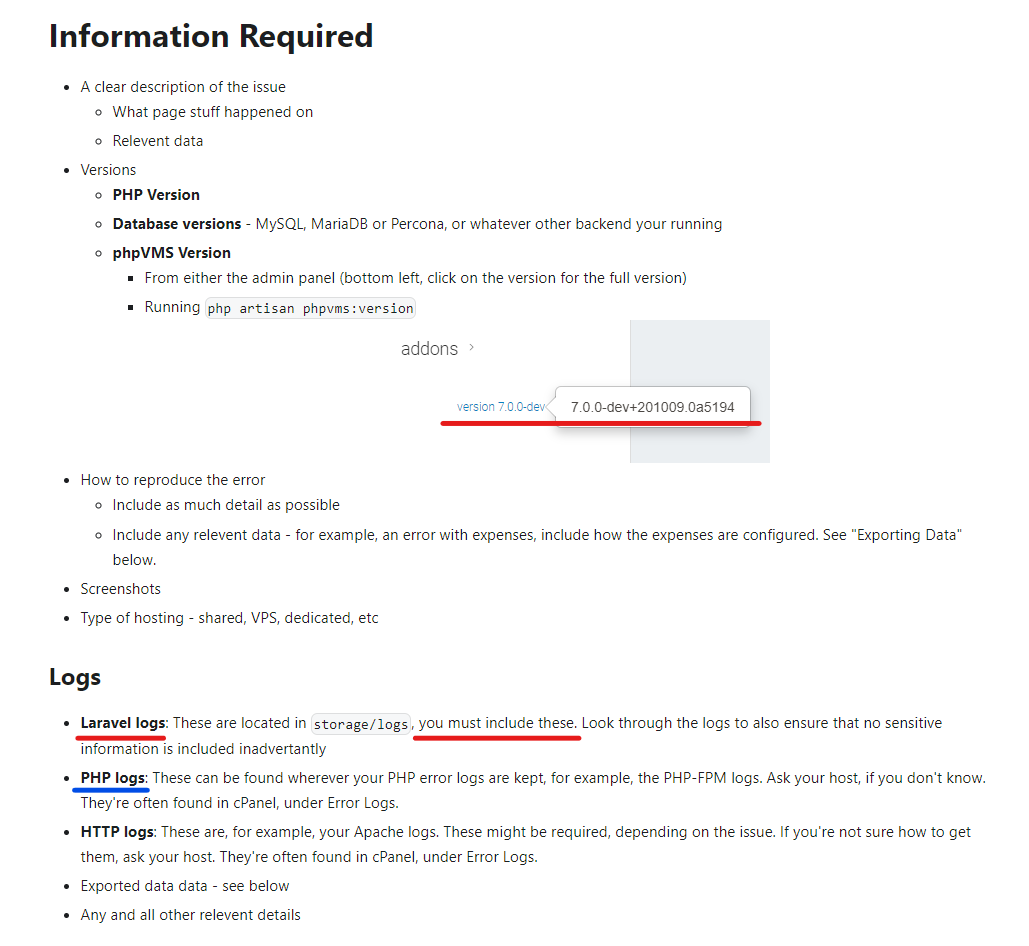
If you can provide some logs, maybe we can understand what is going on and try helping you out.

-
-
4 hours ago, Boogace said:
Good day all i have had a fellow pilot keeps getting landing lights on/off even tho they are switched on
but they keep showing a report of them going off then on ? has anyone had this issue ??
cheers
Wazza
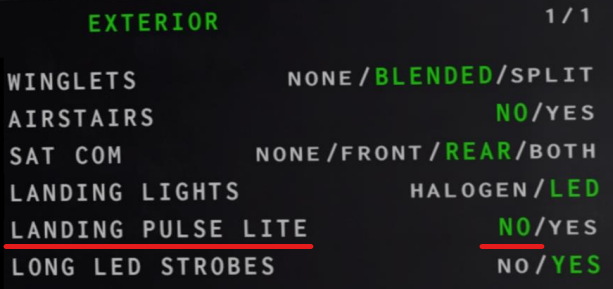
Disable "flashing landing lights" (name may be slightly different) from Zibo options (in EFB), it causes problems in vmsAcars like CTD's and out of memory issues while trying to check their on/off - flashing state.
Safe flights
-
If you want something like `crew.yoursite.com/contact` (full url with separate functions, anything you need in that page) then you need a module,
If you want a contact form with some entries and a button (which sends a message / mail to somewhere) and want to place it to more than one page then a widget will be logical,
If you want to add a button to a page then editing the that blade is more than enough.
I think this will explain the differences between the three.
Good luck
-
To have a route database, you do not need something more, it is just a route database... If you want to check your routes validity/legality for each airac cycle (like we do in real world) with some code/automation, then you will need some data for sure. Navigraph and Aerosoft are the only companies providing such data for simulator usage but you may need to check their licenses about possible different usage scenarios (they may not allow you to use their data like that). Anyway, this is more deeper than just a bunch of data and it is not our topic.
It is not about sharing data or hiding information, it is about responsibility. If you are going to manage a VA, then you have to consider and cover all aspects of it. One should not build something with relying on external sources. So if a VA needs to have valid, current, usable route database, then that VA should not look outside. This is what I am saying, but you are still thinking about sharing routes between VA's

Safe flights
-
 1
1
-
-
I was not talking about a shared, worldwide route database... I was thinking about a local, VA only database with some critical (dep-arr-route-airac-active) and optional (rwy-sid-star-remarks-validity etc) fields. Which will be maintained by the VA staff. I am not after something to hurt my own mental health like providing route to different VA's, if someone is creating a virtual airline, then that same someone should be able to handle all aspects of managing an airline (or be able to create an experienced team to do that).
Personally I am already dealing with my own (real) airline's route database and it is a complex task. There are lots of people working in the background to support front line dispatchers on daily planning, so no, I am not that mad to do that for a bunch of VA's spread around the world
Anyway, one day (hopefully after retiring) I will convert that idea to code, at least it will be enough to fulfill my own needs.
Safe flights
PS: There is no such thing called "best route", it depends on a lot of factors and that factors can change daily. So you can not have the "ultimate best" generated and saved somewhere, it is a dynamic process

-
1. Only if mandatory between city pairs, like a specific company route between DEP-ARR, or a route forced by ATS with special levels/speeds.
2. Only if mandatory between city pairs or needed by ATS ('cause Flight Level is subject to load-performance and wx along the route)
So having YES/NO for questions 1 and 2 is not enough, it really depends on the situation.
As an example to #1, you need to file RATVU UT35 BABSA for an IST-AYT flight, this is mandatory and published as RAD (Route Availability Document) by ATS. So I do have that route inserted to all of my IST-AYT flights (and have a similar one for the return leg).
What v7 needs (in my opinion) is a detailed "Route Database", instead of inserting the same routes over and over, we should be able to have a table (with details and maintenance options) and it should offer pre-defined/saved routes between city pairs when planning (also frontend flight details page can use those stored routes on the map, which then will give ideas to pilots between options etc)
What SimBrief gives you is another topic and should be checked before using (check SimBrief docs/forum) 'cause it does NOT auto generate always, to speed up things most of the time it gives you the last route planned between those city pairs so if someone tries a strange route (or sends in an old route from his company db) then you will have the same.
Safe flights
-
Use Laragon instead of Xammp, all will be fine
-
"Any recommendations ?"
Yes, please check the docs and inspect requirements, it will give you important clues about what you need/seek for at your hosting provider. Stay away from free hosting solutions, be sure you will get prompt support from your hosting, consider VPS (if your plans are big).
Do your homework, define your requirements first, make your decisions, act later with a plan. What to use, how to use, when to use etc... Do NOT try to buy something without checking first. Like you can not use v5 with a new hosting, likewise you can not use v5 supporting acars solutions with v7, or hosting services providing support for v2/v5 will not run v7 etc. etc.
And you can always use vmsHost for your hosting needs. At least you will always be sure about compatibility about stuff (phpVMS = vmsAcars = vmsHost)
Good luck
-
-
Then you can check "Paid Services" of this forum
You can find people offering services, or ask for someone special for your needs.
Good luck
-
9 hours ago, CarpeVinum said:
Hi! Is phpvms still in development? Seems v7 is in beta since 2020.
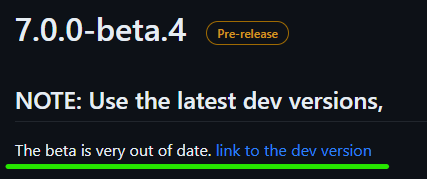
It is being actively developed and improved, this is the reason of that beta4 note
Enjoy v7 with latest dev.
-
 1
1
-
-
1 hour ago, Skytraveler said:
Hi,
Is it possible for a user that flies sometimes on MSFS, and sometimes on X-Plane, to use VMSACARS to file the Pireps to the same Airline?
Thank you,
Joao
It is just two or three clicks for the pilot to switch between installed (and configured) simulators. So yes, it is of course possible.
I am using XP11/12, MSFS (and doing tests with FSX/P3D whenever necessary).
Settings (first click) > Select Simulator (second click) > Save (third click)
Safe flights,
-
1
-
-
1 hour ago, VERTSPD said:
Hi.
I'm new to vmsacars and phpvms. Everything is setup but I can't get the aircraft data, fares, payload etc, to populate in the Flight Info page.
Any ideas?
I have some ideas, I would like to represent them as questions
Did you completed your setup properly from admin side ?
Do you have any subfleets ?
Do you have any aircraft defined to/under that subfleets ?
Do you have any rank / type rating restrictions ?
How is your settings done ? Aircraft at departure, flights with subfleets etc.
Did you read the guides ? (Specially the initial setup and subfleet setup)
https://forum.phpvms.net/forum/57-general-discussions/
Good luck
-
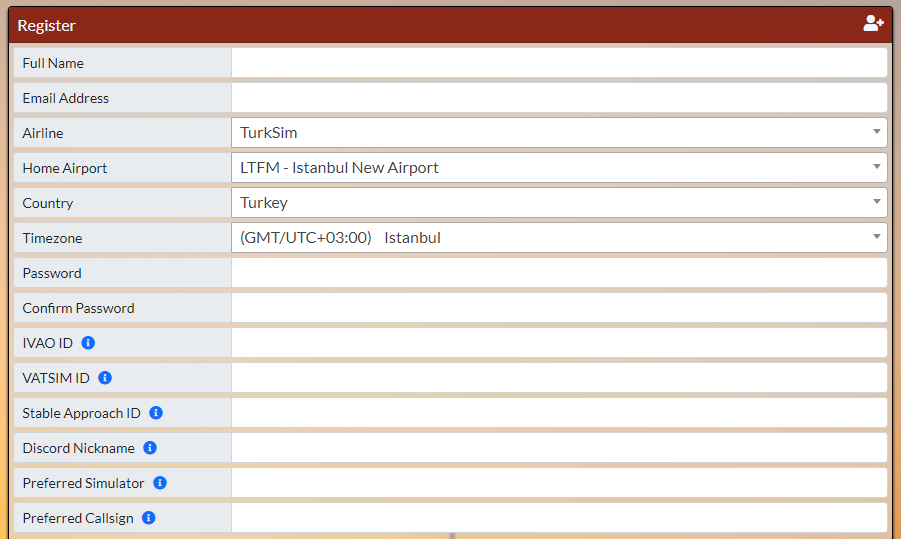
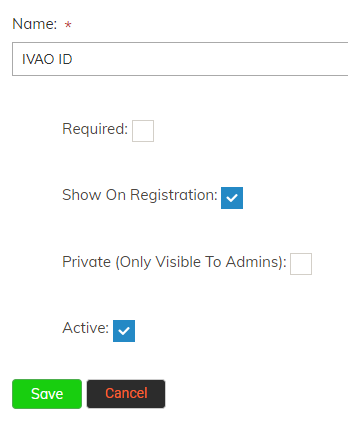
Registration page follows your admin settings / definitions. It is not something related to a widget or theme setting, it is a core feature being used by the theme.
If you enable "Show On Registration" checkbox for your custom profile/user fields my theme follows it and shows the entry fields.
-
Kindly reminder; Change your application name (APP_NAME) from env.php 'cause it is still "phpvms", probably forgotten during install
For the rest, I can only say "Thanks for your kind thoughts, I am glad that my contribution is being used and liked"
Safe flights
-
2 hours ago, LesJar said:
I set up a bid to fly EGEP-EGEW Papa Westray to Westray a flight of around two minutes , the acars log seems to think the flight is still running after I have stopped put on the parking brakes and stopped the engines. The end flight button did not show up.
Since this is a very short flight and the distance between the airports is less than 3 miles and you do not get much altitude is the acars able to handle this type of flight ?.
DO I need to make the times for the acars checking position report smaller etc,
production.INFO: PIREP Update, user 1 [2023-03-13 13:18:55] production.INFO: {"flight_time":8} [2023-03-13 13:18:55]production.INFO: Disposable Basic | Pirep:mrMymp3anA00YB5p TAKE OFF reported, Changed STATE of G-AAAA to IN AIR [2023-03-13 13:19:43]
production.INFO: PIREP Update, user 1 [2023-03-13 13:19:43] production.INFO: {"flight_time":9}
basically I flew 2.34 miles and then the flight was finished but acars still was running so I cancelled it at 12 minutes
Did you checked docs (Acars > User Manual section) for "Flight Phases" (states) ?
https://docs.phpvms.net/acars/user-guide
Pirep:mrMymp3anA00YB5p TAKE OFF reported
Without ENR / Enroute, probably acars will not move on further.
I do not think that reducing reporting times will change anything. Either you will fulfill the requirements described in user guide (also you may need to alter your schedule to eliminate those short flights) or vmsAcars needs to be updated (which will affect all users and this needs to be considered deeply)
Good luck
-
Well, considering v7 can support more than one airline (I have 26 in my setup) and their schedules and their fleet I do not think that this will be an issue.
Regarding admin work (adjusting those schedules to reflect proper airlines / fleet), yes you need to work on that. No one can do it for you, this is a management task to be done. We all did it at some point, either from upgrading from v5 or creating new v7 installs. This is unavoidable at all.
For smartCars I do fully agree with @ProAvia (also I do agree on switching to php5.6 too) it is a choice you need to make at some point, either now or later... Again no one can help you on that
Good luck with v5.x and install
-
Did you tried installing on php7.3 ?
I do not think that there are plans for a specific php version, maybe with some fixes v5.x series can run on php7.3 and php7.4 but not php8. So a year later, or max two years there will be less than limited support for old php versions. You may need to seek for a VPS (in which you can install anything you need and it will be fully under your control)
If you need to use v5.x of course, if not you may check phpVMS v7.x series (at least it runs on recent software and hardware, still being developed and supported)
-
1 hour ago, matheusm said:
hello,
I use the 737 PMDG in FS2020.
none of the aircraft's lights are recognized by acars. All appear as off (false) in the Debug Window , beacon, taxi, landing light...
Thank You!
You have three solutions;
- Use an earlier version of fsuipc-lvar-module or,
- Update vmsAcars\FSUIPC_WAPID.dll file with the latest version (check FsUipc\Utils directory) or,
- Wait for a vmsAcars update.
Safe flights
-
13 hours ago, LesJar said:
I want to add the ACARS.ZIP to my website in PHPVMS7. I cannot see any option in ADMIN to MAINTAIN a downloads section.
Anybody set this up can you please give details thank you.
Really ?
There are options under each Airline, Airport, Subfleet and Aircraft to add files.
Also there is an option under vmsAcars module designed to provide a download link separate from the above groups, just for vmsAcars itself as expected.
But you can not see any options for an Admin to maintain files
Looks like you are rushing, overlooking or not looking at all
Hope this helps, good luck
-
I do not think that current logic of the map allows different icons used for different types of aircraft.
It can be done of course but you need to go deeper and come up with an enhanced map solution (like defining icons for each item on the map at backend) and then compile the new script, adapt frontend to follow backend changes (like removing the generic icon usage etc).

Web integration
in vmsACARS
Posted
phpVMS v7 is free, vmsACARS is not.
phpVMS v7 and vmsACARS do work together out of the box, no extra effort or development is needed to start, this is the easiest way to use both. Only simple steps during installation is required, to start operations / testing phase. Rest will be customizing things and admin work.
No, as far as I know, there are no refunds. Once you buy and activate your license it is yours forever. Also there are no demo or test packages for vmsACARS with limited capabilities, time restrictions etc.
vmsACARS is designed to work with phpVMS v7, this is important. Therefore your question regarding implementing vmsACARS to your current setup is a complex task, depends on your knowledge and skills. Technically it is possible, what you need to make is in simple terms; Have a module or system which can enable communications between your current VA Management software and vmsACARS. As you will not be able to change the way vmsACARS works, you have to re-design your current software's backend, during this task you may need to alter how your old system operates.
If you are using phpVMS v2x/5x (classic series), it is easy to upgrade to v7 (current) series but for other systems like VAM, VaBase etc it will not be that easy (maybe it may not be possible without loosing some abilities)
You can enhance capabilities (backend) of phpVMS v7, also the visuals/skin/theme (frontend) can be customized. This again depends on your PHP + Laravel skill.
Hope this helps, either way you need to inspect specs and requirements of phpVMS v7, compare it to your current hardware (server) and cross check its capabilities according to your current system. This is a time consuming and detailed task...
Good luck and God speed.