Search the Community
Showing results for '계정 획득 Credit Card ⏩acc6.top⏪'.
-
Version 0.0.16
419 downloads
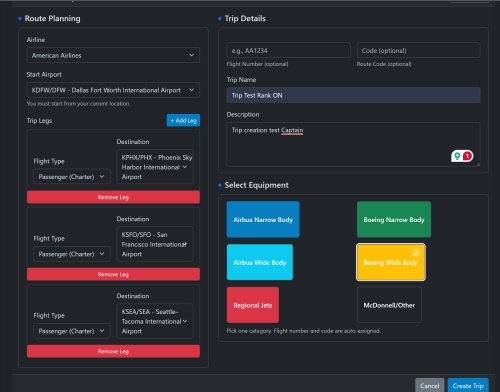
Trip Planner Advanced for phpVMS v7 Create multi-leg “free flight” trips that your pilots can bid on and fly, keeping them moving from airport to airport. Clean UI, simple admin controls, and neutral branding that fits any VA. Derived from Cardinal Horizon CHTrips and packaged for easy drop-in use. ✈️ Highlights Multi-leg trips with custom name & description “Next Flight” summary with aircraft group popover and quick actions Progress tracking + completed PIREPs list Equipment Category picker to attach subfleets (Airbus Narrow, Boeing Narrow, Airbus Wide, Boeing Wide, Regional, McDonnell/Other) Optional rank-aware mode (honors phpVMS Rank/Type settings) Smooth start option: Auto-reposition to the first departure after the first bid if “start anywhere” is allowed Invisible, trip-owned flights to avoid conflicts with schedules 👨✈️ What Pilots Get My Trips page with progress bar, description, created date, and compact action buttons Trip Detail page: “Next Flight” card with quick actions (Info, New PIREP, SimBrief) Add/Remove Bid button (with auto-reposition support) Following flights and completed the PIREPs list Automatic reposition message (only shown before the first PIREP if “start anywhere” is allowed) ⚙️ Admin Settings Accessible at: Admin → Trip Planner Advanced → View Admin Module Enforce VA Ranking ON: Only subfleets allowed by pilot’s rank/type OFF: Rank ignored; All SubFleets available Lock to Current Pilot Location (default ON) ON: First leg must depart the pilot’s current/home airport OFF: Trips can start anywhere Auto-Reposition on First Bid ON: Auto-moves pilot to the first departure after their very first bid OFF: No Auto-move pilot Mandatory if “Lock to Current” is OFF All settings are ability-guarded (admin, admin-access). 🔧 How It Works (Under the Hood) Flights created with: Numbers 7000–7999 and route_code=TPA Visible=False, owned by Trip Leg order tracked in ch_flight_pirep_trip PIREP Create Bridge (tripplanner.pireps.create) filters aircraft per trip Bids handled via module routes (tripplanner.bid.add, phpvms.bids.removeBid()) 📥 Installation Copy folder → modules/TripPlannerAdvanced/ Admin → Addons → Modules: enable Admin → YourVAaddress/pdate (run migrations) Admin → Maintenance → Clear All Caches Frontend menu: Trip Planner appears for logged-in users. Future Updates: Upgrade: Replace folder → Run Update → Clear caches. 📝 Notes & Best Practices If trips CAN start anywhere, enable Auto-Reposition to bypass & avoid “Not at Departure” errors. If trips CAN start anywhere, repositioning only applies after the very first BID in a trip is placed. Flights are invisible & uniquely tagged (TPA + 7000s) to avoid collisions. Always clear caches after installation or upgrade. 📄 License & Attribution License: BSD-3 Portions & Credits derived from CHTrips by Cardinal Horizon © 2024 Additionally, if you want to see exactly how the modules are working for reference & how they should be operating, the demo VA is at: https://simaddon.space/ Username: AAL2 Password: CrewCenter Some modules are linked directly on the Dashboard & while others you can find in Admin > Addons or below (have not had time to link them yet): Login first: https://simaddon.space/aadvantage-miles There's also a basic overview of CHHubManager, although @Taylor Broad made substantial modifications to the newer version. However, since the foundations are the same, this should already give an excellent idea: https://simaddon.space/admin/chhubmanager -
View File Trip Planner Advanced Trip Planner Advanced for phpVMS v7 Create multi-leg “free flight” trips that your pilots can bid on and fly, keeping them moving from airport to airport. Clean UI, simple admin controls, and neutral branding that fits any VA. Derived from Cardinal Horizon CHTrips and packaged for easy drop-in use. ✈️ Highlights Multi-leg trips with custom name & description “Next Flight” summary with aircraft group popover and quick actions Progress tracking + completed PIREPs list Equipment Category picker to attach subfleets (Airbus Narrow, Boeing Narrow, Airbus Wide, Boeing Wide, Regional, McDonnell/Other) Optional rank-aware mode (honors phpVMS Rank/Type settings) Smooth start option: Auto-reposition to the first departure after the first bid if “start anywhere” is allowed Invisible, trip-owned flights to avoid conflicts with schedules 👨✈️ What Pilots Get My Trips page with progress bar, description, created date, and compact action buttons Trip Detail page: “Next Flight” card with quick actions (Info, New PIREP, SimBrief) Add/Remove Bid button (with auto-reposition support) Following flights and completed the PIREPs list Automatic reposition message (only shown before the first PIREP if “start anywhere” is allowed) ⚙️ Admin Settings Accessible at: Admin → Trip Planner Advanced → View Admin Module Enforce VA Ranking ON: Only subfleets allowed by pilot’s rank/type OFF: Rank ignored; All SubFleets available Lock to Current Pilot Location (default ON) ON: First leg must depart the pilot’s current/home airport OFF: Trips can start anywhere Auto-Reposition on First Bid ON: Auto-moves pilot to the first departure after their very first bid OFF: No Auto-move pilot Mandatory if “Lock to Current” is OFF All settings are ability-guarded (admin, admin-access). 🔧 How It Works (Under the Hood) Flights created with: Numbers 7000–7999 and route_code=TPA Visible=False, owned by Trip Leg order tracked in ch_flight_pirep_trip PIREP Create Bridge (tripplanner.pireps.create) filters aircraft per trip Bids handled via module routes (tripplanner.bid.add, phpvms.bids.removeBid()) 📥 Installation Copy folder → modules/TripPlannerAdvanced/ Admin → Addons → Modules: enable Admin → YourVAaddress/pdate (run migrations) Admin → Maintenance → Clear All Caches Frontend menu: Trip Planner appears for logged-in users. Future Updates: Upgrade: Replace folder → Run Update → Clear caches. 📝 Notes & Best Practices If trips CAN start anywhere, enable Auto-Reposition to bypass & avoid “Not at Departure” errors. If trips CAN start anywhere, repositioning only applies after the very first BID in a trip is placed. Flights are invisible & uniquely tagged (TPA + 7000s) to avoid collisions. Always clear caches after installation or upgrade. 📄 License & Attribution License: BSD-3 Portions & Credits derived from CHTrips by Cardinal Horizon © 2024. Submitter William Submitted 09/04/25 Category Add-ons
-
- 1
-

-
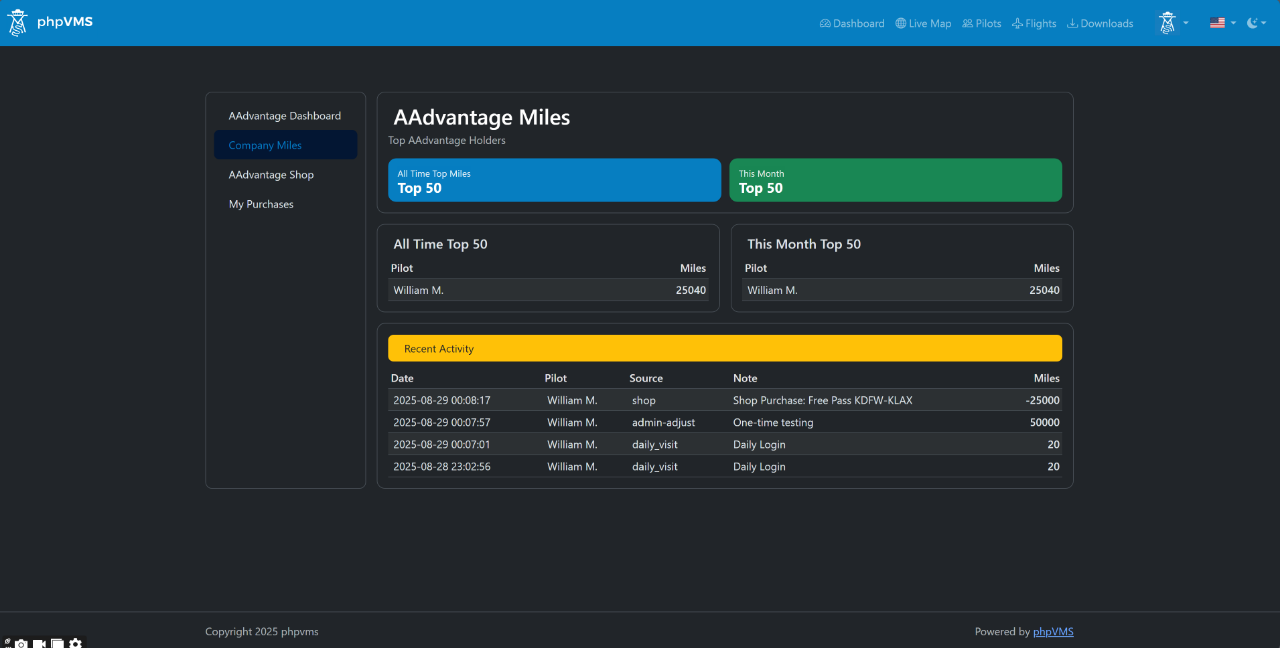
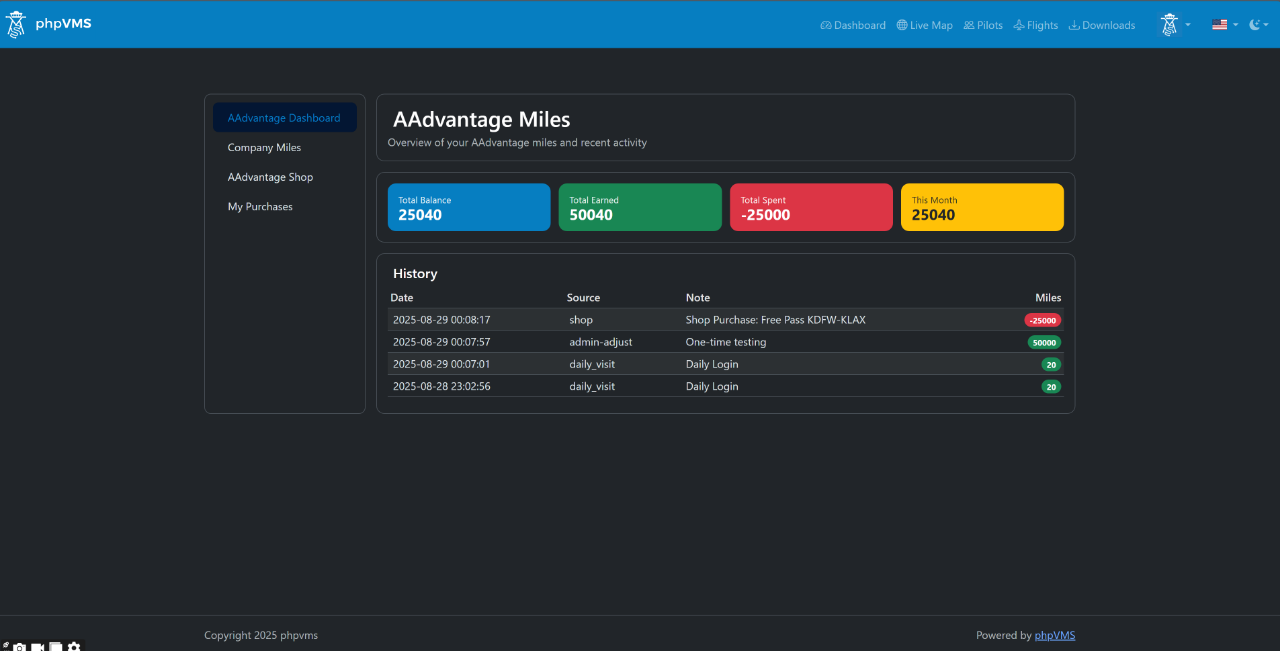
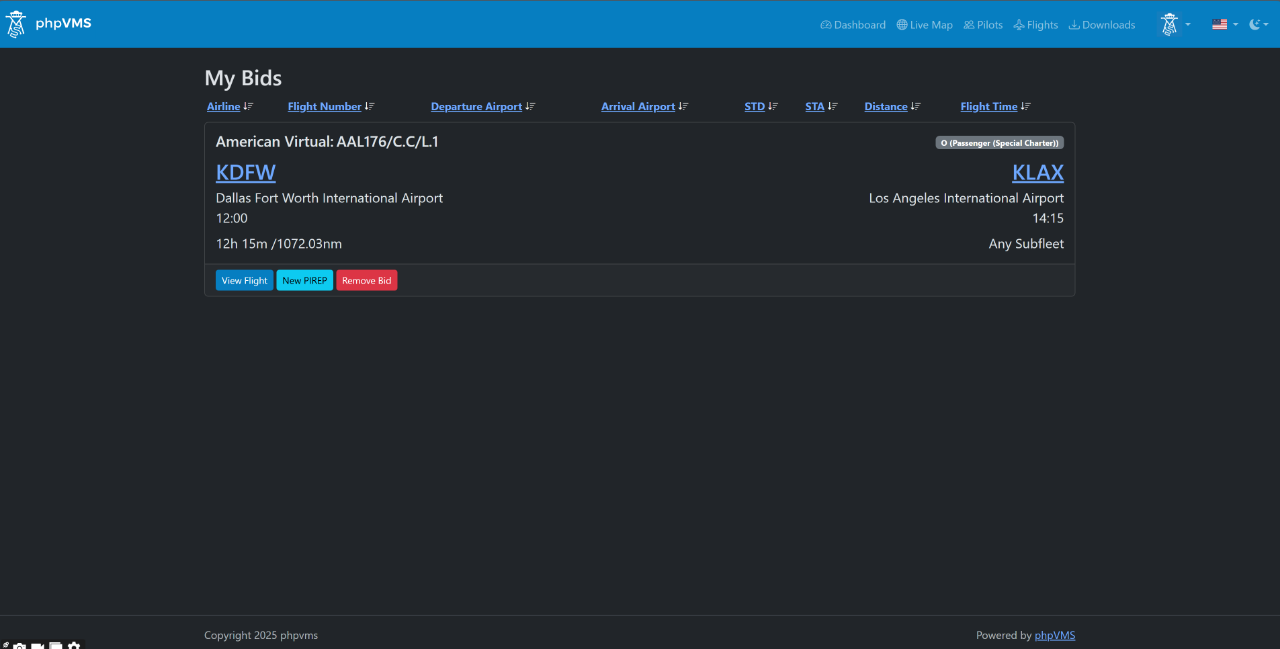
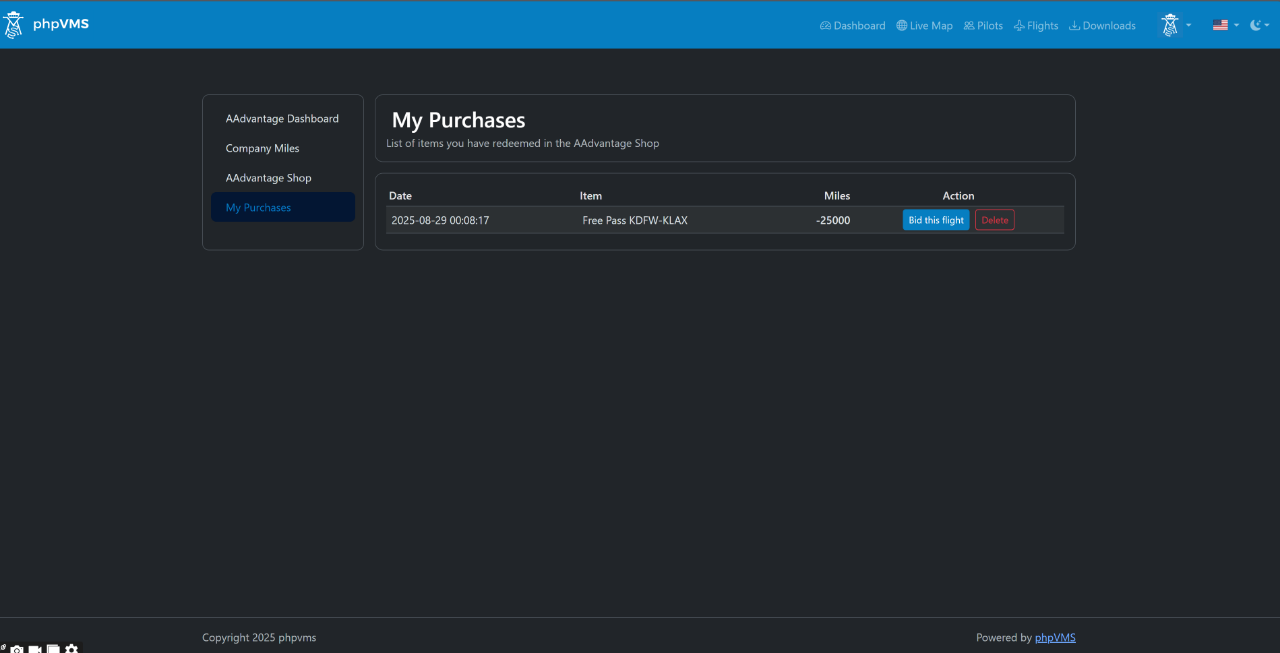
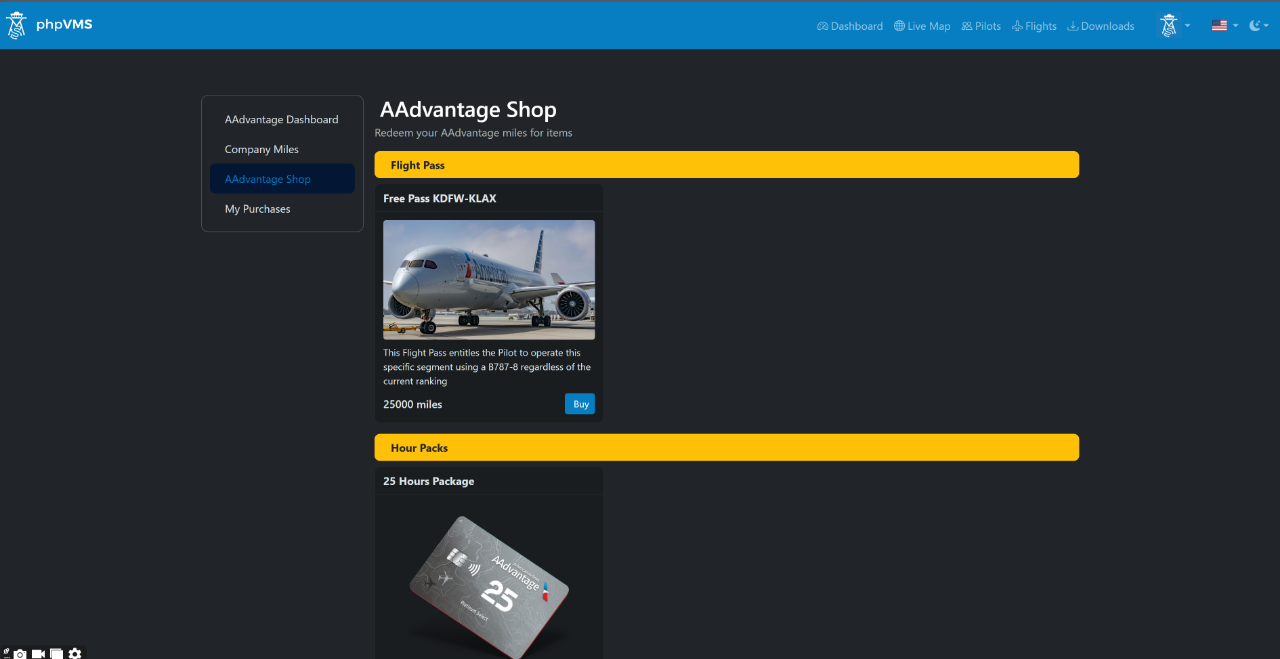
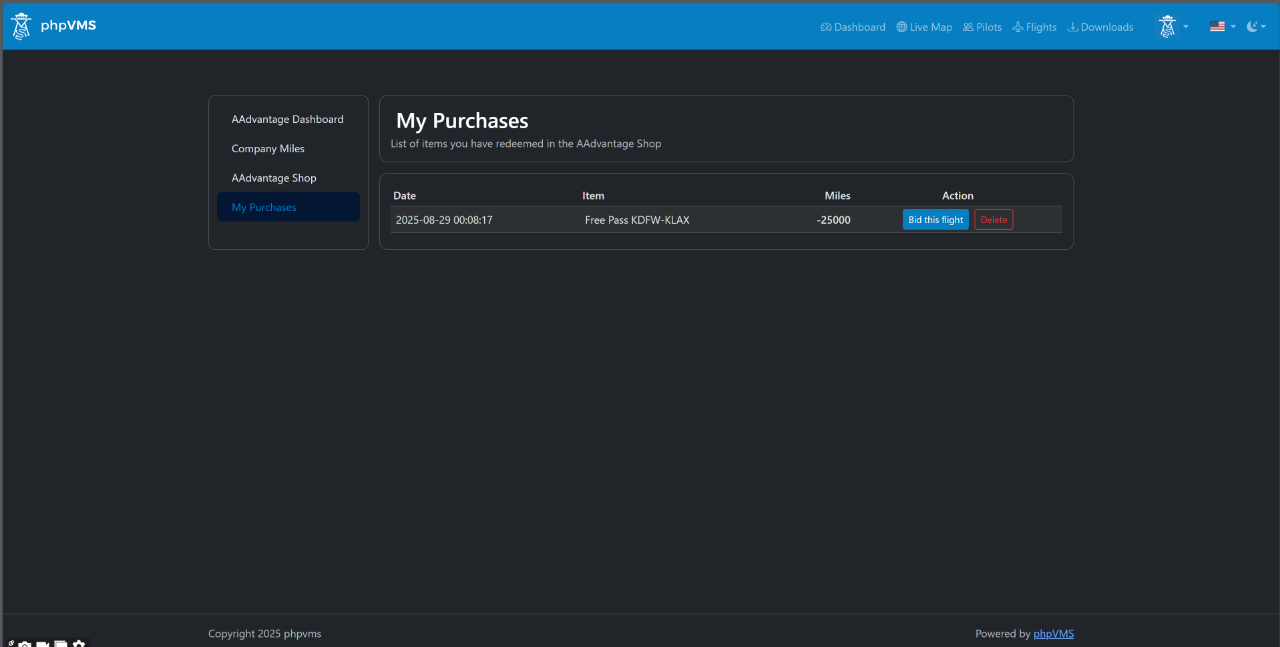
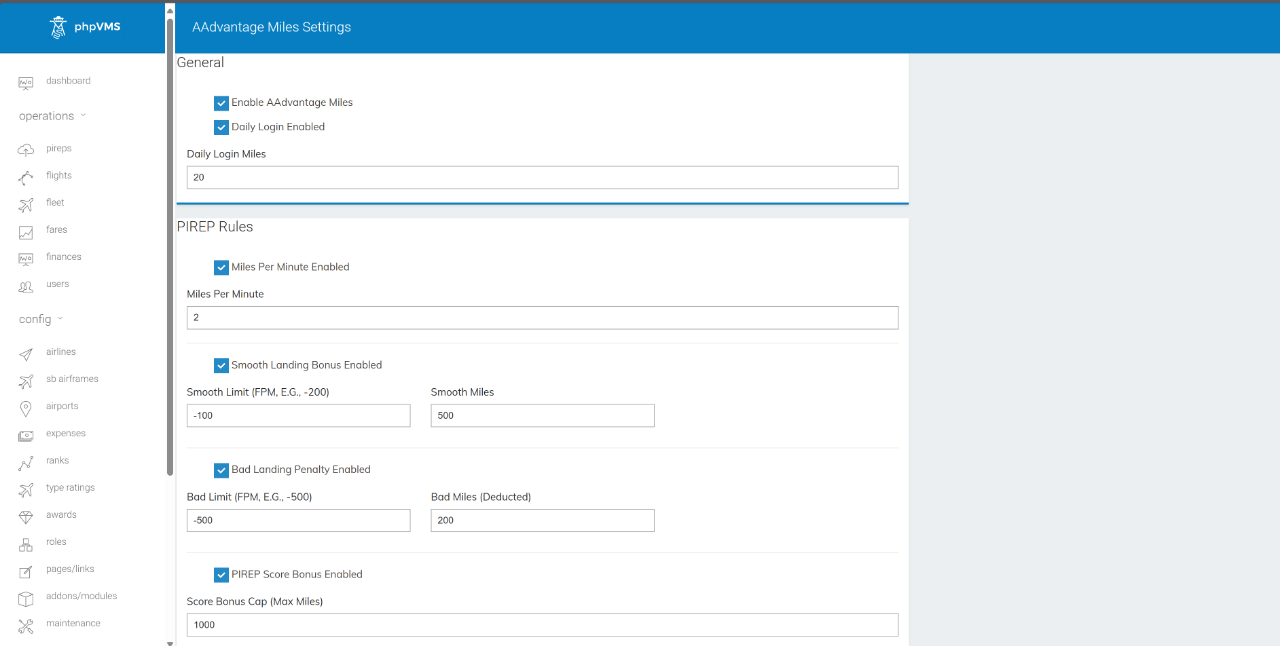
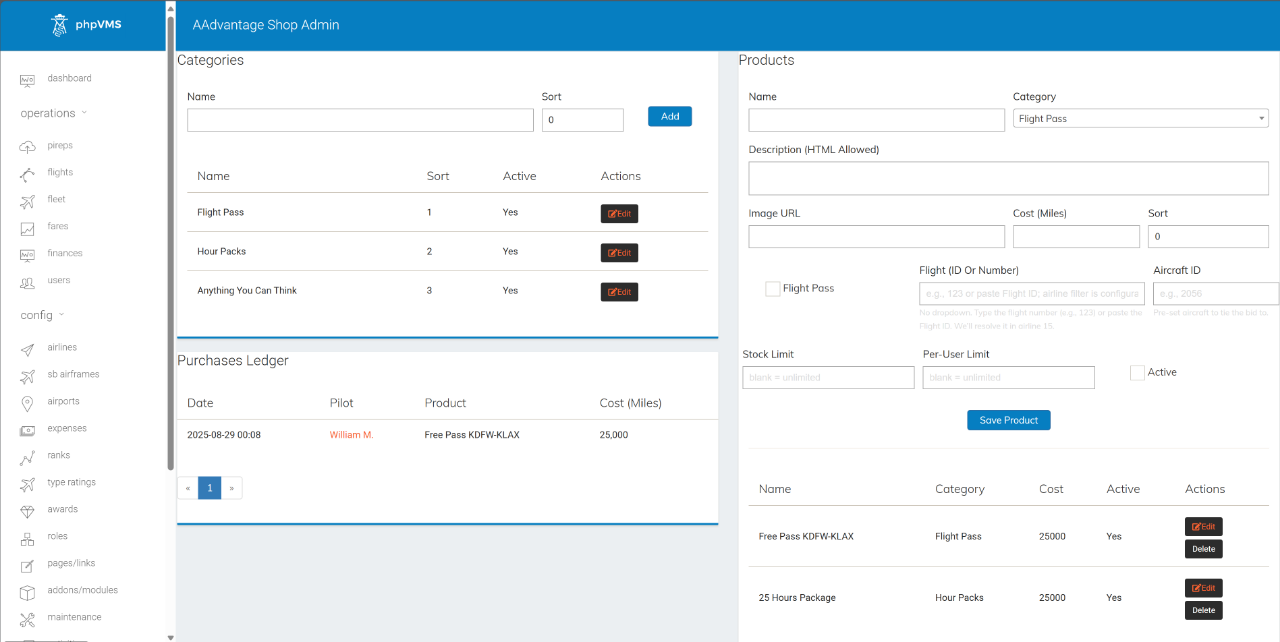
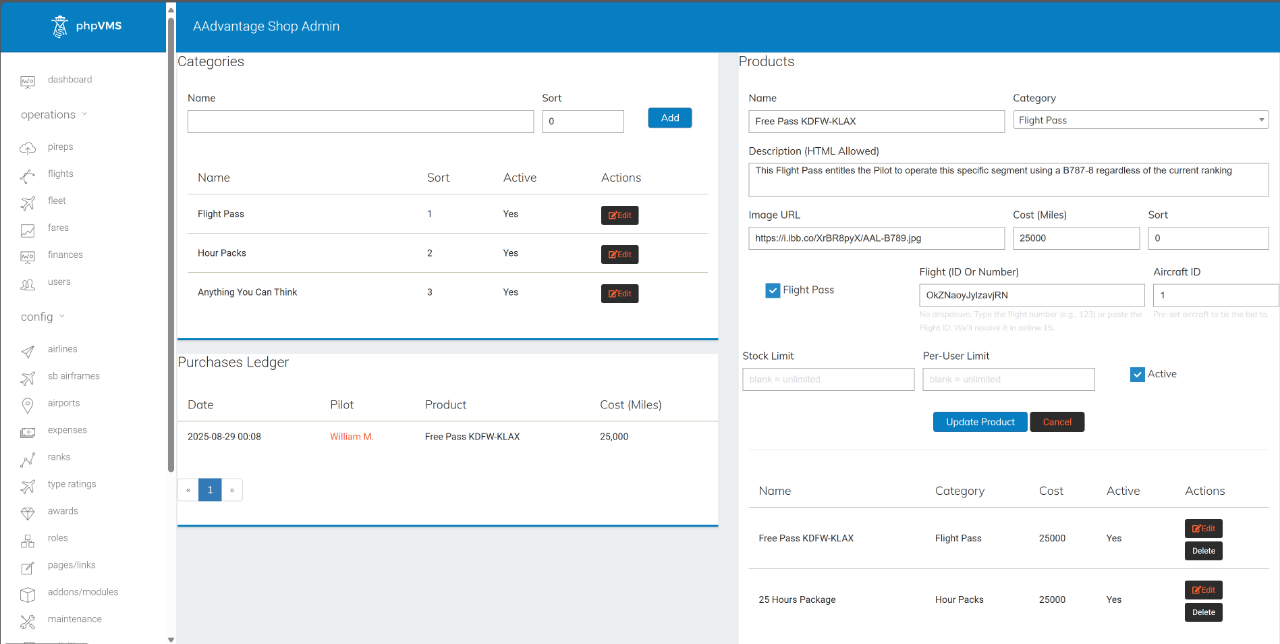
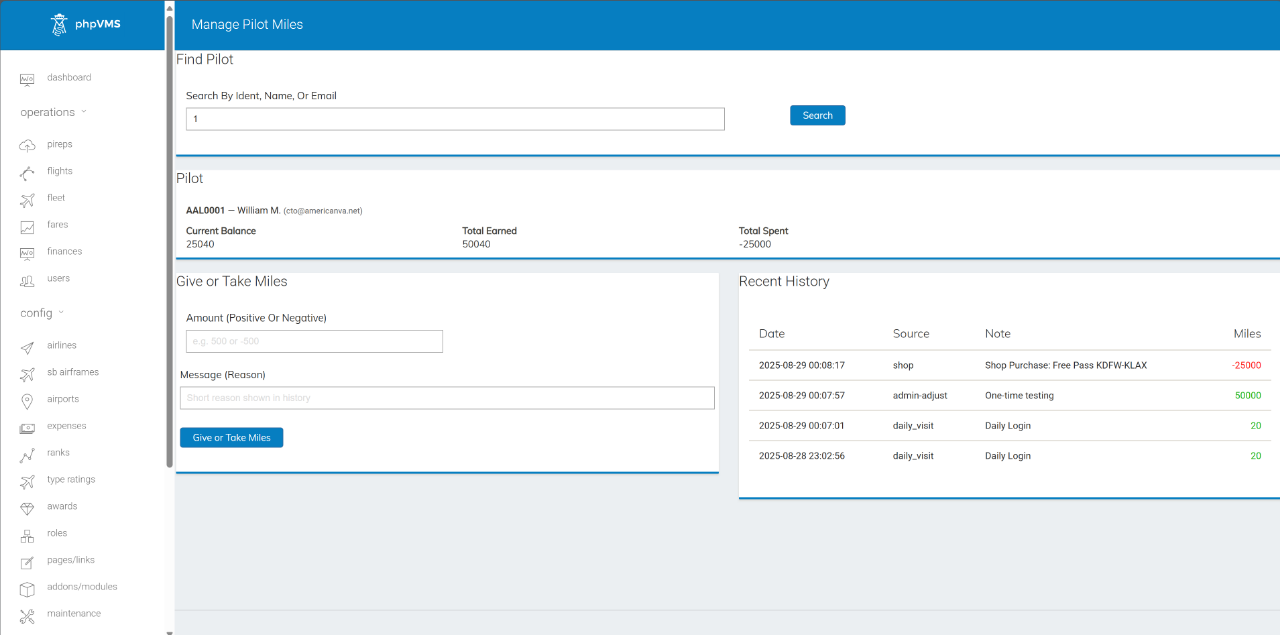
View File AAdvantage Miles Description An easy, automated way to reward pilots, create incentives, promote destinations, unlock special flights (or Rank-Free flights), and even reward real-world items (gift cards, sponsors' perks, etc.)? AAdvantage Miles is a lightweight, production-tested module that adds miles/points to your VA with automatic earning rules, leaderboards, and an optional in-VA Shop with "special" Flight Passes for sale. Why it’s good for your VA (and keeps pilots hooked): Fly → Earn → Unlock: clear progression loop that turns every flight into visible progress. Zero micromanagement: automated awards align with your rules (time flown, landing quality, airports), so good behavior is reinforced without admin work. Daily habit builder: login miles, create streaks, and reasons to come back, even on non-flying days. Friendly competition: leaderboards spark rivalry and social proof, boosting activity across the week. Real rewards, not fluff: the Shop converts effort into perks (simulated or not); Flight Passes add scarcity and excitement (including Ranks-Free access when you want it). Event-ready: drop special routes/passes for weekends or special rewards to spike engagement on demand. Trust & transparency: per-pilot ledger shows exactly how miles were earned/spent. Result: more flights, better flying, happier pilots - on autopilot. What it does Per-pilot miles ledger Full earn/spend history Auto-awards Daily login miles (idempotent) PIREP rules: miles/minute, smooth-landing bonus, bad-landing penalty, score bonus (with cap) Airport-specific bonuses (per rule: departure/arrival / both) Frontend pages My Miles, Leaderboard, Shop, My Purchases Admin tools Settings (toggle/tune all rules) Manage Pilot Miles (search, review history, add/subtract with note) Shop Admin (categories/products, stock, per-user limits, purchase ledger) Flight Passes (optional) Create Pass products targeting a specific flight (Flight ID) Optional aircraft pre-bind for SimBrief / aircraft lock Direct-bid endpoint for pass owners Auto-marks Pass “used” when the related PIREP is filed Default expiry: 30 days New: Bid strictness options Off → Pass bids bypass rank/type checks (only the core “at departure airport” rule applies). Ideal for “selling” access to flights to lower ranks On → Pass bids must satisfy your VA’s current rank/type restrictions (module validates pilot eligibility and subfleet/flight compatibility) Compatibility phpVMS v7 (Laravel 8+) DB: JSON columns required (MySQL 5.7+ / MariaDB 10.2+) Views namespaced as AAMiles:: and override-friendly Quick install Copy folder to: modules/AAdvantageMiles Admin → Addons → Modules → Enable PHPVMS Update → visit your.domain/update (runs migrations) Admin → Maintenance → Clear All Caches Configure under Admin → AAdvantage Miles That’s it — pilots start earning based on your settings. Submitter William Submitted 08/29/25 Category Add-ons
-
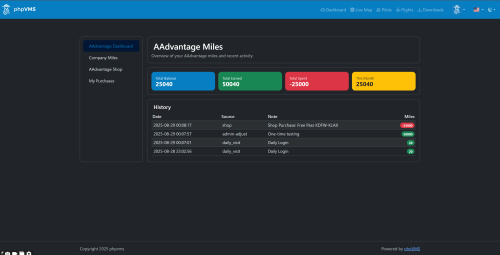
Version 1.0.0
843 downloads
Description An easy, automated way to reward pilots, create incentives, promote destinations, unlock special flights (or Rank-Free flights), and even reward real-world items (gift cards, sponsors' perks, etc.)? AAdvantage Miles is a lightweight, production-tested module that adds miles/points to your VA with automatic earning rules, leaderboards, and an optional in-VA Shop with "special" Flight Passes for sale. Why it’s good for your VA (and keeps pilots hooked): Fly → Earn → Unlock: clear progression loop that turns every flight into visible progress. Zero micromanagement: automated awards align with your rules (time flown, landing quality, airports), so good behavior is reinforced without admin work. Daily habit builder: login miles, create streaks, and reasons to come back, even on non-flying days. Friendly competition: leaderboards spark rivalry and social proof, boosting activity across the week. Real rewards, not fluff: the Shop converts effort into perks (simulated or not); Flight Passes add scarcity and excitement (including Ranks-Free access when you want it). Event-ready: drop special routes/passes for weekends or special rewards to spike engagement on demand. Trust & transparency: per-pilot ledger shows exactly how miles were earned/spent. Result: more flights, better flying, happier pilots - on autopilot. What it does Per-pilot miles ledger Full earn/spend history Auto-awards Daily login miles (idempotent) PIREP rules: miles/minute, smooth-landing bonus, bad-landing penalty, score bonus (with cap) Airport-specific bonuses (per rule: departure/arrival / both) Frontend pages My Miles, Leaderboard, Shop, My Purchases Admin tools Settings (toggle/tune all rules) Manage Pilot Miles (search, review history, add/subtract with note) Shop Admin (categories/products, stock, per-user limits, purchase ledger) Flight Passes (optional) Create Pass products targeting a specific flight (Flight ID) Optional aircraft pre-bind for SimBrief / aircraft lock Direct-bid endpoint for pass owners Auto-marks Pass “used” when the related PIREP is filed Default expiry: 30 days New: Bid strictness options Off → Pass bids bypass rank/type checks (only the core “at departure airport” rule applies). Ideal for “selling” access to flights to lower ranks On → Pass bids must satisfy your VA’s current rank/type restrictions (module validates pilot eligibility and subfleet/flight compatibility) Compatibility phpVMS v7 (Laravel 8+) DB: JSON columns required (MySQL 5.7+ / MariaDB 10.2+) Views namespaced as AAMiles:: and override-friendly Quick install Copy folder to: modules/AAdvantageMiles Admin → Addons → Modules → Enable PHPVMS Update → visit your.domain/update (runs migrations) Admin → Maintenance → Clear All Caches Configure under Admin → AAdvantage Miles That’s it — pilots start earning based on your settings. Additionally, if you want to see exactly how the modules are working for reference & how they should be operating, the demo VA is at: https://simaddon.space/ Username: AAL2 Password: CrewCenter Some modules are linked directly on the Dashboard & while others you can find in Admin > Addons or below (have not had time to link them yet): Log in first: https://simaddon.space/aadvantage-miles There's also a basic overview of CHHubManager, although @Taylor Broad made substantial modifications to the newer version. However, since the foundations are the same, this should already give an excellent idea: https://simaddon.space/admin/chhubmanager -
This community has given me so much in the last 2 decades, and I've personally never had the chance to give anything back. Well, it's time to change that. Attached is a module we have developed for our beloved Virtual Airline, and we have repackaged it for installation into a vanilla phpVMS v7 (tested). We use it daily, and it is extremely popular among our crews. We hope it will be useful for you as well 💪🫶 Description An easy, automated way to reward pilots, create incentives, promote destinations, unlock special flights (or Rank-Free flights), and even reward real-world items (gift cards, sponsors' perks, etc.)? AAdvantage Miles is a lightweight, production-tested module that adds miles/points to your VA with automatic earning rules, leaderboards, and an optional in-VA Shop with "special" Flight Passes for sale. Why it’s good for your VA (and keeps pilots hooked): Fly → Earn → Unlock: clear progression loop that turns every flight into visible progress. Zero micromanagement: automated awards align with your rules (time flown, landing quality, airports), so good behavior is reinforced without admin work. Daily habit builder: login miles, create streaks, and reasons to come back, even on non-flying days. Friendly competition: leaderboards spark rivalry and social proof, boosting activity across the week. Real rewards, not fluff: the Shop converts effort into perks (simulated or not); Flight Passes add scarcity and excitement (including Ranks-Free access when you want it). Event-ready: drop special routes/passes for weekends or special rewards to spike engagement on demand. Trust & transparency: per-pilot ledger shows exactly how miles were earned/spent. Result: more flights, better flying, happier pilots - on autopilot. What it does Per-pilot miles ledger Full earn/spend history Auto-awards Daily login miles (idempotent) PIREP rules: miles/minute, smooth-landing bonus, bad-landing penalty, score bonus (with cap) Airport-specific bonuses (per rule: departure/arrival / both) Frontend pages My Miles, Leaderboard, Shop, My Purchases Admin tools Settings (toggle/tune all rules) Manage Pilot Miles (search, review history, add/subtract with note) Shop Admin (categories/products, stock, per-user limits, purchase ledger) Flight Passes (optional) Create Pass products targeting a specific flight (Flight ID) Optional aircraft pre-bind for SimBrief / aircraft lock Direct-bid endpoint for pass owners Auto-marks Pass “used” when the related PIREP is filed Default expiry: 30 days New: Bid strictness options Off → Pass bids bypass rank/type checks (only the core “at departure airport” rule applies). Ideal for “selling” access to flights to lower ranks On → Pass bids must satisfy your VA’s current rank/type restrictions (module validates pilot eligibility and subfleet/flight compatibility) Compatibility phpVMS v7 (Laravel 8+) DB: JSON columns required (MySQL 5.7+ / MariaDB 10.2+) Views namespaced as AAMiles:: and override-friendly Quick install Copy folder to: modules/AAdvantageMiles Admin → Addons → Modules → Enable PHPVMS Update → visit your.domain/update (runs migrations) Admin → Maintenance → Clear All Caches Configure under Admin → AAdvantage Miles That’s it — pilots start earning based on your settings. **A comprehensive README file is included** Download Link: AAdvantage Miles Addon Module ___

-
Be sure you are using php8.1 or up and be 1000% sure it is the default version, this is related to either a missing/broken php module or multi php usage problem. Switching to a different php version and cleaning all cache (including nginx if you are using it) may help too. In some cases, Apache tries to use php8.2 but nginx running on top if is set to utilize php8.1 or vice versa. Good luck. PS: Running older versions of phpVMS (like the classic series 2.x/5.x) or older beta versions of v7 does not mean that your hosting service (or server) is fully compatible with the released version
-

[phpVMSv7 / SPTheme] Introducing my phpVMS Theme Package
PaintSplasher replied to PaintSplasher's topic in Paid Services
Note: If you own all packages then please note the update order! SPTheme -> DBPack -> DSPack Note 2: If you changed the colors, for example, just backup the following file: /resources/views/layouts/SPTheme/config.json 05.APRIL.25 (v1.3.0 / 1.3.0 / v1.3.5) (v1.3.0 SPTheme) Fixed an issue where incorrect fuel/weight units were displayed Fixed an issue where users could not change their password Fixed some style discrepancies on macOS devices Fixed issues with VATSIM/IVAO user fields and OAuth link Fixed an issue where fares could not be entered when changing aircraft (v1.3.0 DBPack) Fixed an issue where some fleet images were not responsive Fixed an issue where cards did not have space between them Fixed a condition where the cruise profile CI/LRC could not be changed Fixed a label that had some typos Added a failsafe to the SimBrief form in case a profile could not be found Added a failsafe to the random flights Widget (v1.3.5 DSPack) Added a failsafe to the assignments if a flight was deleted Fixed a missing route to the missions area for flight details Fixed an issue with multiple airlines and the selected fleet on free flights Fixed name for the airline on assignments -
Hello. I kind of like the seven theme in version 7.0.3. I would like to change the theme logo at the top of page, but I can't find where to make the change
-

Image (png or jpeg) in phpVMS v7 does not show in vmsACARS v2 opening page
ProAvia replied to easternhops's topic in vmsACARS
Look at the top of the forum here - there is a discord link. -
One of the things I offer in my VA are tours, so far so good. One of my tours has several legs but also includes the necessity to follow a certain set of waypoints in the air. See https://www.icefireair.com/ifatours/tours/9 Currently the only way for me to make these waypoints accessible to pilots is to attach a flight plan. But I cannot check (apart from taking a look at the duration of the flight legs) whether the pilot has actually flown the intended route. Now you could say: If the pilot wants to cheat his way around, it's his own loss, because this whole simulator thing is about experiencing the actualy flying part, not about cheating an avatar to the top of the leaderboard. But you know how it is... Now currently I'm restricted (as far as I can determine) to airports as "waypoints" for routes. Which basically means that a route will only be accepted as completed when the pilot has reached the destination airport of a tour leg. I'd love to have a feature where I can add generic waypoints to a tour which will be recognized by ACARS once a pilot flies over it. There already seems to be some GeoService class which, to a certain extent, is able to check against coordinates. But there'd have to be a lot more than that, e.g. a new type of destination, "waypoint", new completion checks for legs that only partly consist of waypoints, extended error handling, etcetc. And there'd probably have to be additional development on the ACARS client? Seems to be a taller order than reasonable (for what it is trying to achieve), but maybe I'm thinking too complicated?
-
Join the phpVMS discord using the link in the top menu of the forum. Look in the discord #v7-releases channel for the latest dev version. The link to vmsACARS you posted is correct. What happens when you click the "Order Now" link?
-
Hi @DisposableHero! I understand how award classes works but I don't know how to set them to be shown up in these two groups. I've edited the default skin but awards are show all together. This is the code of my profile/index.blade.php <h3 class="titles">Premios</h3> <hr> @if($user->awards) <div class="row row-cols-2 row-cols-md-4 row-cols-lg-6"> @foreach($user->awards as $award) <div class="col"> <div class="card mb-2"> <img class="img-mh150" src="{{ $award->image_url }}" alt="{{ $award->name }}" title="{{ $award->description }}"> </div> </div> @endforeach </div> @endif <br><br> @endsection
-
What version of phpVMS? What ACARS? For phpVMS v7, suggest you read thru the docs, available via the "Docs" link in the top menu. It really isn't difficult to install phpVMS v7 or vmsACARS. The challenging part as a VA owner can be setting up your airports, aircraft and flights. Doing this can take many hours - and if you hire this part out, it will get quite costly. Is your VA up and running on a website at present?
-
View File FlightTools *** DETAILS *** This is version 1.0.9 of a series of aeronautical tools for your Va. Includes V1.0.9 : - Transition Level Calculation - Top Of Descent Calculation - Aero metrics Calculation ========================= - Years of Service Award - Legs in One Day Award - Total Distance Award - Landing Rate Award Check online repository & ReadMe for detailed upgrade Submitter Aciv Submitted 06/17/24 Category Add-ons
-
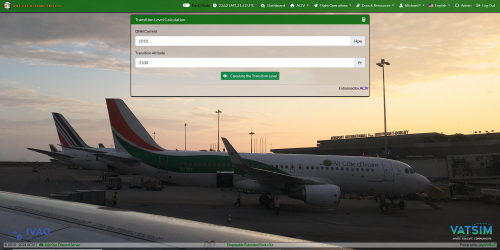
Version 1.1.0
1497 downloads
*** DETAILS *** This is version 1.1.0 of a series of aeronautical tools for your Va. Includes V1.1.0 : - Transition Level Calculation - Top Of Descent Calculation - Aero metrics Calculation ========================= - Years of Service Award - Legs in One Day Award - Total Distance Award - Landing Rate Award Check online repository & ReadMe for detailed upgrade -
For phpVMS version, go to /public_html/core and look in the version file. Report back here with the contents. How old is this install? There is no phpVMS 5.6 - there is 5.5.2 and 5.5.2.72 Neither will fully work with PHP 7.4 and/or MariaDB 10.6 For full functionality of phpVMS 5.5.2.72, PHP version from 7.0 to 7.2 and MySQL 5.6 to 5.7.4 or MariaDB up to 10.2 . For phpVMS 5.5.2, PHP version 5.4 to 5.6 and MySQL 5.6 or MariaDB up to 10.2 . If your database for this install is intact, time to move to phpVMS v7 by doing a legacy import. Check the docs link in the menu at the top of the page for minimum requirements. Check if your host support all minimum requirements. I guess you could try recreating assets, airports and admin. But it may not be worth the time it takes and there may still be other issues.
-
 Skybus Virtual Airlines Job Posting: Come Fly With Us! Are you passionate about aviation and looking for an exciting opportunity to join a dynamic team? Skybus Virtual Airlines is seeking talented individuals to join our virtual airline community. As one of the fastest-growing virtual airlines in the industry, Skybus offers a unique and rewarding experience for aviation enthusiasts of all levels. Realistic Airline Operations Realistic Maintenance Program Part 121 Training Program Seniority Based Bidding Compensated rewards program (convert virtual dollars into rewards, for add-ons and gift cards) Whether you're a seasoned pilot looking for a new challenge or someone with a keen interest in aviation looking to start your journey, Skybus Virtual Airlines has a place for you. With a fleet of modern Airbus A320 aircraft a growing route structure and realistic operations, there's never been a better time to join our team. At Skybus Virtual Airlines, we're committed to excellence in everything we do. From our training programs to our flight operations attention to detail , we strive to deliver the best possible experience for our virtual passengers and virtual pilots. As a member of our team, you'll have the opportunity to experience what its like to fly for an FAA Part 121 airline , all from the comfort of your own home. Join us at Skybus Virtual Airlines and take your passion for aviation to new heights. Apply today and start your journey with us! https://skybusva.com/careers/
 -
Docs link is at the top already (which you have found too) Good luck with the update
-
 Considering v7 is open source and can be improved by contributing via GitHub I would kindly suggest NOT to share core code changes here in the forum. Instead if there is an issue within the latest dev, opening a bug report and fixing it with a pull request is the best solution. So then when a new build gets generated (believe me, it is something urgent this happens pretty quick), everyone following/using v7 dev versions can benefit and it will be less risky compared to editing files manually (or advising that). GitHub repository link is on the top menu https://docs.phpvms.net/installation/updating For best and quickest update (considering you do not have custom core file edits), replace item 4 with this; 4. Download latest dev (zip or tar.gz) package and upload it to your hosting via cPanel (or Plesk) file manager (or FTP), unpack using the same file manager and overwrite everything. (if you have edited core files, you may need to apply your changes back but be careful, double check your changes and replaced files, like a config file or .htaccess a service etc.) Safe flights
 -
I think this can be done in blade... If you know the codes of awards for hours/pirep counts, then you can alter the foreach loop to show only them at top section (or left section) then the rest at bottom etc. (according to your placing wishes)
-
 🌟 Introducing the Creation Crew Center – Your Ultimate phpVMS Solution! As seasoned website designers and phpVMS experts, we're excited to unveil our latest innovation tailored specifically for the virtual aviation community – Creation Crew Center. Say goodbye to the painstaking process of designing and coding from scratch. Our solution is here to revolutionize your virtual airline's management system! 🔍 What Makes Creation Crew Center Stand Out? Versatile Base Theme Set: Choose from various layouts with a consistent, update-friendly core. Perfect for mirroring your airline's unique branding while ensuring top-notch performance. Lifetime Updates: Make a one-time investment of £350 and enjoy a lifetime of updates and bug fixes, including customer navigation layout and color customization. Hassle-Free phpVMS Management: For only £20/month, our team takes care of all your phpVMS management and update needs. Sit back and focus on running your airline! SimBrief Integration: Offering a fully customized integration with the renowned flight planning tool, SimBrief, to enhance your pilots' flight planning experience. Compatibility with vmsACARS and smartCARS 3: Ensuring comprehensive and seamless operational management. 💰 Pricing: One-time Payment: £350 (includes setup, customization, and lifetime updates) Monthly Subscription: £20 per month (for phpVMS management and update service *Optional*) 🔧 Special Features: Support for Disposable Modules (Note: Disposable Special module require separate donation per the module licensing). UK-based development with a promise of quality and reliability. 📢 Join the Revolution! Embark on a journey of efficiency, innovation, and streamlined management with Creation Crew Center. Ideal for virtual airlines of all sizes and ambitions. Interested? Have questions? Let’s discuss how Creation Crew Center can elevate your virtual airline operations. Drop us a message or visit our website https://creationweb.uk/services/phpvms-website-design/phpvms-creation-crew-center/ for more information. Fly high with Creation Crew Center – Where virtual aviation management meets excellence! Thank you for considering Creation Crew Center. We look forward to transforming your virtual airline experience! Launch offer for Creation Crew Center - 30% off for the first 10 new orders using code LAUNCH30 offer ends 31st December 2023. Grab 50% off Creation Crew Center with our Black Friday sale - Use code BLACKFRIDAY50 - Offer ends 31st December 2023 Chad Donoghue Creation Web Solutions Ltd
 -
I was just coming here to let you know about that work-around. Chrome Browser Extension https://chrome.google.com/webstore/detail/allow-cors-access-control/lhobafahddgcelffkeicbaginigeejlf Edge Browser Extension https://microsoftedge.microsoft.com/addons/detail/allow-cors-accesscontro/bhjepjpgngghppolkjdhckmnfphffdag Firefox https://addons.mozilla.org/en-US/firefox/addon/access-control-allow-origin/ Anyone who needs to use the new airport lookup referenced at the top of this post in phpVMS v5 can install the browser extension for their chosen browser. Use at your own risk.
-
What will be the benefit of this effort ? Are you willing to automatically create the v7 user with data provided by VATSIM (like name, mail, VATSIM CID etc.) or just willing to use it for login/authentication ? If this will be used for authentication only, what is the difference between using your username and password compared to VATSIM CID and password ? If you are wishing to create the user record, is VATSIM returning all necessary data for you to create a user record when someone signs in within their system ? There can be more questions regarding this, but the main one is at the top Good luck and God speed
-
I am wondering if there is a way to change the default sort order of the roster from pilot id to a more complex order like rank -> pilot id or rank -> hours flown? Essentially looking to have the more senior members at the top of the roster regardless of join date or id number alone.
-
See the Docs link in the top menu. It's pretty easy to set up - but be sure your host supports the minimum requirements listed in the docs.