Search the Community
Showing results for '계정 획득 Credit Card ⏩acc6.top⏪'.
-
Version 0.0.16
419 downloads
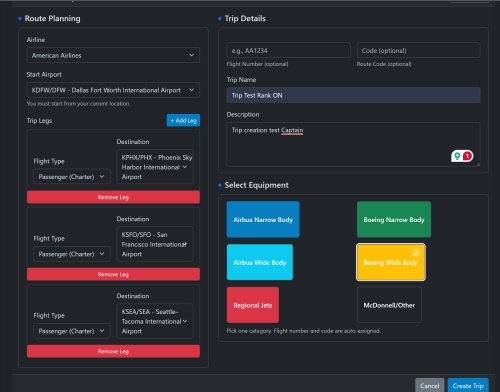
Trip Planner Advanced for phpVMS v7 Create multi-leg “free flight” trips that your pilots can bid on and fly, keeping them moving from airport to airport. Clean UI, simple admin controls, and neutral branding that fits any VA. Derived from Cardinal Horizon CHTrips and packaged for easy drop-in use. ✈️ Highlights Multi-leg trips with custom name & description “Next Flight” summary with aircraft group popover and quick actions Progress tracking + completed PIREPs list Equipment Category picker to attach subfleets (Airbus Narrow, Boeing Narrow, Airbus Wide, Boeing Wide, Regional, McDonnell/Other) Optional rank-aware mode (honors phpVMS Rank/Type settings) Smooth start option: Auto-reposition to the first departure after the first bid if “start anywhere” is allowed Invisible, trip-owned flights to avoid conflicts with schedules 👨✈️ What Pilots Get My Trips page with progress bar, description, created date, and compact action buttons Trip Detail page: “Next Flight” card with quick actions (Info, New PIREP, SimBrief) Add/Remove Bid button (with auto-reposition support) Following flights and completed the PIREPs list Automatic reposition message (only shown before the first PIREP if “start anywhere” is allowed) ⚙️ Admin Settings Accessible at: Admin → Trip Planner Advanced → View Admin Module Enforce VA Ranking ON: Only subfleets allowed by pilot’s rank/type OFF: Rank ignored; All SubFleets available Lock to Current Pilot Location (default ON) ON: First leg must depart the pilot’s current/home airport OFF: Trips can start anywhere Auto-Reposition on First Bid ON: Auto-moves pilot to the first departure after their very first bid OFF: No Auto-move pilot Mandatory if “Lock to Current” is OFF All settings are ability-guarded (admin, admin-access). 🔧 How It Works (Under the Hood) Flights created with: Numbers 7000–7999 and route_code=TPA Visible=False, owned by Trip Leg order tracked in ch_flight_pirep_trip PIREP Create Bridge (tripplanner.pireps.create) filters aircraft per trip Bids handled via module routes (tripplanner.bid.add, phpvms.bids.removeBid()) 📥 Installation Copy folder → modules/TripPlannerAdvanced/ Admin → Addons → Modules: enable Admin → YourVAaddress/pdate (run migrations) Admin → Maintenance → Clear All Caches Frontend menu: Trip Planner appears for logged-in users. Future Updates: Upgrade: Replace folder → Run Update → Clear caches. 📝 Notes & Best Practices If trips CAN start anywhere, enable Auto-Reposition to bypass & avoid “Not at Departure” errors. If trips CAN start anywhere, repositioning only applies after the very first BID in a trip is placed. Flights are invisible & uniquely tagged (TPA + 7000s) to avoid collisions. Always clear caches after installation or upgrade. 📄 License & Attribution License: BSD-3 Portions & Credits derived from CHTrips by Cardinal Horizon © 2024 Additionally, if you want to see exactly how the modules are working for reference & how they should be operating, the demo VA is at: https://simaddon.space/ Username: AAL2 Password: CrewCenter Some modules are linked directly on the Dashboard & while others you can find in Admin > Addons or below (have not had time to link them yet): Login first: https://simaddon.space/aadvantage-miles There's also a basic overview of CHHubManager, although @Taylor Broad made substantial modifications to the newer version. However, since the foundations are the same, this should already give an excellent idea: https://simaddon.space/admin/chhubmanager -
View File Trip Planner Advanced Trip Planner Advanced for phpVMS v7 Create multi-leg “free flight” trips that your pilots can bid on and fly, keeping them moving from airport to airport. Clean UI, simple admin controls, and neutral branding that fits any VA. Derived from Cardinal Horizon CHTrips and packaged for easy drop-in use. ✈️ Highlights Multi-leg trips with custom name & description “Next Flight” summary with aircraft group popover and quick actions Progress tracking + completed PIREPs list Equipment Category picker to attach subfleets (Airbus Narrow, Boeing Narrow, Airbus Wide, Boeing Wide, Regional, McDonnell/Other) Optional rank-aware mode (honors phpVMS Rank/Type settings) Smooth start option: Auto-reposition to the first departure after the first bid if “start anywhere” is allowed Invisible, trip-owned flights to avoid conflicts with schedules 👨✈️ What Pilots Get My Trips page with progress bar, description, created date, and compact action buttons Trip Detail page: “Next Flight” card with quick actions (Info, New PIREP, SimBrief) Add/Remove Bid button (with auto-reposition support) Following flights and completed the PIREPs list Automatic reposition message (only shown before the first PIREP if “start anywhere” is allowed) ⚙️ Admin Settings Accessible at: Admin → Trip Planner Advanced → View Admin Module Enforce VA Ranking ON: Only subfleets allowed by pilot’s rank/type OFF: Rank ignored; All SubFleets available Lock to Current Pilot Location (default ON) ON: First leg must depart the pilot’s current/home airport OFF: Trips can start anywhere Auto-Reposition on First Bid ON: Auto-moves pilot to the first departure after their very first bid OFF: No Auto-move pilot Mandatory if “Lock to Current” is OFF All settings are ability-guarded (admin, admin-access). 🔧 How It Works (Under the Hood) Flights created with: Numbers 7000–7999 and route_code=TPA Visible=False, owned by Trip Leg order tracked in ch_flight_pirep_trip PIREP Create Bridge (tripplanner.pireps.create) filters aircraft per trip Bids handled via module routes (tripplanner.bid.add, phpvms.bids.removeBid()) 📥 Installation Copy folder → modules/TripPlannerAdvanced/ Admin → Addons → Modules: enable Admin → YourVAaddress/pdate (run migrations) Admin → Maintenance → Clear All Caches Frontend menu: Trip Planner appears for logged-in users. Future Updates: Upgrade: Replace folder → Run Update → Clear caches. 📝 Notes & Best Practices If trips CAN start anywhere, enable Auto-Reposition to bypass & avoid “Not at Departure” errors. If trips CAN start anywhere, repositioning only applies after the very first BID in a trip is placed. Flights are invisible & uniquely tagged (TPA + 7000s) to avoid collisions. Always clear caches after installation or upgrade. 📄 License & Attribution License: BSD-3 Portions & Credits derived from CHTrips by Cardinal Horizon © 2024. Submitter William Submitted 09/04/25 Category Add-ons
-
- 1
-

-
Version 1.0.0
843 downloads
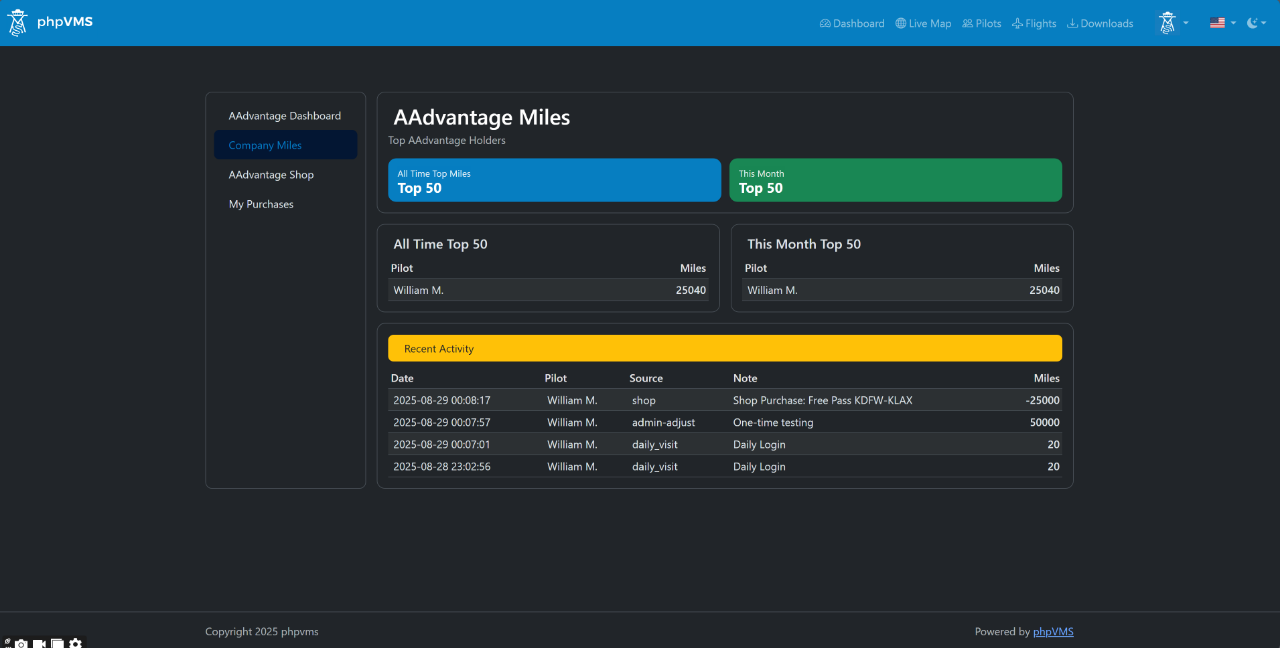
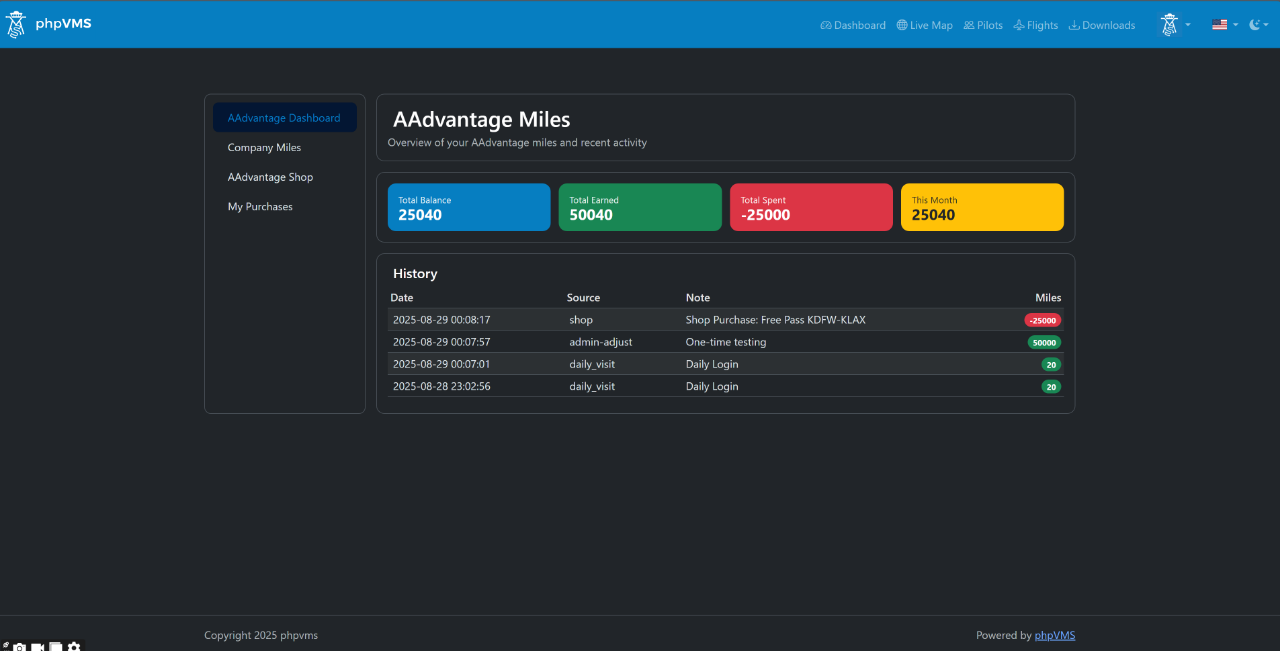
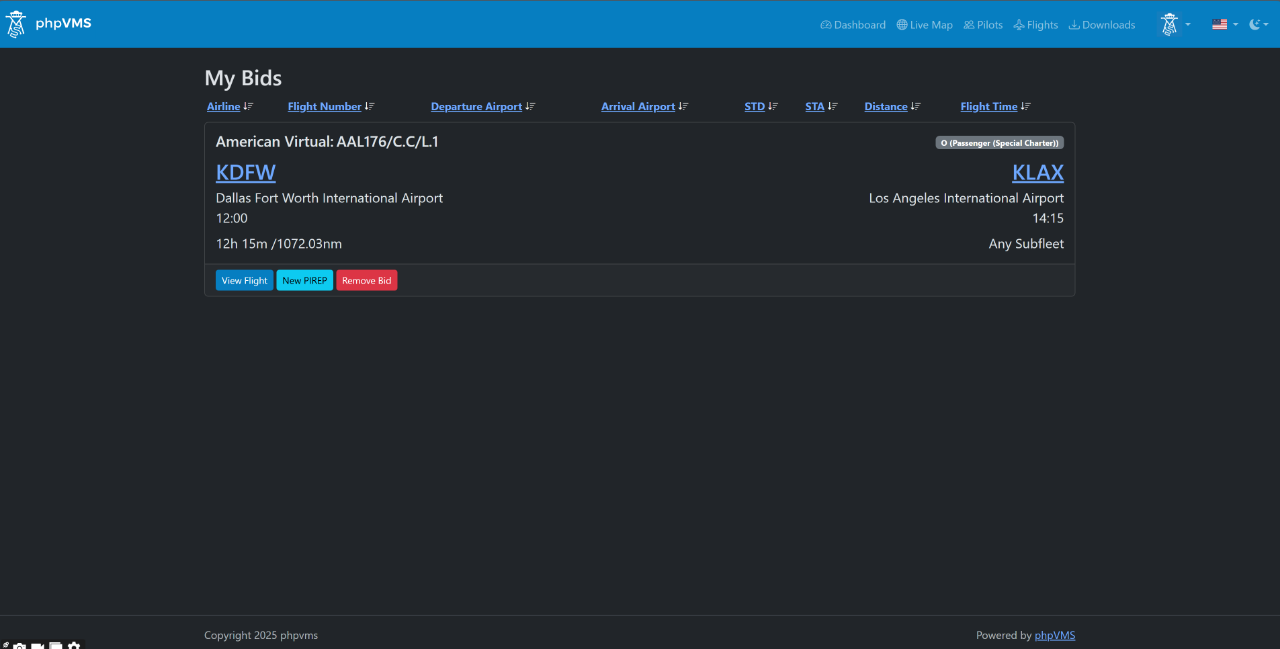
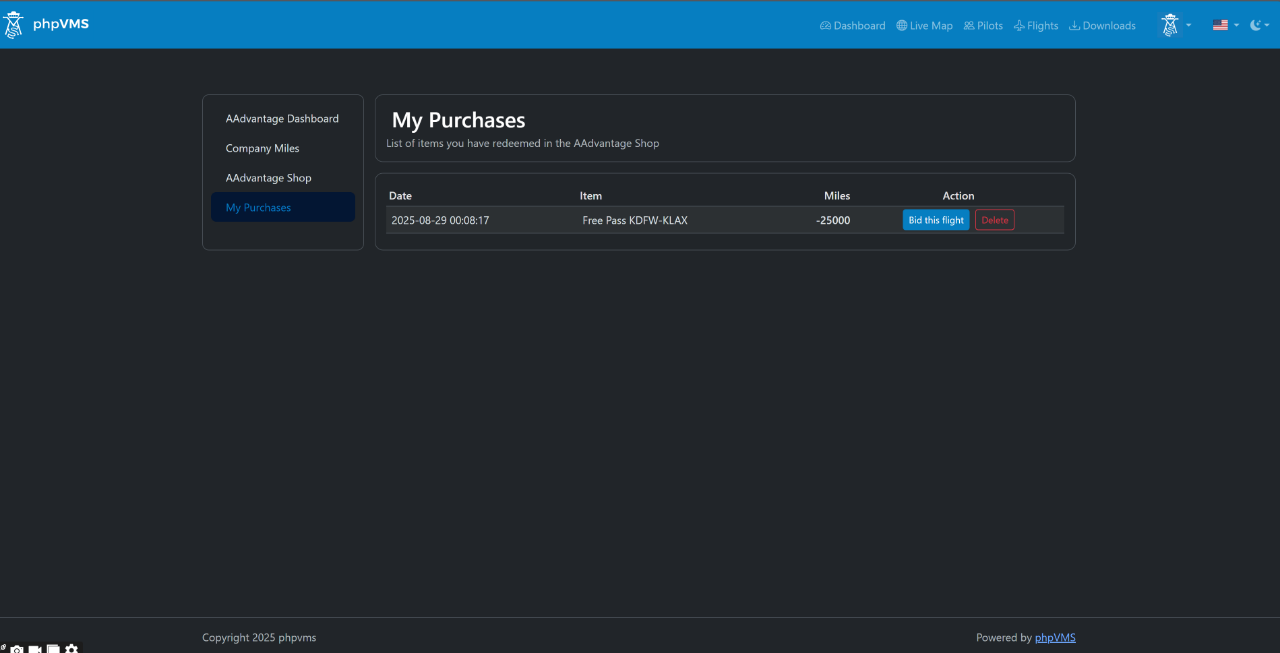
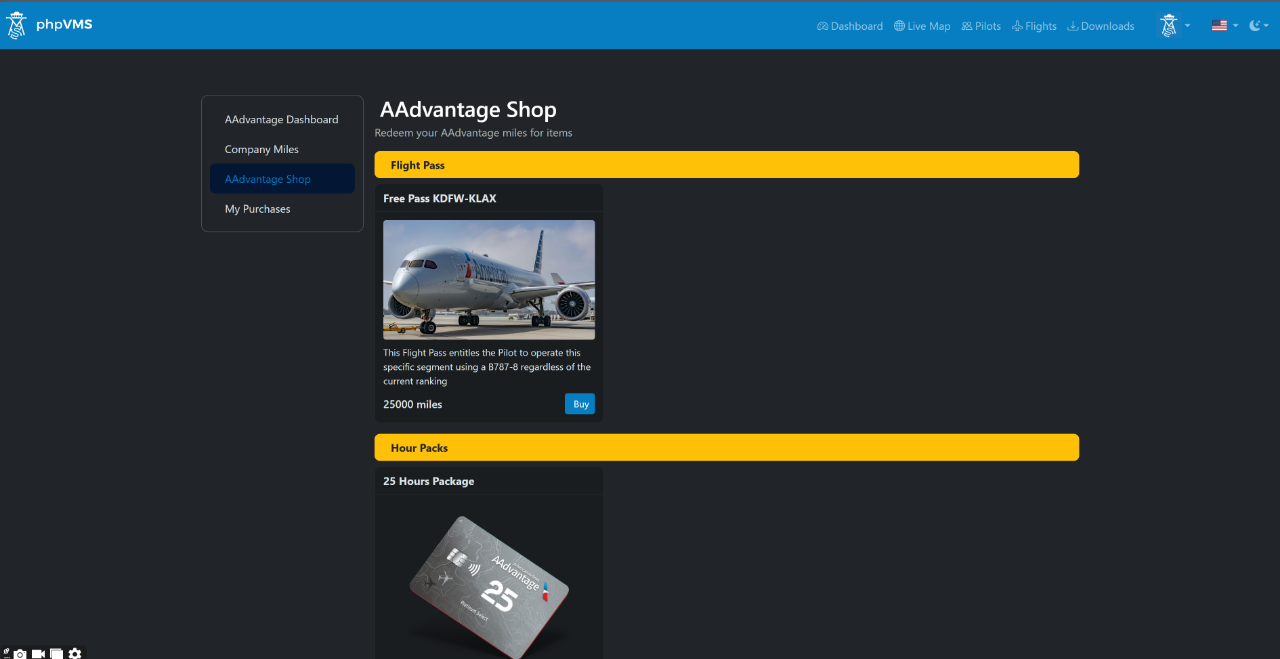
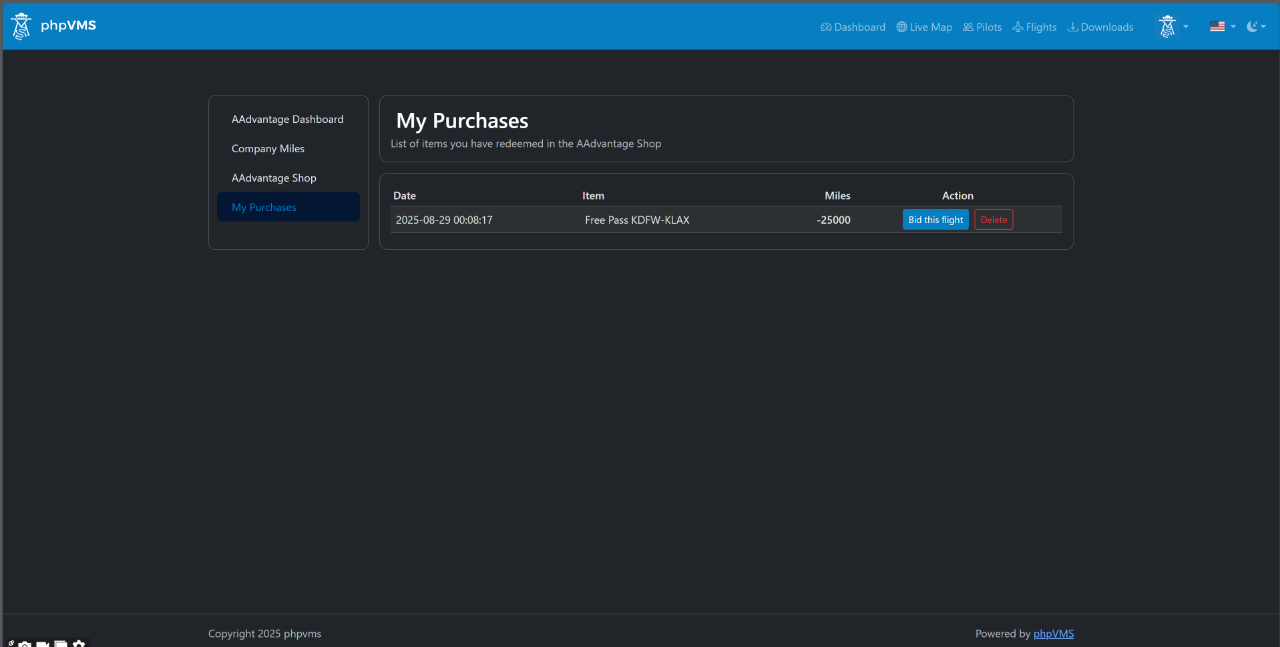
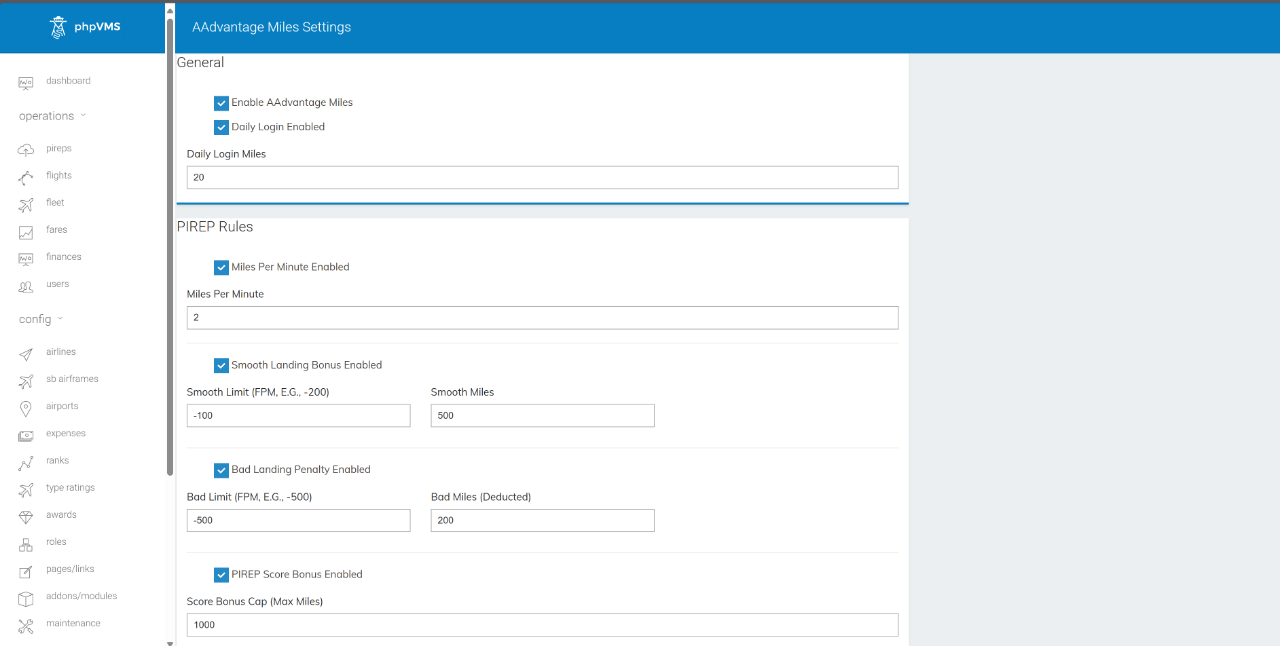
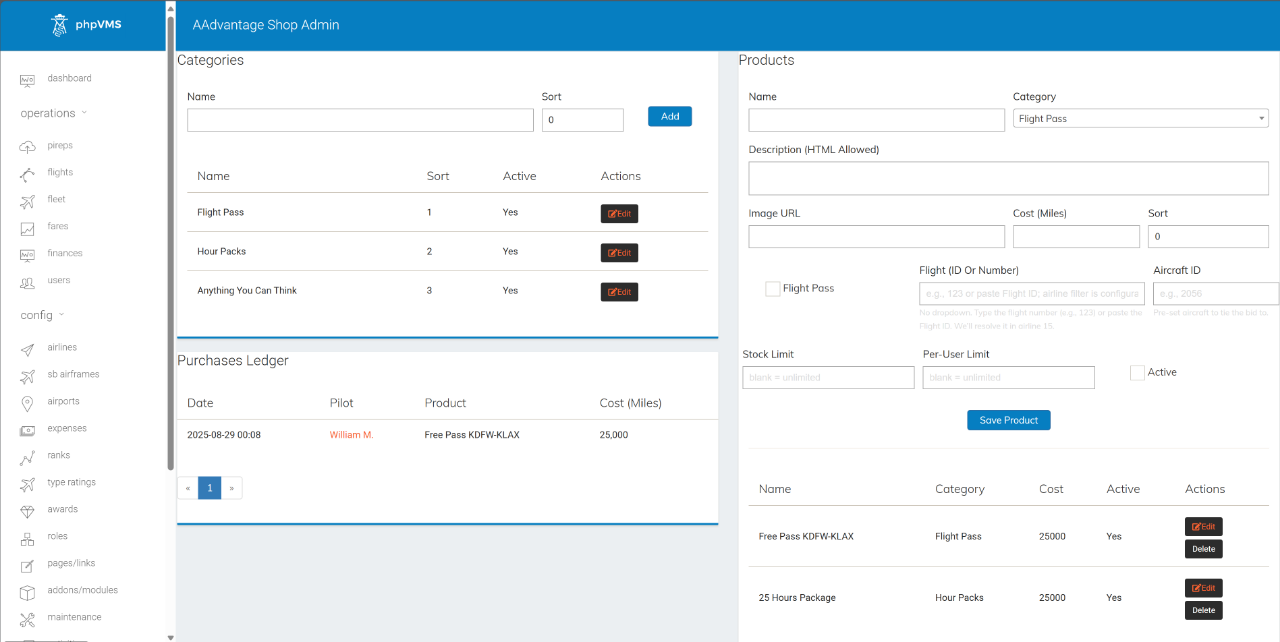
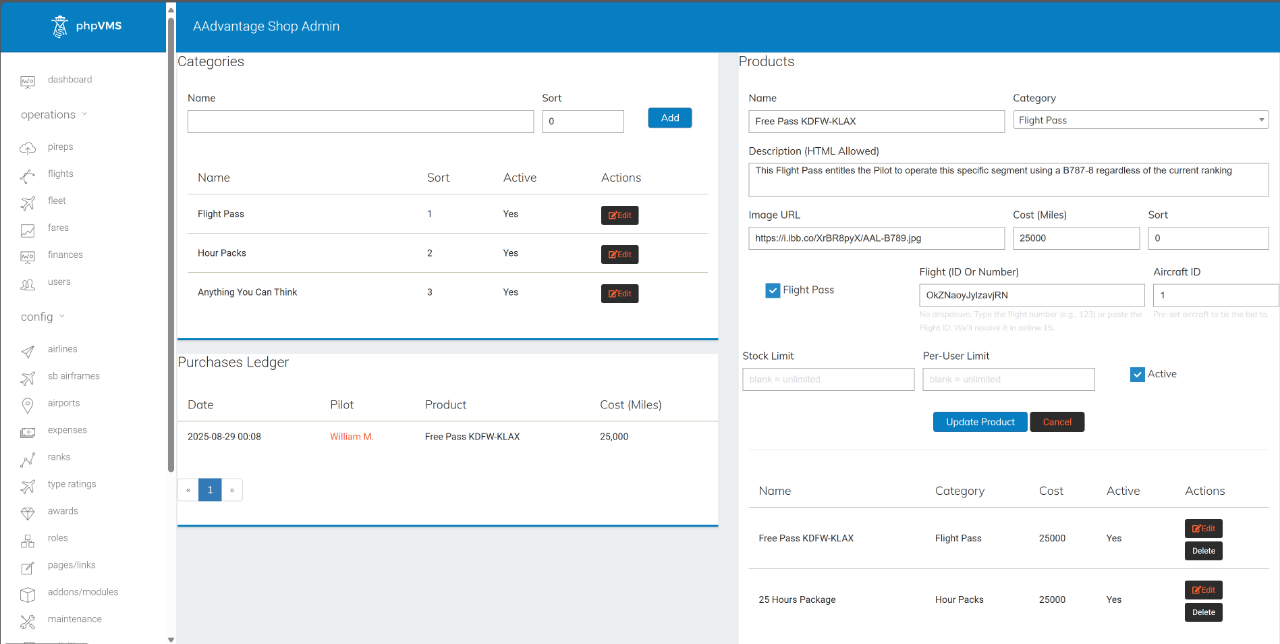
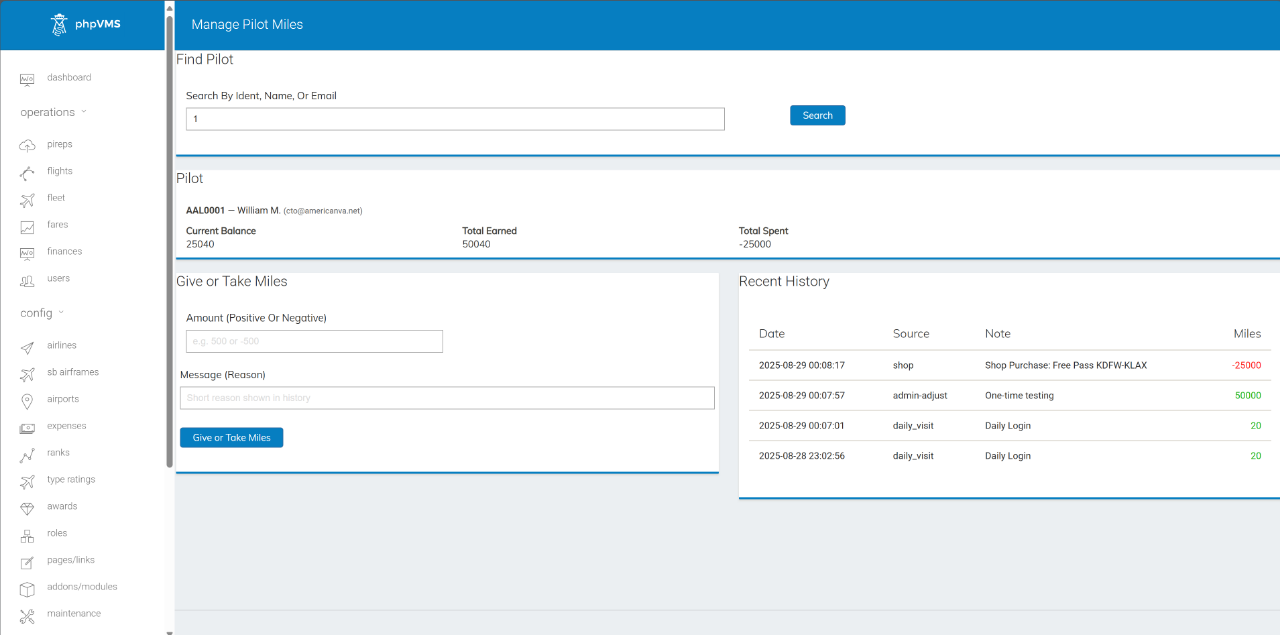
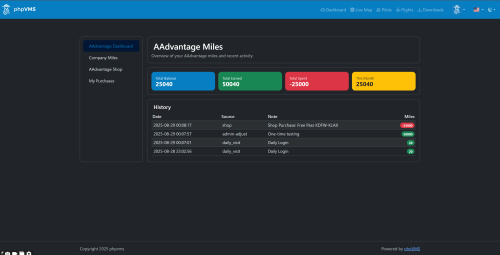
Description An easy, automated way to reward pilots, create incentives, promote destinations, unlock special flights (or Rank-Free flights), and even reward real-world items (gift cards, sponsors' perks, etc.)? AAdvantage Miles is a lightweight, production-tested module that adds miles/points to your VA with automatic earning rules, leaderboards, and an optional in-VA Shop with "special" Flight Passes for sale. Why it’s good for your VA (and keeps pilots hooked): Fly → Earn → Unlock: clear progression loop that turns every flight into visible progress. Zero micromanagement: automated awards align with your rules (time flown, landing quality, airports), so good behavior is reinforced without admin work. Daily habit builder: login miles, create streaks, and reasons to come back, even on non-flying days. Friendly competition: leaderboards spark rivalry and social proof, boosting activity across the week. Real rewards, not fluff: the Shop converts effort into perks (simulated or not); Flight Passes add scarcity and excitement (including Ranks-Free access when you want it). Event-ready: drop special routes/passes for weekends or special rewards to spike engagement on demand. Trust & transparency: per-pilot ledger shows exactly how miles were earned/spent. Result: more flights, better flying, happier pilots - on autopilot. What it does Per-pilot miles ledger Full earn/spend history Auto-awards Daily login miles (idempotent) PIREP rules: miles/minute, smooth-landing bonus, bad-landing penalty, score bonus (with cap) Airport-specific bonuses (per rule: departure/arrival / both) Frontend pages My Miles, Leaderboard, Shop, My Purchases Admin tools Settings (toggle/tune all rules) Manage Pilot Miles (search, review history, add/subtract with note) Shop Admin (categories/products, stock, per-user limits, purchase ledger) Flight Passes (optional) Create Pass products targeting a specific flight (Flight ID) Optional aircraft pre-bind for SimBrief / aircraft lock Direct-bid endpoint for pass owners Auto-marks Pass “used” when the related PIREP is filed Default expiry: 30 days New: Bid strictness options Off → Pass bids bypass rank/type checks (only the core “at departure airport” rule applies). Ideal for “selling” access to flights to lower ranks On → Pass bids must satisfy your VA’s current rank/type restrictions (module validates pilot eligibility and subfleet/flight compatibility) Compatibility phpVMS v7 (Laravel 8+) DB: JSON columns required (MySQL 5.7+ / MariaDB 10.2+) Views namespaced as AAMiles:: and override-friendly Quick install Copy folder to: modules/AAdvantageMiles Admin → Addons → Modules → Enable PHPVMS Update → visit your.domain/update (runs migrations) Admin → Maintenance → Clear All Caches Configure under Admin → AAdvantage Miles That’s it — pilots start earning based on your settings. Additionally, if you want to see exactly how the modules are working for reference & how they should be operating, the demo VA is at: https://simaddon.space/ Username: AAL2 Password: CrewCenter Some modules are linked directly on the Dashboard & while others you can find in Admin > Addons or below (have not had time to link them yet): Log in first: https://simaddon.space/aadvantage-miles There's also a basic overview of CHHubManager, although @Taylor Broad made substantial modifications to the newer version. However, since the foundations are the same, this should already give an excellent idea: https://simaddon.space/admin/chhubmanager -
View File AAdvantage Miles Description An easy, automated way to reward pilots, create incentives, promote destinations, unlock special flights (or Rank-Free flights), and even reward real-world items (gift cards, sponsors' perks, etc.)? AAdvantage Miles is a lightweight, production-tested module that adds miles/points to your VA with automatic earning rules, leaderboards, and an optional in-VA Shop with "special" Flight Passes for sale. Why it’s good for your VA (and keeps pilots hooked): Fly → Earn → Unlock: clear progression loop that turns every flight into visible progress. Zero micromanagement: automated awards align with your rules (time flown, landing quality, airports), so good behavior is reinforced without admin work. Daily habit builder: login miles, create streaks, and reasons to come back, even on non-flying days. Friendly competition: leaderboards spark rivalry and social proof, boosting activity across the week. Real rewards, not fluff: the Shop converts effort into perks (simulated or not); Flight Passes add scarcity and excitement (including Ranks-Free access when you want it). Event-ready: drop special routes/passes for weekends or special rewards to spike engagement on demand. Trust & transparency: per-pilot ledger shows exactly how miles were earned/spent. Result: more flights, better flying, happier pilots - on autopilot. What it does Per-pilot miles ledger Full earn/spend history Auto-awards Daily login miles (idempotent) PIREP rules: miles/minute, smooth-landing bonus, bad-landing penalty, score bonus (with cap) Airport-specific bonuses (per rule: departure/arrival / both) Frontend pages My Miles, Leaderboard, Shop, My Purchases Admin tools Settings (toggle/tune all rules) Manage Pilot Miles (search, review history, add/subtract with note) Shop Admin (categories/products, stock, per-user limits, purchase ledger) Flight Passes (optional) Create Pass products targeting a specific flight (Flight ID) Optional aircraft pre-bind for SimBrief / aircraft lock Direct-bid endpoint for pass owners Auto-marks Pass “used” when the related PIREP is filed Default expiry: 30 days New: Bid strictness options Off → Pass bids bypass rank/type checks (only the core “at departure airport” rule applies). Ideal for “selling” access to flights to lower ranks On → Pass bids must satisfy your VA’s current rank/type restrictions (module validates pilot eligibility and subfleet/flight compatibility) Compatibility phpVMS v7 (Laravel 8+) DB: JSON columns required (MySQL 5.7+ / MariaDB 10.2+) Views namespaced as AAMiles:: and override-friendly Quick install Copy folder to: modules/AAdvantageMiles Admin → Addons → Modules → Enable PHPVMS Update → visit your.domain/update (runs migrations) Admin → Maintenance → Clear All Caches Configure under Admin → AAdvantage Miles That’s it — pilots start earning based on your settings. Submitter William Submitted 08/29/25 Category Add-ons
-
This community has given me so much in the last 2 decades, and I've personally never had the chance to give anything back. Well, it's time to change that. Attached is a module we have developed for our beloved Virtual Airline, and we have repackaged it for installation into a vanilla phpVMS v7 (tested). We use it daily, and it is extremely popular among our crews. We hope it will be useful for you as well 💪🫶 Description An easy, automated way to reward pilots, create incentives, promote destinations, unlock special flights (or Rank-Free flights), and even reward real-world items (gift cards, sponsors' perks, etc.)? AAdvantage Miles is a lightweight, production-tested module that adds miles/points to your VA with automatic earning rules, leaderboards, and an optional in-VA Shop with "special" Flight Passes for sale. Why it’s good for your VA (and keeps pilots hooked): Fly → Earn → Unlock: clear progression loop that turns every flight into visible progress. Zero micromanagement: automated awards align with your rules (time flown, landing quality, airports), so good behavior is reinforced without admin work. Daily habit builder: login miles, create streaks, and reasons to come back, even on non-flying days. Friendly competition: leaderboards spark rivalry and social proof, boosting activity across the week. Real rewards, not fluff: the Shop converts effort into perks (simulated or not); Flight Passes add scarcity and excitement (including Ranks-Free access when you want it). Event-ready: drop special routes/passes for weekends or special rewards to spike engagement on demand. Trust & transparency: per-pilot ledger shows exactly how miles were earned/spent. Result: more flights, better flying, happier pilots - on autopilot. What it does Per-pilot miles ledger Full earn/spend history Auto-awards Daily login miles (idempotent) PIREP rules: miles/minute, smooth-landing bonus, bad-landing penalty, score bonus (with cap) Airport-specific bonuses (per rule: departure/arrival / both) Frontend pages My Miles, Leaderboard, Shop, My Purchases Admin tools Settings (toggle/tune all rules) Manage Pilot Miles (search, review history, add/subtract with note) Shop Admin (categories/products, stock, per-user limits, purchase ledger) Flight Passes (optional) Create Pass products targeting a specific flight (Flight ID) Optional aircraft pre-bind for SimBrief / aircraft lock Direct-bid endpoint for pass owners Auto-marks Pass “used” when the related PIREP is filed Default expiry: 30 days New: Bid strictness options Off → Pass bids bypass rank/type checks (only the core “at departure airport” rule applies). Ideal for “selling” access to flights to lower ranks On → Pass bids must satisfy your VA’s current rank/type restrictions (module validates pilot eligibility and subfleet/flight compatibility) Compatibility phpVMS v7 (Laravel 8+) DB: JSON columns required (MySQL 5.7+ / MariaDB 10.2+) Views namespaced as AAMiles:: and override-friendly Quick install Copy folder to: modules/AAdvantageMiles Admin → Addons → Modules → Enable PHPVMS Update → visit your.domain/update (runs migrations) Admin → Maintenance → Clear All Caches Configure under Admin → AAdvantage Miles That’s it — pilots start earning based on your settings. **A comprehensive README file is included** Download Link: AAdvantage Miles Addon Module ___

-
Be sure you are using php8.1 or up and be 1000% sure it is the default version, this is related to either a missing/broken php module or multi php usage problem. Switching to a different php version and cleaning all cache (including nginx if you are using it) may help too. In some cases, Apache tries to use php8.2 but nginx running on top if is set to utilize php8.1 or vice versa. Good luck. PS: Running older versions of phpVMS (like the classic series 2.x/5.x) or older beta versions of v7 does not mean that your hosting service (or server) is fully compatible with the released version
-
Unfortunately no, there is no easy way of doing that in phpvms v7. However, Disposable Basic (the new module pack I released instead of the old ones) + Disposable Theme v3 offers a pre defined solution for that. With Disposable Basic, you get 3 additional pages; roster, stats and one empty page for you to customize with widgets like LiveMap which can be used to show/display data at your main domain (with html/iframe). These pages will have no logo, background image or menu items. They are suitable for iframe usage at your landing pages (or main sites) /dp_roster // Pilot roster /dp_stats // Statistics /dp_page // Empty page in which you can place widgets like Flight Board etc as per your needs Check my landing page to see the result https://turksim.org , that info comes from my phpvms v7 with the background system Disposable Basic offers. For example you can change the Top Pilots with the Live Map etc. Good luck.
-
Good Day, We use phpVMS Version simpilot 5.5.2 It seems our CAVacars has stopped communicating with our website. The "Live Flight Board" and "Live Flights" on our homepage are empty and there are no "Top 10 Landings" being displayed. PIREPs submissions have stopped coming into the Admin Panel as well. In the Maintenance options I have tried "Reset ACARS" with no luck and "Optimize Tables" gives the following errors... canadaai_phpvms.phpvms_acarsdata - Table does not support optimize, doing recreate + analyze instead canadaai_phpvms.phpvms_acarsdata - Invalid default value for 'lastupdate' canadaai_phpvms.phpvms_acarsdata - Operation failed canadaai_phpvms.phpvms_adminlog - Incorrect datetime value: '0000-00-00 00:00:00' for column 'lastupdate' at row 1 canadaai_phpvms.phpvms_adminlog - Invalid default value for 'lastupdate' canadaai_phpvms.phpvms_adminlog - Table is already up to date canadaai_phpvms.phpvms_aircraft - Table does not support optimize, doing recreate + analyze instead canadaai_phpvms.phpvms_aircraft - OK canadaai_phpvms.phpvms_airlines - Table does not support optimize, doing recreate + analyze instead canadaai_phpvms.phpvms_airlines - OK canadaai_phpvms.phpvms_airports - Table does not support optimize, doing recreate + analyze instead canadaai_phpvms.phpvms_airports - OK canadaai_phpvms.phpvms_awards - Table is already up to date canadaai_phpvms.phpvms_awardsgranted - Table is already up to date canadaai_phpvms.phpvms_bids - Table does not support optimize, doing recreate + analyze instead canadaai_phpvms.phpvms_bids - OK canadaai_phpvms.phpvms_customfields - Table does not support optimize, doing recreate + analyze instead canadaai_phpvms.phpvms_customfields - OK canadaai_phpvms.phpvms_downloads - Table is already up to date canadaai_phpvms.phpvms_expenselog - Table is already up to date canadaai_phpvms.phpvms_expenses - Table is already up to date canadaai_phpvms.phpvms_fieldvalues - Table does not support optimize, doing recreate + analyze instead canadaai_phpvms.phpvms_fieldvalues - OK canadaai_phpvms.phpvms_financedata - Table is already up to date canadaai_phpvms.phpvms_fuelprices - Table is already up to date canadaai_phpvms.phpvms_groupmembers - Table does not support optimize, doing recreate + analyze instead canadaai_phpvms.phpvms_groupmembers - OK canadaai_phpvms.phpvms_groups - Table does not support optimize, doing recreate + analyze instead canadaai_phpvms.phpvms_groups - OK canadaai_phpvms.phpvms_navdata - Table is already up to date canadaai_phpvms.phpvms_news - Table does not support optimize, doing recreate + analyze instead canadaai_phpvms.phpvms_news - Invalid default value for 'postdate' canadaai_phpvms.phpvms_news - Operation failed canadaai_phpvms.phpvms_pages - Incorrect datetime value: '0000-00-00 00:00:00' for column 'postdate' at row 1 canadaai_phpvms.phpvms_pages - Invalid default value for 'postdate' canadaai_phpvms.phpvms_pages - Table does not support optimize, doing recreate + analyze instead canadaai_phpvms.phpvms_pages - Invalid default value for 'postdate' canadaai_phpvms.phpvms_pages - Operation failed canadaai_phpvms.phpvms_pilots - Incorrect datetime value: '0000-00-00 00:00:00' for column 'postdate' at row 1 canadaai_phpvms.phpvms_pilots - Invalid default value for 'postdate' canadaai_phpvms.phpvms_pilots - Table does not support optimize, doing recreate + analyze instead canadaai_phpvms.phpvms_pilots - Invalid default value for 'lastlogin' canadaai_phpvms.phpvms_pilots - Operation failed canadaai_phpvms.phpvms_pirepcomments - Incorrect date value: '0000-00-00' for column 'lastlogin' at row 1 canadaai_phpvms.phpvms_pirepcomments - Invalid default value for 'lastlogin' canadaai_phpvms.phpvms_pirepcomments - Table does not support optimize, doing recreate + analyze instead canadaai_phpvms.phpvms_pirepcomments - OK canadaai_phpvms.phpvms_pirepfields - Table does not support optimize, doing recreate + analyze instead canadaai_phpvms.phpvms_pirepfields - OK canadaai_phpvms.phpvms_pireps - Table does not support optimize, doing recreate + analyze instead canadaai_phpvms.phpvms_pireps - Invalid default value for 'submitdate' canadaai_phpvms.phpvms_pireps - Operation failed canadaai_phpvms.phpvms_pirepvalues - Incorrect datetime value: '0000-00-00 00:00:00' for column 'submitdate' at row 1 canadaai_phpvms.phpvms_pirepvalues - Invalid default value for 'submitdate' canadaai_phpvms.phpvms_pirepvalues - Table does not support optimize, doing recreate + analyze instead canadaai_phpvms.phpvms_pirepvalues - OK canadaai_phpvms.phpvms_ranks - Table does not support optimize, doing recreate + analyze instead canadaai_phpvms.phpvms_ranks - OK canadaai_phpvms.phpvms_schedules - Table does not support optimize, doing recreate + analyze instead canadaai_phpvms.phpvms_schedules - OK canadaai_phpvms.phpvms_sessions - OK canadaai_phpvms.phpvms_settings - Table does not support optimize, doing recreate + analyze instead canadaai_phpvms.phpvms_settings - OK canadaai_phpvms.phpvms_updates - Table is already up to date Any help/guidance to resolve this issue would be greatly appreciated
-
Has anyone added the new API for Google maps? If so what changes were necessary. I have already read all the conversion info/posts. Seems like everyone is against giving Google their Credit Card. Just so haappens we have other products from them and they have all our info already. There should be a fix giving people an alternative of which product they want to use.
-
Clicking on the dropdown and typing only causes the list to jump to what ever letter you type. For example if you were trying to get KLAX the K takes you to the top of the K list and then the L jumps to the L's and A to 'All'. I Am asking if someone has the code already.
-
Hi, thanks for the help with this code I solved the error but now it gives me another. Here it works right with comments. http://i68.tinypic.com/6z95wm.png here it does not work without comments http://i68.tinypic.com/zl7l0i.png code: <!-- Comentarios --> <div class="card"> <div class="card-title"> <i class="fa fa-commenting-o"></i> <span class="caption-subject bold uppercase"> Comentarios </span> </div> <div class="card-body"> <?php if(!$comments) { echo '<p align="center"><strong>There are no comments for this PIREP</strong></p>'; return; } ?> <div id="dialogresult"></div> <?php foreach($comments as $comment) { ?> <p id="row<?php echo $comment->id;?>"> <strong><?php echo $comment->firstname. ' '. $comment->lastname ?>: </strong><?php echo $comment->comment; ?> <hr /> </p> <?php } ?> <form action="<?php echo url('/pireps/viewpireps');?>" method="post"> <textarea name="comment" style="width:100%; height: 100px"></textarea> <input type="hidden" name="action" value="addcomment" /> <input type="hidden" name="pirepid" value="<?php echo $pirep->pirepid?>" /> <input type="submit" name="submit"class="btn btn-primary btn-block" value="Añadir" /> </div> </div> <!-- Comentarios -->
-
I have the version of Simpilot GroupCurrent 5.5.2 and before I had recaptcha v2 on it, everything was fine, only then came the top message. I looked at the "app.config.php" and also was not an empty line
-
after integrating the recaptcha v2 I have the following warning at the top of the header area: Warning: Cannot modify header information - headers already sent by (output started at /var/www/web144317/html/core/app.config.php:1) in /var/www/web144317/html/index.php on line 74 Warning: Cannot modify header information - headers already sent by (output started at /var/www/web144317/html/core/app.config.php:1) in /var/www/web144317/html/index.php on line 76 Warning: Cannot modify header information - headers already sent by (output started at /var/www/web144317/html/core/app.config.php:1) in /var/www/web144317/html/index.php on line 78 in the reference to the index.php, the following can be found: 73: // http://blogs.msdn.com/b/ieinternals/archive/2010/03/30/combating-clickjacking-with-x-frame-options.aspx?Redirected=true 74: header('X-Frame-Options: SAMEORIGIN'); 75: // http://blogs.msdn.com/b/ieinternals/archive/2011/01/31/controlling-the-internet-explorer-xss-filter-with-the-x-xss-protection-http-header.aspx 76: header('X-XSS-Protection: 1'); 77: // http://msdn.microsoft.com/en-us/library/ie/gg622941(v=vs.85).aspx 78: header('X-Content-Type-Options: nosniff'); how do I get this message / warnings away
-
Hi there everyone new to the forums so sorry if i posted in the wrong area, i have created my own skin and put all the bits of code that phpvms needs to use the template everything seems to work fine other than the Parallax twitter scroll and slider and logo, i believe this is a javascript issue but not to sure, ill go through what ive done so far, so i have added one bit of java file at a time to see if there was conflict everything seemed fine so put them back together, made sure the code was correct and file locations and they all are, so im at a bit of a dead end not to sure where to go now, the lower parallax image is there but not the one near the top of the page, and the slider at the top of the page is not there and neither is the paragraph that goes over it. ill link a bit of the HTML down below for you to look at, also this works fine in the test browser. <!DOCTYPE html> <html> <head> <title><?php echo $page_title; ?></title> <?php echo $page_htmlhead; ?> <meta name="description" content="TOM Virtual"> <meta name="keywords" content="CSS, HTML5, clean, corporate, jQuery, retina, bootstrap, business"> <meta charset="UTF-8"> <meta name="viewport" content="width=device-width, initial-scale=1.0"> <!-- Stylesheets --> <link rel="stylesheet" href="css/bootstrap.css"/><!-- bootstrap grid --> <link rel="stylesheet" href="css/style.css"/><!-- template styles --> <link rel="stylesheet" href="css/color-default.css"/><!-- default template color styles --> <link rel="stylesheet" href="css/retina.css"/><!-- retina ready styles --> <link rel="stylesheet" href="css/responsive.css"/><!-- responsive styles --> <link rel="stylesheet" href="css/animate.css"/><!-- animation for content --> <link rel="stylesheet" href="linecons/linecons.css"/><!-- line icons css --> <link rel='stylesheet' href='owl-carousel/owl.carousel.css'/><!-- .carousels --> <link rel="stylesheet" media="all" type="text/css" href="<?php echo SITE_URL?>/lib/skins/Wide/css/bootstrap.css" /> <link rel="stylesheet" media="all" type="text/css" href="<?php echo SITE_URL?>/lib/skins/Wide/css/style.css" /> <link rel="stylesheet" media="all" type="text/css" href="<?php echo SITE_URL?>/lib/skins/Wide/css/color-default.css" /> <link rel="stylesheet" media="all" type="text/css" href="<?php echo SITE_URL?>/lib/skins/Wide/css/retina.css" /> <link rel="stylesheet" media="all" type="text/css" href="<?php echo SITE_URL?>/lib/skins/Wide/css/responsive.css" /> <link rel="stylesheet" media="all" type="text/css" href="<?php echo SITE_URL?>/lib/skins/Wide/css/animate.css" /> <link rel="stylesheet" media="all" type="text/css" href="<?php echo SITE_URL?>/lib/skins/Wide/linecons/linecons.css" /> <link rel="stylesheet" media="all" type="text/css" href="<?php echo SITE_URL?>/lib/skins/Wide/owl-carousel/owl.carousel.css" /> <link rel="stylesheet" media="all" type="text/css" href="<?php echo SITE_URL?>/lib/skins/Wide/rs-plugin/css/settings.css" /> <link rel="stylesheet" media="all" type="text/css" href="<?php echo SITE_URL?>/lib/skins/Wide/rs-plugin/css/mixed.css" /> <link rel="stylesheet" media="all" type="text/css" href="<?php echo SITE_URL?>/lib/skins/Wide/rs-plugin/css/settings-ie8.css" /> <link rel="stylesheet" media="all" type="text/css" href="<?php echo SITE_URL?>/lib/skins/Wide/css/magnific-popup.css" /> <link rel="stylesheet" media="all" type="text/css" href="<?php echo SITE_URL?>/lib/skins/Wide/font-awesome/css/font-awesome.min.css" /> <!-- Revolution slider --> <link rel="stylesheet" href="rs-plugin/css/settings.css"/><!-- .rs-settings end --> <link rel="stylesheet" href="rs-plugin/css/mixed.css"/><!-- settings for rev slider --> <!-- Maginic Popup - image lightbox --> <link rel="stylesheet" href="css/magnific-popup.css" /> <!-- Google Web fonts --> <link href='http://fonts.googleapis.com/css?family=Raleway:400,300,100,200,500,600,800,700,900' rel='stylesheet' type='text/css'><!-- Raleway font --> <link href='http://fonts.googleapis.com/css?family=Open+Sans:300italic,400italic,600italic,700italic,800italic,400,300,600,700,800&.subset=latin,cyrillic-ext,greek-ext,greek,vietnamese,latin-ext,cyrillic' rel='stylesheet' type='text/css'><!-- Open Sans --> <!-- Font icons --> <link rel="stylesheet" href="font-awesome/css/font-awesome.min.css"/><!-- Font awesome icons --> <link rel="stylesheet" href="https://cdnjs.cloudflare.com/ajax/libs/font-awesome/4.7.0/css/font-awesome.min.css" /><!-- Social icons font - Pixons --> <?php /* This is required, so phpVMS can output the necessary libraries it needs */ echo $page_htmlhead; ?> <?php /*Any custom Javascript should be placed below this line, after the above call */ ?> <script type="text/javascript" src="<?php echo SITE_URL?>/lib/skins/Wide/js/bootstrap.min.js"></script> <script type="text/javascript" src="<?php echo SITE_URL?>/lib/skins/Wide/js/county.js"></script> <script type="text/javascript" src="<?php echo SITE_URL?>/lib/skins/Wide/js/easypiechart.js"></script> <script type="text/javascript" src="<?php echo SITE_URL?>/lib/skins/Wide/js/include.js"></script> <script type="text/javascript" src="<?php echo SITE_URL?>/lib/skins/Wide/js/jquery.countTo.js"></script> <script type="text/javascript" src="<?php echo SITE_URL?>/lib/skins/Wide/js/jquery.dlmenu.min.js"></script> <script type="text/javascript" src="<?php echo SITE_URL?>/lib/skins/Wide/js/jquery.fitvids.js"></script> <script type="text/javascript" src="<?php echo SITE_URL?>/lib/skins/Wide/js/jquery.isotope.min.js"></script> <script type="text/javascript" src="<?php echo SITE_URL?>/lib/skins/Wide/js/jquery.magnific-popup.min.js"></script> <script type="text/javascript" src="<?php echo SITE_URL?>/lib/skins/Wide/js/jquery.matchHeight-min.js"></script> <script type="text/javascript" src="<?php echo SITE_URL?>/lib/skins/Wide/js/jquery.nav.js"></script> <script type="text/javascript" src="<?php echo SITE_URL?>/lib/skins/Wide/js/jquery.nivo.slider.pack.js"></script> <script type="text/javascript" src="<?php echo SITE_URL?>/lib/skins/Wide/js/jquery.scrollTo.min.js"></script> <script type="text/javascript" src="<?php echo SITE_URL?>/lib/skins/Wide/js/jquery.scripts.min.js"></script> <script type="text/javascript" src="<?php echo SITE_URL?>/lib/skins/Wide/js/jquery.tweetscroll.js"></script> <script type="text/javascript" src="<?php echo SITE_URL?>/lib/skins/Wide/js/jquery.ui.map.full.min.js"></script> <script type="text/javascript" src="<?php echo SITE_URL?>/lib/skins/Wide/js/jquery-2.1.1.min.js"></script> <script type="text/javascript" src="<?php echo SITE_URL?>/lib/skins/Wide/js/less.js"></script> <script type="text/javascript" src="<?php echo SITE_URL?>/lib/skins/Wide/js/morphext.min.js"></script> <script type="text/javascript" src="<?php echo SITE_URL?>/lib/skins/Wide/js/portfolio.js"></script> <script type="text/javascript" src="<?php echo SITE_URL?>/lib/skins/Wide/js/retina.min.js"></script> <script type="text/javascript" src="<?php echo SITE_URL?>/lib/skins/Wide/js/socialstream.jquery.js"></script> <script type="text/javascript" src="<?php echo SITE_URL?>/lib/skins/Wide/owl-carousel/owl.carousel.js"></script> <script type="text/javascript" src="<?php echo SITE_URL?>/lib/skins/Wide/owl-carousel/owl.carousel.min.js"></script> <script type="text/javascript" src="<?php echo SITE_URL?>/lib/skins/Wide/pixons/ite-ie7.js"></script> <script type="text/javascript" src="<?php echo SITE_URL?>/lib/skins/Wide/js/jplayer/jquery.jplayer.min.js"></script> <script type="text/javascript" src="<?php echo SITE_URL?>/lib/skins/Wide/rs-plugin/js/jquery.themepunch.enablelog.js"></script> <script type="text/javascript" src="<?php echo SITE_URL?>/lib/skins/Wide/rs-plugin/js/jquery.themepunch.plugins.min.js"></script> <script type="text/javascript" src="<?php echo SITE_URL?>/lib/skins/Wide/rs-plugin/js/jquery.themepunch.revolution.js"></script> <script type="text/javascript" src="<?php echo SITE_URL?>/lib/skins/Wide/rs-plugin/js/jquery.themepunch.revolution.min.js"></script> <script type="text/javascript" src="<?php echo SITE_URL?>/lib/skins/Wide/rs-plugin/js/jquery.themepunch.tools.min.js"></script> <script type="text/javascript" src="<?php echo SITE_URL?>/lib/skins/Wide/sharre/jquery.sharre-1.3.4.js"></script> <script type="text/javascript" src="<?php echo SITE_URL?>/lib/skins/Wide/sharre/jquery.sharre-1.3.4.min.js"></script>
-
Quite possibly - or it just slipped through the cracks over the years. Maybe it's to adjust for the big virtual bucks the management gets paid. Will this update the revenue column in pireps for previous entries too? Hmm, I'll back up the DB before I attempt. Will have to wait until tomorrow though. Thanks for all your time and effort with this. I really do appreciate it! Hard to believe I started this thread asking about the flight time separator (period vs colon) and morphed to pilotpay only to find that's correct and the revenue was off. I do have two more questions, if I may - While I NOW know that the way I tried calling Pilot Pay below is incorrect, how do I call it? I tried substituting flighttime_stamp for flighttime, but that gave me pilotpay based on the hour and dropped the minutes. So 02:37 was computed as 2 hours. Is there a way for pilots and admins to see how much a pilot has been paid for a PIREP and a total pay somewhere? I'd like to provide a table with that data for pilots/admins to review. <tr> <td align="right">Pilot Pay: <br /> (per hour based on rank)<br /> <td align="right" valign="top"><?php echo FinanceData::FormatMoney($pirep->pilotpay * $pirep->flighttime);?></td> </tr> Thanks!!
-
My conversion from 2.1.x to 5.5.2 is mostly complete - I'm just trying to clean up a few items. What is the purpose of following statement? - <?php if(!defined('IN_PHPVMS') && IN_PHPVMS !== true) { die(); } ?> I see it in all the 5.5.2 default template folder php files and those of some updated Modules template files. I think it has something to do with security and/or theft of file content. Am I close? If I'm using any modules or custom template file from my 2.1.x install, should I add the statement to the top of all of those template files? Including those in my skins folder? Including those in 'admin/templates'? Should it be in any other files elsewhere in the install? Are there any downsides to including it in the older modules? (I guess worst case is the 'blank page' issue I read about??) Anything else I should know about this? Thanks! Really appreciated all the help I've gotten here and for you all putting up with my (mostly) newbie questions! I've really learned quite a bit through the conversion '"experience".
-
Why don't you try to explain to him what to do via here? This way, others who might have the same question might find this useful too. The instructions are easy to understand. So: ________________________________________________________ To show all the landing stats currently in the datbase create a link to www.yoursite.com/index.php/TouchdownStats Explanation: Replace www.yoursite.com with your website url and you will be able to see the landing stats of your database. Try it to review what you can see. ________________________________________________________ To show a limited number of stats from your database create a link to www.yoursite.com/index.php/TouchdownStats/top_landings/10 Explanation: This is basically the same with the previous one. Replace www.yourdomain.com with your website url and you will be able to see the 10 top landings of your virtual airline. You can change 10 with any number you want to show the top X landings. ________________________________________________________ The most useful method of the data class would be to use TouchdownStatsData::get_all_stats(); and TouchdownStatsData::get_stats('10'); The above two functions return some specific data. These data should be echoed by you. In general, you can use the above functions in your phpVMS template files and echo several landing statistics data in any part of your system. Your websites template files are stored in your core/templates folder or in your lib/skins/your_current_skin_name folder. If you could explain to us where and what do you want to show, we would be able to assist you.
-
Games Networks VA is recruiting new Pilots: We offer: A unique custom coded ACARS which is still updated frequently. Over 14000 different Routes mainly in North America, Europe and Australia. Regularly occurring Events. An active and friendly Staff. Our own TS³. A Flight School to learn your newest purchased Don followed by the real FCOM. Credit of 50% of your VATSIM and IVAO hours. Credit of 25% of your hours at a previous VA We guarantee: PIREP processing within 12h. Application processing within 24h. Your profile: You are an active virtual pilot. You own a legit copy of either FSX, P3D or X-Plane 10/11 You are willing to fly at least 30 hours a month for our Virtual Airline. What are you waiting for apply today at: http://va.gamesnetworks.de/index.php/Registration/
-
Can you try adding the below code at the top of the file you run using cronjob? error_reporting(0); For your information, it should be placed within <?php and ?> tags. Alternatively, you can just try to solve the errors reported.
-
And I did it it as you said , here my final layout.php state. I ve marked the lines bold I ve put . I couldnt find any .js files after the second head tag. is this correct like this ? <!DOCTYPE html> <html dir="ltr" lang="en-US"> > <link rel="stylesheet" href="<?php echo SITE_URL?>/lib/js/leaflet/leaflet.css" /> <head> <meta charset="utf-8"> <title><?php echo $page_title; ?></title> <meta name="viewport" content="initial-scale = 1.0, maximum-scale = 1.0, user-scalable = no, width = device-width"> <!--[if lt IE 9]><script src="https://html5shiv.googlecode.com/svn/trunk/html5.js"></script><![endif]--> <link rel="shortcut icon" type="image/png" href="<?php echo SITE_URL ?>/lib/skins/sky_Blue/images/favicon.png"/> <link rel="stylesheet" media="all" type="text/css" href="<?php echo SITE_URL?>/lib/skins/sky_Blue/css/style.css" /> <link rel="stylesheet" media="all" type="text/css" href="<?php echo SITE_URL?>/lib/skins/sky_Blue/css/bootstrap.css" /> <!-- Fonts --> <link rel="stylesheet" href="https://maxcdn.bootstrapcdn.com/font-awesome/4.5.0/css/font-awesome.min.css"> <link href='http://fonts.googleapis.com/css?family=PT+Sans:400,400italic,700,700italic' rel='stylesheet' type='text/css'> <link href='http://fonts.googleapis.com/css?family=Oxygen:400,700,300' rel='stylesheet' type='text/css'> <!--[if lte IE 7]><link rel="stylesheet" href="css/style.ie7.css" media="screen" /><![endif]--> <link rel="stylesheet" media="all" type="text/css" href="<?php echo SITE_URL?>/lib/skins/sky_Blue/css/style.responsive.css" /> <style>.sky-content .sky-postcontent-0 .layout-item-0 { border-left-style:solid;border-left-width:1px;border-left-color:#A6A6A6; color: #D6D6D6; background: #050829; padding: 10px; } .sky-content .sky-postcontent-0 .layout-item-1 { color: #E0E0E0; background: #314872; padding: 10px; } .sky-content .sky-postcontent-0 .layout-item-2 { color: #D6D6D6; background: #050B31; padding: 10px; } .sky-content .sky-postcontent-0 .layout-item-3 { color: #E0E0E0; background: #2D4778; padding: 10px; } .sky-content .sky-postcontent-0 .layout-item-4 { border-top-style:solid;border-right-style:solid;border-bottom-style:solid;border-left-style:solid;border-width:2px;border-color:#E0E0E0; } .sky-content .sky-postcontent-0 .layout-item-5 { border-top-style:solid;border-right-style:solid;border-top-width:0px;border-right-width:1px;border-top-color:#E0E0E0;border-right-color:#E0E0E0; padding: 20px; } .sky-content .sky-postcontent-0 .layout-item-6 { border-top-style:solid;border-right-style:solid;border-bottom-style:solid;border-left-style:solid;border-top-width:0px;border-right-width:1px;border-bottom-width:1px;border-left-width:1px;border-color:#E0E0E0; padding: 20px; } .sky-content .sky-postcontent-0 .layout-item-7 { border-top-style:solid;border-left-style:solid;border-top-width:0px;border-left-width:1px;border-top-color:#E0E0E0;border-left-color:#E0E0E0; padding: 20px; } .sky-content .sky-postcontent-0 .layout-item-8 { border-top-style:solid;border-right-style:solid;border-bottom-style:solid;border-left-style:solid;border-width:2px;border-color:#E0E0E0;border-top:none !important; } .sky-content .sky-postcontent-0 .layout-item-9 { border-top-style:solid;border-top-width:0px;border-top-color:#E0E0E0;border-top:none !important; padding: 20px; } .ie7 .sky-post .sky-layout-cell {border:none !important; padding:0 !important; } .ie6 .sky-post .sky-layout-cell {border:none !important; padding:0 !important; } </style> <?php /* This is required, so phpVMS can output the necessary libraries it needs */ echo $page_htmlhead; ?> <script src="<?php echo SITE_URL?>/lib/js/leaflet/leaflet.js"></script> <script src="<?php echo SITE_URL?>/lib/js/leaflet/leaflet-providers.js"></script> <script src="<?php echo SITE_URL?>/lib/js/leaflet/Leaflet.Geodesic.js"></script> </head> <body> <?php /* This should be the first thing you place after a <body> tag This is also required by phpVMS */ echo $page_htmlreq; ?> <div id="sky-main"> <div id="sky-hmenu-bg" class="sky-bar sky-nav"> </div> <header class="sky-header"> <?php if(!Auth::LoggedIn()) { // Show these if they haven't logged in yet ?> <?php } else { // Show these items only if they are logged in ?> <h2 class="sky-slogan" data-left="78%"><i class="fa fa-envelope"></i><a href="<?php echo SITE_URL ?>/index.php/Mail"> My Messages</a> <span class="badge"><a href="<?php echo SITE_URL ?>/index.php/Mail"><?php MainController::Run('Mail', 'checkmail'); ?></span></a>| <i class="fa fa-money"></i> My Earnings(<?php setlocale(LC_MONETARY,"en_US"); ?><?php echo money_format("%10.2n", Auth::$userinfo->totalpay); ?> )</h2> <?php } ?> <?php Template::Show('core_navigation'); ?> </header> <?php echo $page_content; ?> <footer class="sky-footer"> <div class="sky-footer-inner"> <div class="sky-content-layout layout-item-0"> <div class="sky-content-layout-row"> <div class="sky-layout-cell layout-item-1" style="width: 24%"> <p><span style="color: rgb(238, 238, 238); font-size: 18px;"><i class="fa fa-info-circle"></i> About SkyBlue Air</span><br><br></p> Lorem ipsum dolor sit amet, consectetur adipiscing elit. Aliquam et congue nisl. Maecenas et commodo leo. Vivamus turpis odio, malesuada sit amet lectus id, fringilla volutpat massa. Fusce luctus velit eget sapien lobortis, sed aliquet purus venenatis. </div><div class="sky-layout-cell layout-item-2" style="width: 24%"> <p><span style="color: rgb(238, 238, 238); font-size: 18px;"><i class="fa fa-paper-plane"></i> Recent Activity</span><br><br></p> <?php MainController::Run('Activity', 'Frontpage', 3); ?> </div><div class="sky-layout-cell layout-item-3" style="width: 22%"> <p><span style="color: rgb(238, 238, 238); font-size: 18px;"><i class="fa fa-users"></i> Our Partners</span><br><br></p> <p><a href="http://www.simpilotgroup.com"target="new"><img src="<?php echo SITE_URL?>/lib/skins/sky_Blue/images/partner_simpilotgroup2.png"width="103" height="30"border="0" alt="0"></a><br></p> <p><a href="http:www.//fs-products.net"target="new"><img src="<?php echo SITE_URL?>/lib/skins/sky_Blue/images/partner_fsproducts_small.png"width="103" height="30"border="0" alt="0"></a><br></p> <p><a href="http://www.php-mods.eu"target="new"><img src="<?php echo SITE_URL?>/lib/skins/sky_Blue/images/partners_phpmods.png"width="103" height="30"border="0" alt="0"></a><br></p> <p><a href="http://www.crazycreatives.com"target="new"><img src="<?php echo SITE_URL?>/lib/skins/sky_Blue/images/partner_crazy_creatives.png"width="103" height="30"border="0" alt="0"></a><br></p> <p><a href="http://www.vacentral.net"target="new"><img src="<?php echo SITE_URL?>/lib/skins/sky_Blue/images/partner_vacentral.png"width="103" height="30"border="0" alt="0"></a><br></p> </div><div class="sky-layout-cell layout-item-4" style="width: 30%"> <p style="text-align: right;"><a href="http://www.vatsim.net" target="new"><img src="<?php echo SITE_URL?>/lib/skins/sky_Blue/images/vatsim.png"class="sky-lightbox"width="120" height="36"border="0" style="border-top-width: 0px; border-right-width: 0px; border-bottom-width: 0px; border-left-width: 0px;"></a> <a href="#"target="new"><img src="<?php echo SITE_URL?>/lib/skins/sky_Blue/images/youtube.png"style="border-top-width: 0px; border-right-width: 0px; border-bottom-width: 0px; border-left-width: 0px;" class=""></a> <a href="#"target="new"><img src="<?php echo SITE_URL?>/lib/skins/sky_Blue/images/twitter_32-2.png"style="border-top-width: 0px; border-right-width: 0px; border-bottom-width: 0px; border-left-width: 0px;" class=""></a> <a href="#"target="new"><img src="<?php echo SITE_URL?>/lib/skins/sky_Blue/images/facebook_32-2.png"style="border-top-width: 0px; border-right-width: 0px; border-bottom-width: 0px; border-left-width: 0px;" class=""></a> </p> <br> © 2015-<?php echo date("Y") ?>, All Rights Reserved.<br> skyBlue v1.0.4 by <a href="http://www.phpvms.209studios.com" target="_blank" title="209Studios">209Studios</a><br> CMS by <a href="http://www.phpvms.net" target="_blank" title="phpVMS">phpVMS</a><br> ----------------------------------------------<br> <script> var montharray=new Array("Jan","Feb","Mar","Apr","May","Jun","Jul","Aug","Sep","Oct","Nov","Dec") function countup(yr,m,d){ var today=new Date() var todayy=today.getYear() if (todayy < 1000) todayy+=1900 var todaym=today.getMonth() var todayd=today.getDate() var todaystring=montharray[todaym]+" "+todayd+", "+todayy var paststring=montharray[m-1]+" "+d+", "+yr var difference=(Math.round((Date.parse(todaystring)-Date.parse(paststring))/(24*60*60*1000))*1) years=parseInt(difference/365) difference=difference%365 difference+=" days" document.write("It\'s been "+years+" years and "+difference+" since the launch of skyBlue Airways. We have been flying in the sky since December 14, 2015") } //enter the count up date using the format year/month/day countup(2015,12,14) </script> <br> ----------------------------------------------<br> skyBlue Air is in no way affiliated with any real world Airline. The Logos and Trademarks displayed on this site remain property of their respective owners. </div> </div> </div> </div> </footer> </div> <script type="text/javascript" src="<?php echo SITE_URL?>/lib/skins/sky_Blue/js/script.js"></script> <script type="text/javascript" src="<?php echo SITE_URL?>/lib/skins/sky_Blue/js/script.responsive.js"></script> <script type="text/javascript" src="<?php echo SITE_URL?>/lib/skins/sky_Blue/js/bootstrap.min.js"></script> <!-- Modal --> <div class="modal fade" id="login" tabindex="-1" role="dialog" aria-labelledby="login"> <div class="modal-dialog" role="document"> <div class="modal-content"> <div class="modal-header"> <button type="button" class="close" data-dismiss="modal" aria-label="Close"><span aria-hidden="true">×</span></button> <h4 class="modal-title"><i class="fa fa-sign-in"></i> Crew Login</h4> </div> <div class="modal-body"> <form name="loginform" action="<?php echo url('/login');?>" method="post"> <div class="container center_div"> <label>Email Address or Pilot ID</label> <input class="form-control input-sm" type="text" name="email" value=""/> </div> <br> <div class="container center_div"> <label>Password</label> <input class="form-control input-sm" type="password" name="password" value="" /> <br> </div> <div style="text-align:center;"> <div> <input type="checkbox" name="remember"/><span> Remember Me</span> </div> <div> </div> <a href="<?php echo url('Login/forgotpassword'); ?>">I forgot my password</a> </div> <div class="modal-footer"> <span class="pull-left"><a href="<?php echo url('Login/forgotpassword'); ?>">Having Trouble Logging In?</a></span> <button type="submit" name="submit" class="sky-button" value="Log In" /><i class="fa fa-sign-in fa-lg"></i> Login</button> <input type="hidden" name="redir" value="index.php/Profile" /> <input type="hidden" name="action" value="login" /> <button type="button" class="sky-button" data-dismiss="modal"><i class="fa fa-times fa-lg"></i> Close</button> </form> </div> </div> </div> </div> </div> </div> </div> </div> <!-- Login Modal End--> </body> </html>
-
 Best place is to join the Discord server link at the top here. He post the latest versions there all the time! It's in the Developement category on the Discord server!
 -
I seem to have ran into a problem using this method. I've included the code on top, and I can confirm it works as I've managed to iFrame the live map. However, when attempting to call the phpVMS functions, any content below that line disappears and the stats don't show. It's probably something small that I'm missing. Any ideas? Thanks
-
Web541 it is showing 10 and thank you for that, but it is not showing the Top Ten by country if you know what I mean. I not only wanted 10 listed, but the Top Ten listed if there is a way to do that! Thank you very much! This is what I wanted to match my other top ten tables: I want to list the Top Ten in order, which this is a bad example, except for USA, which would be listed first, etc.... So it would be USA, United Kingdom, Switzerland, etc.... in order! And ONLY show the Top Ten! Thanks again!
-
Hello Guys, I need your help. We would like to disable the Pilot Registration Site if i.E. 300 Pilots are in our VA. When we delete a Pilot and came so bellow 300 again it should be enabled again. Here a snipout of our Website to show the Registration: <li class="b-top-nav__2level_title f-top-nav__2level_title">Register</li> <li class="b-top-nav__2level f-top-nav__2level f-primary"><a href="<?php echo SITE_URL?>/index.php/registration"><i class="fa fa-angle-right"></i>Register</a></li> Thanks in advance for your help! :-)
-
Thats my code for it: <li> <a href="<?php echo url('/userprofile'); ?>"> <img style="position:absolute;top:3px;left:-15px;width:30px;height:30px;" src="<?php echo PilotData::getPilotAvatar($pilotcode); ?>" /> <?php - if (!file_exists(SITE_ROOT.AVATAR_PATH.'/'.$pilot.'.png')) { ?> - <img src="<?= SITE_URL ?>/lib/images/noavatar.png" alt="No Avatar" style="width: 50px" class="img-responsive"/> - <?php - } else { - echo '<img src="'.SITE_URL.AVATAR_PATH.'/'.$pilot.'.png'.'" alt="No Avatar" class="img-responsive"/> '; - } ?> </a> </li> (also displaying the avatar beside)